



PortaBilling offers a simple solution for identifying and billing for US inter-/intra-state VoIP traffic. In order to properly apply LCR and calculate call costs in accordance to rates applied by vendors, PortaBilling determines whether the caller resides in the same state as the called party and then applies the correct rate.
Enable separate US inter-/intra-state rates on the Configuration server
- Clone the existing configuration.
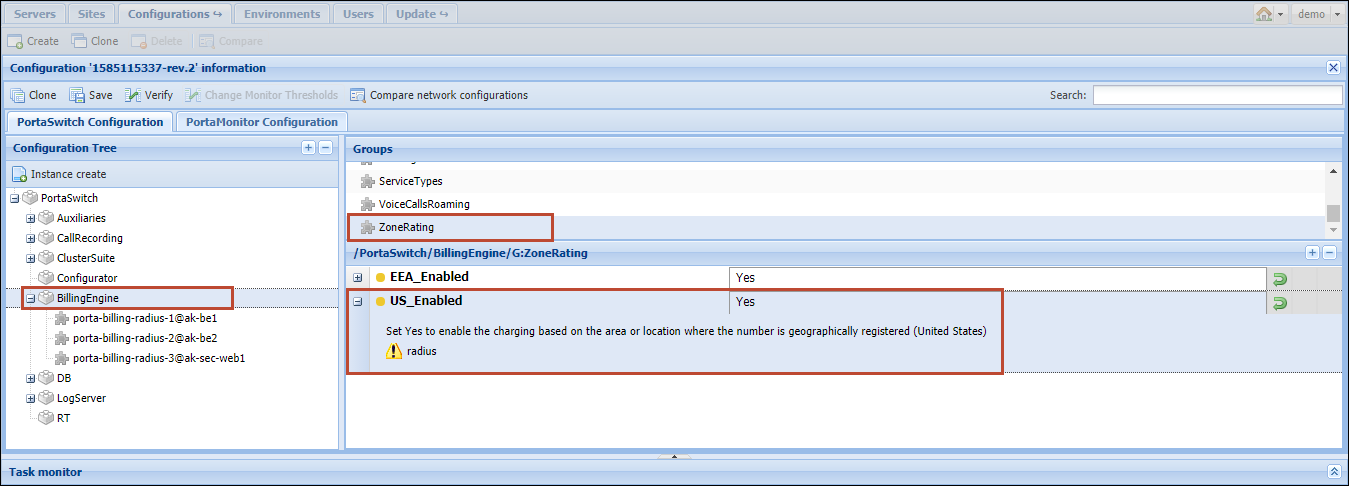
- From the Configuration Tree choose BillingEngine.
- In the Groups section, select the ZoneRating group.
- Select Yes under the US_Enabled option.
Upon activation of separate rates for inter-/intra-state calls on the Configuration server (the US_Enabled option is set to Yes), it is required to re-upload all tariffs containing US destinations. Otherwise, intra-state calls would be charged at 0 price.
- Click Save and then click
 Verify.
 - Verify the new configuration and click Check/Apply.
Create US inter-/intra-state rates
When a user from the United States dials a US phone number, PortaBilling first checks if both the number calling and the called number start with a “1.” If so, then PortaBilling searches for both destinations in the database. If these destinations are in the same state, PortaBilling applies charges according to the intra-state rate; if the destinations are in different states, the inter-state rates are applied.
Note, the following taxation plug-ins are supported in PortaBilling to calculate customers’ taxes for the inter/intra-state calls:
- Avalara;
- SureTax.
To specify inter-/intra-state rates, do the following:
- On the navigation menu on the left, select Service catalog and click Tariffs.
- Open the tariff and click Rates.
- Click Rate and fill in the rate details:
- Rate code – select a rate code from the list or type it in directly.
- Rating mode – select the Separate inter/intra-state rate option to enter different rates for the intra-state and inter-state calls.
- First interval/Next interval – specify the billing unit in seconds.
- Intra-state rate/Inter-state rate – specify separate prices for intra-state and inter-state calls in the corresponding fields.

- Click Save.
- Repeat these steps if you need to enter more rates.
Please consult the Upload via the rate upload tool chapter for more information.
You can find an example of a NPA NXX Area Code data format in /home/porta-db/billing/schema/npanxx.sql.xz
We provide the default set of NPA NXX Area Codes that can be manually imported into the PortaBilling mysql and Oracle databases for testing purposes. To do this, perform the following operations:
- Login in to your PortaBilling web server using ssh.
- Execute the following commands:
- For mysql database:
cd /home/porta-db/billing/schema/
unxz --stdout npanxx.sql.xz | mysql -u root porta-billing
- For Oracle database:
cd /home/porta-db/billing/schema/
unxz --stdout $NPANXX_XZ| sqlplus <login>/<password>@PMASTER
- For mysql database:
Wait until the database is being imported. It may take up to several minutes.


