



A dispatching session border controller, or DSBC, is a dedicated PortaSIP node that operates as SBC (Session Border Controller) for SIP signaling. It runs in high-availability mode and presents a single point of entry for traffic to/from vendors and customers.
The DSBC is used in the following scenarios:
- Site-redundant PortaSwitch, for zero-downtime updates (ZDU) and load balancing between sites.
- Dual Version PortaSwitch, for uninterrupted service during migration.
- Dual Version PortaSwitch with site-redundant systems, combining both of the above.
- DID provisioning from one PortaSwitch to another and incoming call delivery to those DIDs.
The DSBC performs the following functions:
- Accepts call, registration, and subscription requests for accounts in either system/site.
- Creates the NAT tunnel between the IP device and PortaSwitch and performs NAT traversal.
- For incoming calls, it identifies the account IDs and/or DID based on the destination number and dispatches the request to the respective PortaSIP for further processing.
Since the DSBC only accepts first dialog initiation requests (e.g., REGISTER, NOTIFY, INVITE), all subsequent messages within an established dialog bypass the DSBC entirely. This enables the DSBC to process up to 1000 CPS (calls per second). For high availability, the DSBC can be scaled up by adding more instances. In this case, all instances share a virtual IP address, although only one instance is active at any time.
Deployment recommendation
Consider the following recommendations when you deploy the DSBC for either ZDU or Dual Version PortaSwitch:
- The DSBC uses a virtual IP address. This address must be public because the DSBC is the entry point to your network.
- For normal operation, deploy the DSBC on a dedicated server. For testing purposes, you can deploy it on an existing PortaSIP server within the same site. Find more details on the configuration here.
- For high availability, deploy several DSBC instances, either on dedicated servers or in the cloud.
- The DSBC must have access to the LogServer. We recommend deploying the LogServer on a private IP address. Deploying it on a public IP address is technically possible, but not recommended, as it introduces security risks.
- When a call is routed through the DSBC, extra Via and Record-Route headers are added to the outgoing INVITE message. This can increase the message size beyond the MTU (Maximum Transmission Unit) limit and cause fragmentation. We recommend verifying this during your test deployment of the DSBC.
ZDU specifics
- ZDU requires the site-redundancy option to be enabled on your PortaSwitch installation.
- Two components must be in place for ZDU to run without interrupting calls:
- DSBC: deploy a minimum of two dedicated DSBC servers (either at the main or secondary site), one DSBC instance per server. DSBC servers can be deployed at either the main or secondary site.
- PortaSIP cluster: configure the PortaSIP cluster for each billing environment on at least two sites.
- First, the main site is updated, then the dedicated DSBC servers are updated one by one, and finally the secondary site is updated. While one DSBC server is being updated, the remaining servers continue dispatching traffic.
- Each DSBC server must only run the DSBC service, with no other services on it. When updating a server, the system shuts down the DSBC service running on it without interrupting call dispatching. If another service shares that server, the system can stop it abruptly during the update, which could result in downtime or data loss.
Dual Version PortaSwitch specifics
- At least one DSBC on the target system is mandatory.
- If the source system already has DSBCs, deploy the same number of DSBCs on the target system.
- DSBC needs to know which system (source or target) currently holds each account, so it can deliver call or registration requests. To determine this, the DSBC checks the forwarding registry – a database that records account location. ESPF handlers keep this registry updated as accounts move between systems, so enable ESPF handlers on both source and target systems.
- The forwarding registry runs on the Cassandra instance (storage for invoices, xDRs, reports, etc.). We recommend deploying Cassandra on a private IP address.
- While a customer is being migrated, it exists in both systems. Its exported status in PortaBilling determines on which system the customer is currently active.
High availability for the DSBC in site-redundant PortaSwitch
To ensure uninterrupted services even if the main site experiences an outage, you can add a DSBC instance on the fully redundant secondary site. You can assign either the same virtual IP address or different IP addresses to the DSBCs on both sites.
This setup applies to both ZDU and Dual Version PortaSwitch. Find configuration details here.
DSBCs with the same virtual IP address
In this configuration, the DSBC instance on the secondary site has the same virtual IP address as the one on the main site.
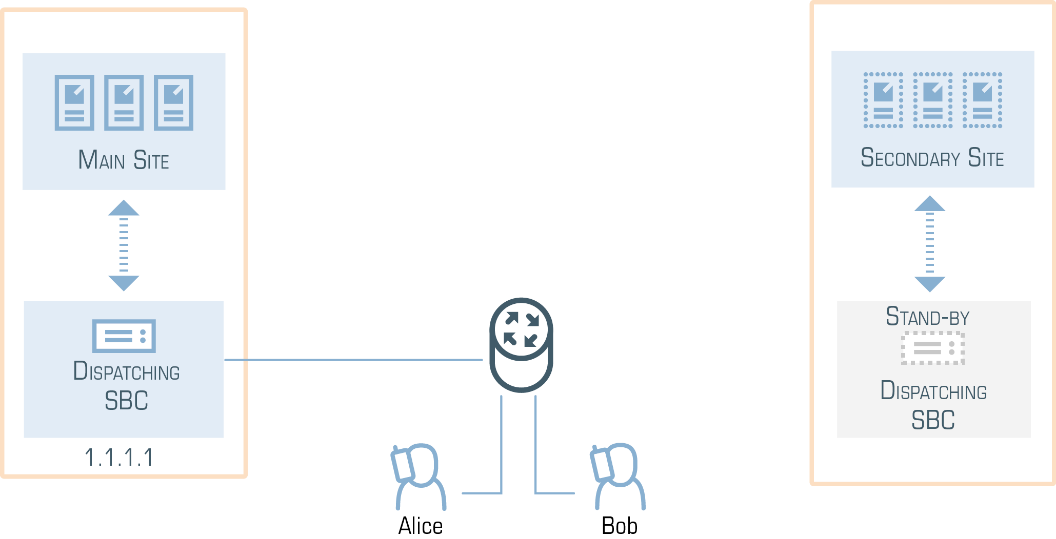
During normal operation, only the DSBC at the main site is active and it handles all requests. When the main site experiences an outage, the virtual IP address switches to the secondary site. The activated DSBC at the secondary site accepts registration and call requests from all end-user devices and vendor equipment.
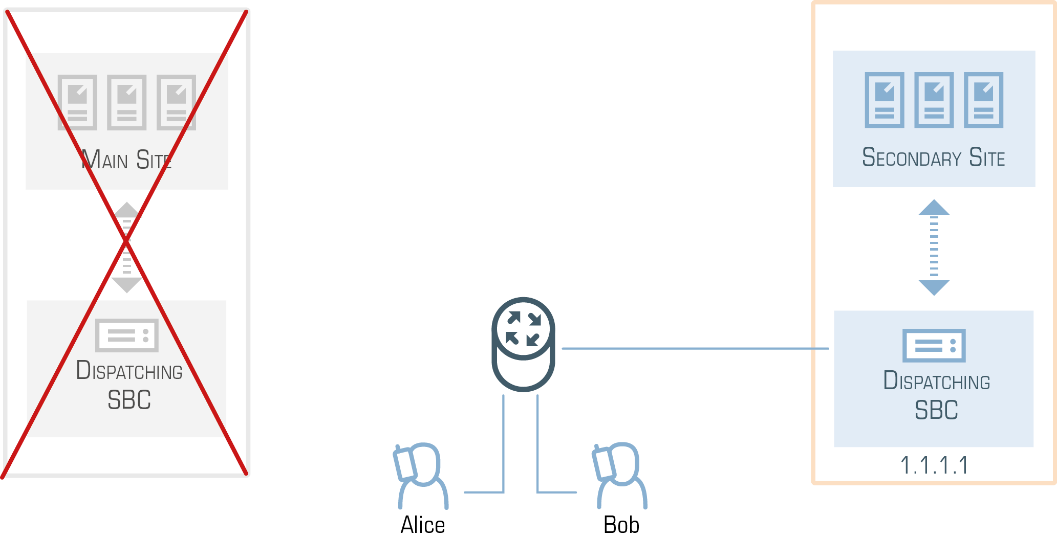
The communication flow with PortaSwitch for user devices and vendor equipment remains unchanged. This simplifies service configuration and system management.
To ensure that the DSBC is reachable, configure IP routing to its virtual IP address on both sites (e.g., using technologies such as BGP/EGP, LISP protocols, Tinc tunneling, or policy-based routing).
This automatic failover depends on your network infrastructure meeting the following two requirements:
- Your hosting provider or ISP must support IP address roaming between your co-locations.
- The connection between your sites must be reliable and have low latency.
Test both IP address roaming and inter-site connectivity before deploying this setup. If IP address roaming isn’t supported or the inter-site connection is unstable, each DSBC may incorrectly assume it is the active instance (a “split-brain” state). This can make the virtual IP address unroutable or prevent a DSBC instance from starting.
For this topology, plan for the following:
- Minimum 2 DSBC instances on the main site, and at least 1 on the secondary site.
- Minimum 5 public IP addresses:
- 1 for the DSBC’s virtual IP address
- 2 for the PortaSIP cluster virtual IP addresses (1 per site)
- 2 for processing nodes (1 per site)
We recommend 7 public IP addresses:
- 1 for the DSBC’s virtual IP address
- 2 for the PortaSIP cluster virtual IP addresses (1 per site)
- 4 for processing nodes (2 per site)
If you use this topology in Dual Version PortaSwitch with site-redundant systems, failover works differently depending on which system is affected:
- If the main site of the target system goes offline, the DSBC’s virtual IP address automatically relocates to the target system’s secondary site and dispatching continues as normal.
- If the main site of the source system goes offline, the DSBC on the target system can’t reach the source system’s main site, but it can still dispatch messages to the source system’s secondary site.
DSBCs with different virtual IP addresses
If you or your hosting service provider can’t support the same virtual IP address for the DSBC, assign different virtual IP addresses for the DSBC on the main and secondary sites instead.
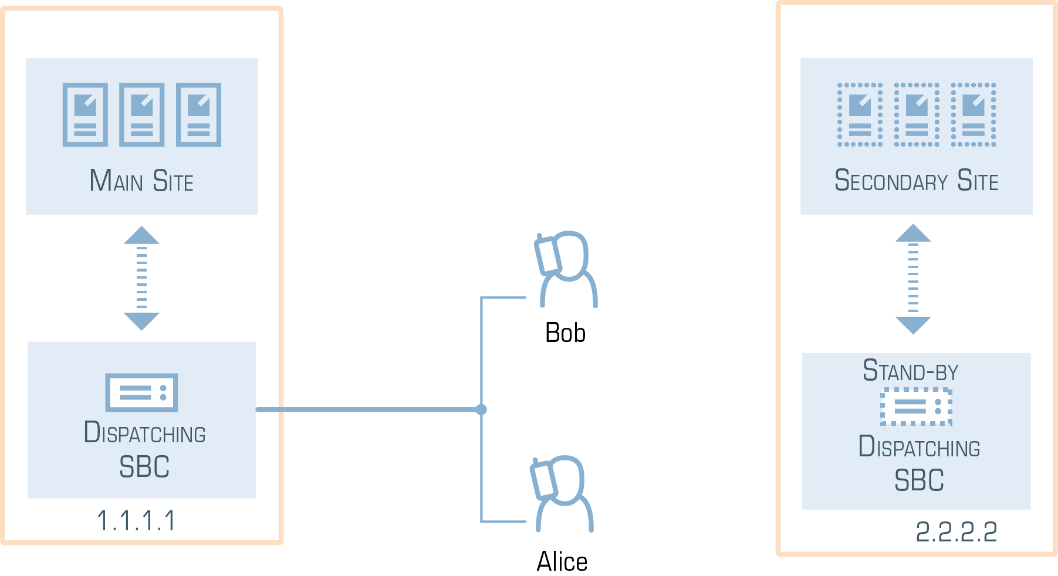
Such a configuration presents two entry points to your network, so vendor equipment and user devices must be able to send requests to both of them. Configure the DSBC domain name on the DNS server so that it resolves to two virtual IP addresses, and provision this domain name to the vendor equipment and user devices.
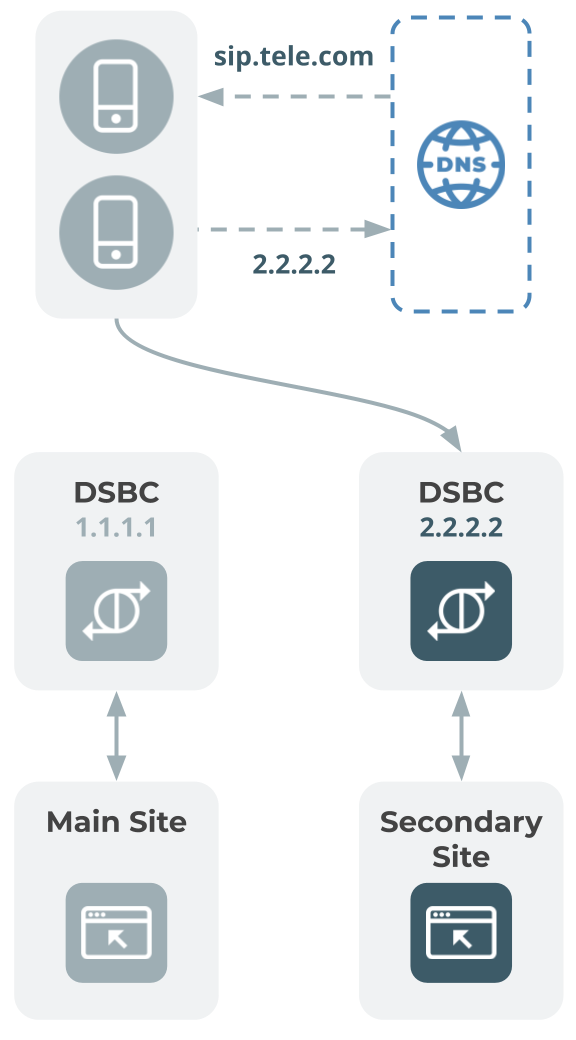
Vendor and user devices must be configured to send all requests to the DSBC on the main site during normal operation. Unlike the same-VIP topology, failover to the secondary site is not automatic. When the main site is down, you must manually switch traffic to the secondary site’s DSBC, using DNS or your own hardware (e.g., a gateway that’s aware of both DSBC IP addresses and can switch traffic if one stops responding). User devices can accept incoming calls only after they re-register with the IP address of the secondary site’s DSBC.
If you want to balance the load across both DSBC instances instead of using one as a backup, you can set up an external load balancer or configure DNS SRV records to distribute traffic between the two DSBC instances.
For this topology, plan for the following:
- Minimum 2 DSBC instances on the main site and at least 1 on the secondary site.
- Minimum 6 public IP addresses:
- 2 for the DSBC virtual IP addresses (1 per site)
- 2 for the PortaSIP cluster virtual IP addresses (1 per site)
- 2 for processing nodes (1 per site)
We recommend 8 public IP addresses:
- 2 for the DSBC virtual IP addresses (1 per site)
- 2 for the PortaSIP cluster virtual IP addresses (1 per site)
- 4 for processing nodes (2 per site)
If you use this topology in Dual Version PortaSwitch with site-redundant systems, both DSBC instances stay active at the same time, unlike the same-VIP topology, where only one instance is active. We recommend deploying at least one Cassandra database on the target system’s secondary site, so the DSBC there can access data locally instead of over the inter-site connection.
IP aliasing for the DSBC
You can configure several entry points for the DSBC by adding IP aliases to its virtual IP address. This allows you to smoothly migrate customers from legacy PortaSIP servers or from multiple separate sites to a single entry point in your site-redundant or Dual Version PortaSwitch installation.
When user IP phones re-register, the DSBC starts processing their registration and call requests. Requests sent to the IP aliases and to the DSBC main virtual IP address are processed in the same way.
Find configuration details here.
Load balancing within sites using the DSBC
You can define the ratio by which the DSBC distributes requests across the geo-redundant PortaSwitch sites. This gives you advanced flexibility in balancing the load within your network.
Traffic distribution to a particular PortaSIP is set in the load_distribution option on the Configuration server web interface.
The default value is auto, which means the DSBC distributes requests equally among sites (e.g., the main and three secondary sites each handle 25% of all requests).
You can also set fixed percentages instead of auto. For example, you can send all traffic to the main site and keep a secondary site as a backup or split traffic between sites by a custom ratio, such as 70/30. Find more configuration details here.
During a system update, requests from the site under maintenance are split equally across the remaining active sites. This applies whether the sites use auto or a fixed distribution. For example, the main site handles 50% of all requests, while secondary sites A and B handle 30% and 20%, respectively. When the main site is being updated, its 50% share is split evenly between A and B, adding 25% to each. As a result, the DSBC delivers 55% (30% + 25%) of requests to secondary site A and 45% (20% + 25%) to secondary site B. When secondary site A is being maintained, its 30% share is split evenly between the main site and site B, adding 15% to each. The main site processes 65% (50% + 15%) of requests, while secondary site B processes 35% (20% + 15%).
Call routing through the DSBC
By default, incoming and outgoing calls are routed through the DSBC, which delivers them to PortaSIP for processing. This includes calls to an external SIP URI, static IP of a PBX, and calls to vendors. As a result, even if you have several PortaSIP instances, your customers and vendors don’t need to adjust their configurations (e.g., firewall rules) to accept requests from different IP addresses. By default, they send and receive requests through the single IP address of the DSBC.
Details on secure calling for the call scenarios listed above can be found here.
You can change this using the Force route through DSBC option (enabled by default) in the service policy. For example, to decrease the traffic load on the DSBC, you can send outgoing calls directly from PortaSIP, bypassing the DSBC. To do this, disable the Force route through DSBC option and assign this service policy to:
- Outgoing connections for specific vendors.
- The SIP-UA connection to send calls directly to the static IPs of PBXs.
- The SIP-URI connection to forward calls directly to external SIP URIs.
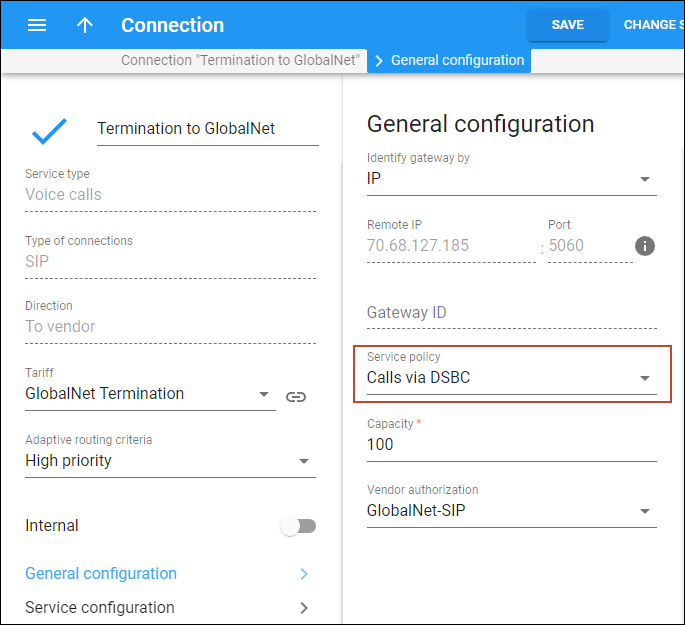

When PortaSIP sends a call via a route with this service policy assigned, it sends the outgoing INVITE request directly, bypassing the DSBC.
Call routing during ZDU
One of the key advantages of site-redundant PortaSwitch is the ability to perform ZDU, assuming your PortaSwitch installation meets the ZDU deployment requirements.
During ZDU, the DSBC dispatches call and registration requests from users’ devices to the active site for processing. As a result, users can continue using their services without interruption, and their devices don’t need to wait to re-register on the secondary site.
Owl Telecom’s site-redundant PortaSwitch has the following configuration:
- Two DSBCs of the main and secondary sites with the same 1.1.1.1 IP address.
- The IP address of PortaSIP on the main site is 2.2.2.2.
- The IP address of PortaSIP on the secondary site is 3.3.3.3.
MegaTrunk is Owl Telecom’s customer. Jane and Bob are MegaTrunk employees. Jane’s phone is already registered and online. Bob’s phone is switched off.
Owl Telecom’s team starts the update procedure: the main site is updated first, and all services switch to the secondary site.
- Bob turns on his phone. The phone sends a REGISTER request.
- The DSBC routes the request to PortaSIP on the secondary site (3.3.3.3).
- PortaSIP on the secondary site registers the phone.
- The DSBC delivers the response to Bob’s phone.
- Jane’s phone hasn’t re-registered with the secondary site yet, so the DSBC keeps the NAT tunnel to her phone open from before the update.
- A client, John Doe, calls Jane’s phone number (120655578961). The call arrives at the DSBC.
- The DSBC sends the call to PortaSIP on the secondary site for authorization and processing.
- The DSBC delivers the call to Jane’s phone through the existing NAT tunnel.
As soon as the main site is updated and services switch back, the DSBC sends all requests from users’ devices to the main PortaSIP for processing.
Secondary sites don’t synchronize data with each other while operating in standalone mode. As a result, a device can re-register on different sites while the main site is being updated.
Call routing in Dual Version PortaSwitch
In Dual Version PortaSwitch, when the DSBC receives a call or registration request, it determines whether the account belongs to the source or the target system, then dispatches the request to PortaSIP on the corresponding system for processing. Find more details on how the DSBC processes calls in different scenarios here.
Owl Telecom’s Dual Version PortaSwitch has the following configuration:
- Two DSBCs of the target and source systems with the same 1.1.1.1 IP address.
- The IP address of PortaSIP on the source system is 2.2.2.2.
- The IP address of PortaSIP on the target system is 3.3.3.3.
MegaTrunk is Owl Telecom’s SIP trunking customer. MegaTrunk’s PBX doesn’t support digest authentication, but it has the static IP address 4.4.4.4. To route calls to the PBX address directly, Owl Telecom’s admin configures the SIP contact as 4.4.4.4:5060 for MegaTrunk account 120655578960 in PortaBilling.
- John Doe calls MegaTrunk’s main phone number 120655578960. The call arrives at the DSBC.
- The DSBC looks up the account ID in the database and detects that it belongs to the target system.
- The DSBC sends the call to PortaSIP on the target system (3.3.3.3).
- PortaSIP is instructed to send the call to the PBX at 4.4.4.4. Because of the Dual Version configuration, PortaSIP sends the call to the DSBC.
- The DSBC receives this request and sends it to the IP address of the PBX (4.4.4.4).
The call flow is the same when a call is forwarded to an external SIP URI or sent to a vendor.
Calls between the source and target systems are routed directly, bypassing the DSBC.
In site-redundant Dual Version PortaSwitch, the DSBC dispatches calls across sites according to your load-balancing configuration, and the calls are then processed as described above. Find configuration details here.
Call delivery to DIDs provisioned from your PortaSwitch
If you share your pool of DIDs with other PortaSwitch systems and allow customers of other service providers to provision your DIDs on demand, you become their DID provider. When a call to such a DID arrives at your system, the DSBC automatically delivers it to the relevant PortaSwitch where the DID was provisioned.
When a call is made to a DID number, the DSBC checks the forwarding registry – the same database used by Dual Version PortaSwitch to look up account locations – to determine which system the DID belongs to and then delivers the call there.
Find DSBC configuration details here and instructions for setting up PortaSwitch here.


