

APPENDIX A. Client’s Yealink configuration for PortaSIP
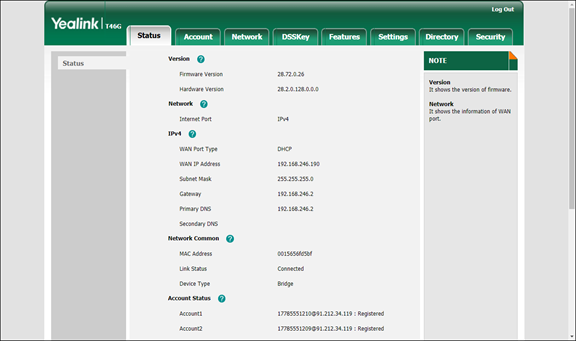
- First, you need to know the SIP phone IP address. There are two ways to check this via the phone user interface:
- Press the OK button in the idle screen.
- Press Menu and select the Status tab.
- Specify the Yealink device’s IP address in your web browser’s address bar (e.g., http://1.2.3.4/).
- On the Account tab, go to the Register section. Select the phone line you wish to configure (named as Account) from the pull-down list in the Account field.
- Configure the registration parameters for the selected account in the corresponding fields:
- Line Active – select Enabled here.
- Label – the name of the account displayed on the LCD screen of your SIP phone (e.g., 17785551210).
- Display Name – your identification (e.g., John Doe); this will be seen by the called party.
- Register Name – ID that is used to authenticate your SIP account. This field is mandatory.
- User Name – ID of your SIP account registered in PortaBilling.
- Password – service password for your SIP account.
- SIP server 1 section:
- Server Host – PortaSIP IP address or hostname (e.g., 91.212.34.119).
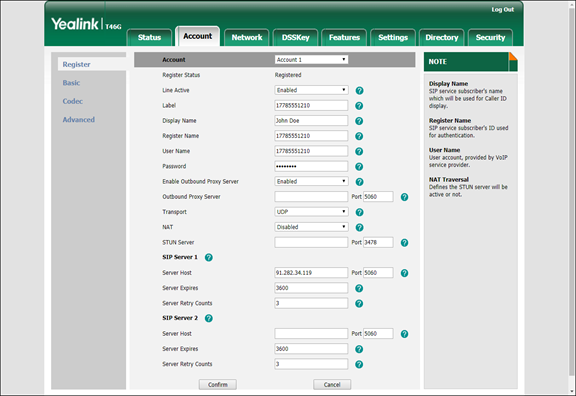
In the SIP server 2 section you can define the IP address of PortaSIP on the secondary site. If the main site becomes unavailable, the phone re-registers using this IP address.
- Server Host – PortaSIP IP address or hostname (e.g., 91.212.34.119).
- Click the Confirm button to update the SIP phone configuration.
APPENDIX B. SJLabs softphone configuration for PortaSIP
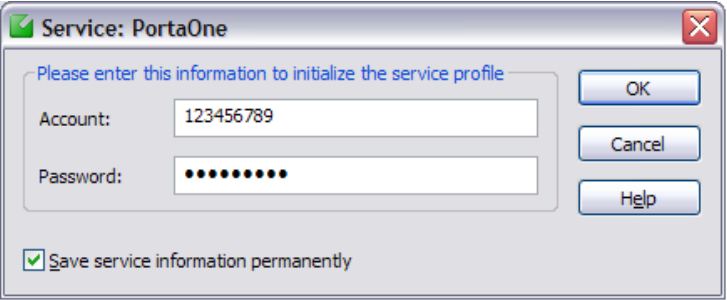
- First, you need to install the SJPhone on your machine. Following installation, launch the SJPhone software. The following login screen will be displayed.
-
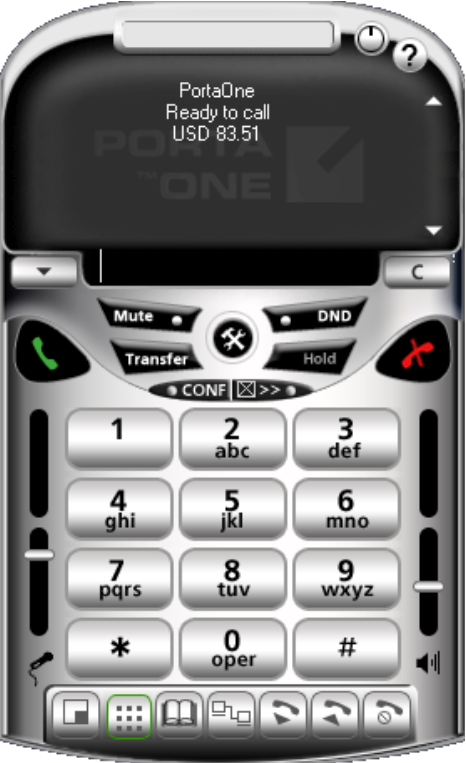
Key in the account ID and password for PortaSIP and press OK. The SJPhone display should be similar to the one in the illustration below, showing the account balance in “Ready to call” state. The phone is now ready to be used.
-
Right click on the softphone and press “Login…” to change or make corrections to the account/password.
APPENDIX D. List of variables used in CPE profile configuration
CPE profiles describe configuration parameters required for provisioning an IP device automatically. Depending on the device type, the set of parameters will differ. Instead of defining them as set values, use variables that will be replaced with actual values during device provisioning.
The table below describes default variables used for IP device provisioning. They are global and can be used with any IP device type.
|
Variable |
Description |
|
$firstname |
An account’s first name, taken from the First name field of the account’s Personal Info panel. |
|
$midinit |
An account’s middle name, taken from the Middle name field of the account’s Personal Info panel. |
|
$lastname |
An account’s last name, taken from the Last name field of the account’s Personal Info panel. |
|
$id |
Usually contains the account’s phone number. It is provisioned to the IP device as the username. |
|
$h323_password |
The account’s service password used to authenticate calls made from this IP device. |
|
$i_account |
The internal identifier of the account record. It is retrieved from the database. |
|
$faxnum |
An account’s fax number. It is taken from the account’s Address Info panel. |
|
$ascii_key |
The secret key used to encrypt the configuration files. It will be replaced by the IP device’s secret key value. |
|
$i_env |
The number of the billing environment. Configuration files are stored in separate directories per billing environment. Therefore, this number is typically included in the path to the configuration file with the parameters for IP device auto-provisioning. |
Additionally, these variables are used in CPE profile configuration:
|
Variable |
Description |
|
$mac |
The MAC address of the IP device. This is substituted by the MAC address taken from the device. |
|
$i_customer |
The unique ID of the customer record. It is retrieved from the database. |
|
$i_passphrase |
The unique identifier of a passphrase needed for password encryption. A passphrase is a constant value and is kept in secure storage. |
|
$i_ua |
The unique identifier of the IP device record. |
|
$i_ua_link |
The unique identifier of a port record for a particular IP device. |
|
$i_ua_profile |
The unique identifier for each version of the same CPE profile. |
|
$ua_profile_id |
The unique identifier for the CPE profile to be recognized in the system. It remains the same for all versions of the CPE profile. |
|
$inventory_id |
An ID that allows you to identify this IP device in the external system (e.g., your warehouse management application). |
|
$manufacturer |
The name of the IP device manufacturer. |
|
$name |
The name of the IP device in the CPE inventory. |
|
$port |
The IP device port to be used by a particular account. |
|
$i_ua_type |
The unique identifier of the IP device type. For example, if i_ua_type is 84 – then Yealink SIP-T23G with v8x firmware version is used. |
|
$product |
The model of the IP device of a particular type. |
|
$version |
The version of the IP device of a particular type. |
|
$profile_name |
The name of the CPE profile. |
|
$config |
The list of IP device port configurations. |
|
$login |
Login to the web self-care. |
|
$password |
Password to the web self-care. |
|
$group_pickup |
The prefix for answering a call to a huntgoup. This variable is applicable only to Gransdstream phones. |


