

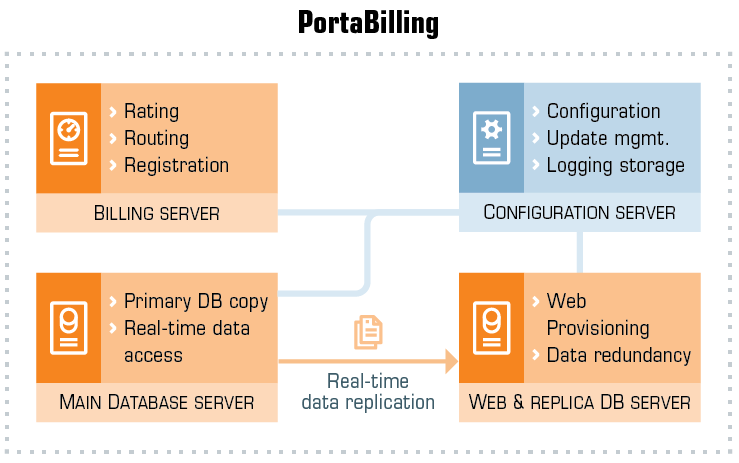
PortaBilling system consists of five main logical components:
- Billing (OCS) server – hosts the billing engine, which communicates with the nodes and performs real-time authentication, authorization, and accounting (AAA).
- Main database server – hosts the primary data, which is mostly used for AAA.
- Replica database server – hosts a copy of the primary data as a backup in case of a failure of the main database. Additionally, to reduce the load on the main database, the replica database is used for calculations that do not require real-time data access, such as retrieving historical data, compiling reports, or producing invoices.
- Web server – hosts the web interfaces, the API for integration with external applications, and scripts for periodic tasks such as invoice generation.
- Configuration server – stores the configuration details of all the other servers in the installation and log data.
PortaBilling setup
The basic PortaBilling deployment uses 4 physical or virtual servers:
Staging system:
- As staging installations are not required to handle the same load as production installations, the minimum required setup should include at least 2 servers – one for the Configuration server and the other for hosting all other components. This setup can serve as a test/demo sandbox for your team.
Production system:
- The minimal setup requires 4 servers – one to host both the web server and replica database, and the other three to host each of the remaining components.
- The recommended setup is to use at least 5 servers, installing each of the 5 components on a separate server. This setup ensures that each component has the resources necessary for correct functioning.
Note that the actual setup may require additional servers based on factors such as expected load, availability, redundancy requirements, and other considerations. For instance, multiple web servers and replica databases can be implemented within the system, each hosted on a separate server:
- Multiple web servers distribute incoming web/API traffic across several servers instead of one (horizontal scaling), which speeds up background tasks and supports a larger number of users.
- An additional replica database instance helps maintain higher availability. If either the main or the replica database server, or both, experiences downtime due to hardware issues, the additional instance can handle the data requests.
Billing / Online charging system (OCS) server
The Billing (OCS) server hosts the billing engine which communicates with the nodes via the RADIUS protocol. It can also process Diameter requests that are received from nodes provisioned for services via the Diameter protocol.
The billing engine provides:
- Authentication – it tells the node whether the subscriber (identified by phone number, PIN, IP, or the like) is allowed to use a specific service (e.g., voice calls or wireless Internet access), and returns attributes such as the current balance.
- Authorization – it tells the node whether the subscriber (identified by phone number, PIN, IP, etc.) is allowed to initiate a session with specific parameters within a service (e.g., calling a particular phone number). It also returns session attributes such as the maximum allowed session duration or the allowed amount of bandwidth.
- Interim (also called keep-alive) accounting processing – this is used for services like internet access, where nodes continuously send usage updates to the billing system for the current session.
- Accounting processing – based on information received from the gateways, it bills the session and writes transaction records to the database.
Main database server
The main database server hosts the primary copy of the database. This database is used for all real-time data access (e.g., during account authentication) and for all data modifications.
Replica database server
The replica database server hosts a copy of the database. This database is used for all data mining activities (e.g., calculating a summary for the invoice or producing reports) and can be used to restore billing data in the event that the main database is lost.
Web server
The web server hosts the following:
- Web interface, consisting of:
- Admin interface
- Account self-care web interface
- Customer self-care web interface
- Reseller web interface
- Distributor web interface
- Representative web interface
- Scripts for generating invoices, assessing charges, and producing reports.
- Optional IVR (TFTP) server.
- XML API (SOAP) or JSON RPC for integration with external applications.
Configuration server
This server stores information about all the other servers in the installation, as well as service configuration details about each of them. See the Centralized Configuration Management chapter for more details.
The Configuration server monitors the status of all the other servers. Data such as available disk space, load, or service status can be viewed via the web interface. If a problem is detected, the PortaOne support team will be notified immediately.
The Configuration server also collects log data, such as SIP communication logs from PortaSIP, or billing engine logs from billing nodes. These are then stored, processed, and indexed so that all entries relating to a particular session can be retrieved instantly. This reduces the amount of disk space needed on the production servers, as well as the load on those servers.
Log data for the most recent time period is kept in the original format. Older data is archived to save disk space, while log files that are outdated are erased.


