



Quite often, when somebody calls you, the only information available is the caller’s phone number, which may not be sufficient. Sometimes an unwanted call may get through, and you may want to avoid the conversation. Therefore, it is important to see not only the original caller’s number but also the caller’s name (the name of the person or company that owns the number).
Integration with a CNAM provider enables you to offer the Caller ID (CNAM) Lookup feature to your customers so that they can see the caller’s name associated with the caller’s phone number and respond accordingly. Currently, PortaSwitch is integrated with OpenCNAM, which supports numbers from the USA and Canada.
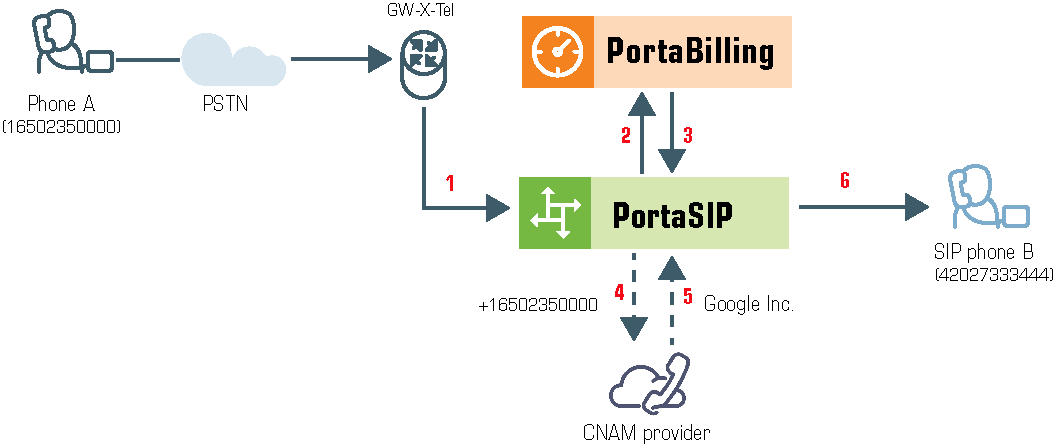
Here’s how it works:
- An incoming call comes in to PortaSIP
- PortaSIP sends an authorization request to PortaBilling
- PortaBilling confirms whether the account receiving the call has the Caller ID (CNAM) Lookup feature enabled
- If enabled, PortaSIP sends a request with the caller number to the CNAM provider
- PortaSIP receives the caller’s name in response
- The caller’s name is then displayed on the recipient’s phone (e.g., John’s Pizza)
For PortaSIP to send CNAM requests, CNAM provider credentials must be defined on the Configuration server web interface.
This feature can be enabled for each account on the account’s Service Configuration > Incoming calls tab.



 Back to main menu