



The reasons for accurate disconnect matter because they explain why an attempt or a connected call ended and make troubleshooting and reporting consistent. A disconnect cause is the normalized reason reported for why the attempt ended (not just “who hung up”).
When a call starts:
- The caller’s device sends an INVITE to PortaSIP.
- PortaSIP sends a request to PortaBilling to:
- authenticate and authorize the attempt
- get a routing list
- PortaSIP then hunts through that routing list until:
- a route answers with 200 OK, or
- all routing options are exhausted
A call is considered established only after 200 OK is received.
A call can end at two points:
- Before two parties are connected (failed attempt): the attempt ends with a non-2xx final response to the INVITE. Typical reasons include authentication/authorization failure, no reachable destination, or busy/declined.
- After two parties are connected (connected call): the dialog is normally terminated by BYE from one of the parties. Some failures (for example, loss of connectivity) are detected by PortaSIP through periodic polling, which causes PortaSIP to forcefully terminate the call.
To keep results consistent and reportable, PortaSIP forwards the disconnect reason across both call legs and stores it in PortaBilling xDRs in a single normalized form (ISDN/Q.850 numeric code).
Next, we explain how PortaSIP communicates the disconnect reason to call parties via the SIP “Reason” header and how that reason is mapped and stored as Q.850 codes in PortaBilling xDRs.
Provide improved clarity on call disconnection causes
Your customers will receive the real disconnection codes transmitted in the “Reason” header in SIP messages (according to RFC3326). These codes allow the customers to accurately identify the cause for each call disconnection.
Say your SIP trunking customer makes a call from their PBX, and a vendor’s gateway ends the connection, indicating the disconnection reason with a specific code, e.g., “1” – an ISDN (Integrated Services Digital Network) code from SS7 network. When PortaSIP sends a SIP message such as “404 Not found” to PBX, it passes on this code in the SIP “Reason” header. And this code (“1”) represents the specific cause of this disconnection – in this case “unallocated (unassigned) number”.
The received disconnection codes empower the customers such as call centers to build accurate reports based on the call disconnection reasons, allowing them, for example, to monitor how many calls are not picked up or are hung up and how many are disconnected due to error.
Customers are able to build accurate reports on call disconnection causes.
Configuration
This feature is enabled by default starting from MR104. For earlier releases, it is disabled by default for backward compatibility and can be enabled on the Configuration server web interface: set the MUB2bua.parse_reason_headers option to Yes.
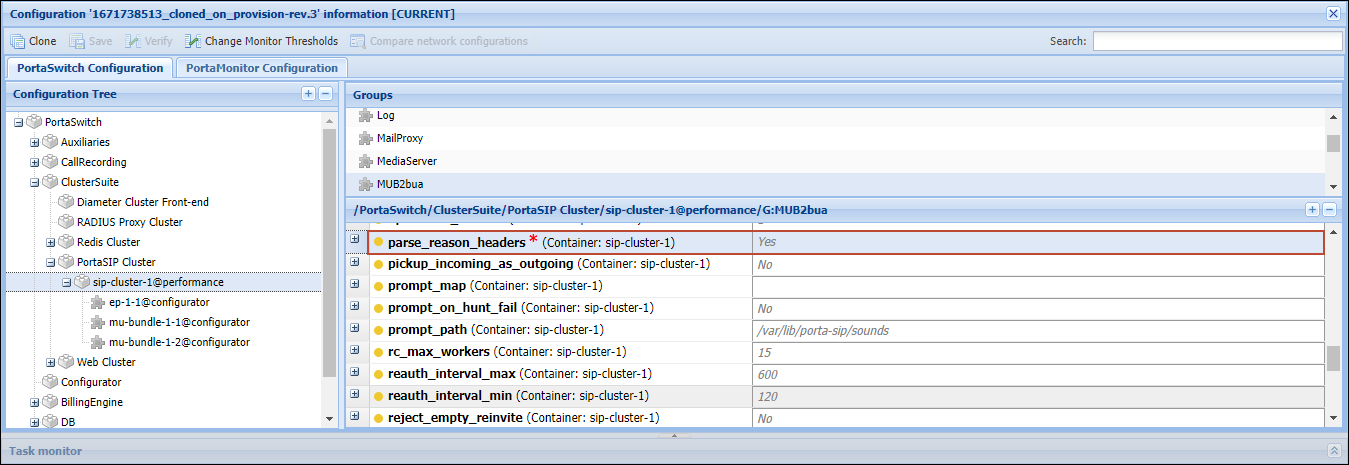
- The “Reason” header is passed in both directions (from the calling to the called party and vice versa) in "BYE"/"CANCEL" requests and SIP error responses (like 3xx, 4xx, and so on).
Store comprehensive disconnect causes data in PortaBilling
You can have comprehensive information on call disconnect causes, returned by your interconnect partners, in your system.
The real call disconnection causes that PortaSIP receives in the “Reason” header of a SIP message, are not only passed on to the calling/called party as described in the Provide improved clarity on call disconnection causes chapter, but also stored in PortaBilling xDRs.
Thus, you have access to accurate disconnection causes and can partner with your customers or vendors to analyze the call disconnection causes. For example, when your new customer wants to test the service and reconcile the call data in PortaBilling with the data on their side.
Your engineering team can manage reconciliations with customers or vendors more quickly and with less investigation.
Configuration
It’s the same as in the Provide improved clarity on call disconnection causes chapter.
In PortaBilling xDRs, the reasons for a disconnect are always stored as ISDN (Q.850) numeric codes in the disconnect_cause column of the following database tables: CDR_Accounts, CDR_Customers, CDR_Vendors, CDR_*_Failed, and CDR_Onnet.
The SIP “Reason” header may contain a SIP code or/and an ISDN code – depending on whether a SIP or non-SIP network, such as SS7, produced it:
- If an ISDN code is received, it’s stored in PortaBilling xDRs as is.
- If a SIP code is received, PortaSIP translates it into the ISDN code according to RFC3398.
- In case there’s no “Reason” header, PortaSIP uses the generic SIP code included in a SIP message for mapping.
Mapping the SIP response codes to ISDN disconnect cause codes
The table below maps SIP response codes to their corresponding ISDN disconnect cause codes (in decimal and hexadecimal formats).
(*) – No mapping in RFC; value is based on other sources.
| SIP response | ISDN code (dec) | ISDN code (hex) |
|---|---|---|
| 301 Moved Permanently | 22 | 16 |
| 302 Moved Temporarily | 22 | 16 |
| 400 Bad Request | 41 | 29 |
| 401 Unauthorized | 21 | 15 |
| 402 Payment required | 21 | 15 |
| 403 Forbidden | 21 | 15 |
| 404 Not found | 1 | 01 |
| 405 Method not allowed | 63 | 3F |
| 406 Not acceptable | 79 | 4F |
| 407 Proxy authentication required | 21 | 15 |
| 408 Request timeout | 102 | 66 |
| 410 Gone | 22 | 16 |
| 413 Request Entity too long | 127 | 7F |
| 414 Request-URI too long | 127 | 7F |
| 415 Unsupported media type | 79 | 4F |
| 416 Unsupported URI Scheme | 127 | 7F |
| 420 Bad extension | 127 | 7F |
| 421 Extension Required | 127 | 7F |
| 423 Interval Too Brief | 127 | 7F |
| 480 Temporarily unavailable | 18 | 12 |
| 481 Call/Transaction Does not Exist | 41 | 29 |
| 482 Loop Detected | 25 | 19 |
| 483 Too many hops | 25 | 19 |
| 484 Address incomplete | 28 | 1C |
| 485 Ambiguous | 1 | 01 |
| 486 Busy here | 17 | 11 |
| 487 Request Terminated (*) | 127 | 7F |
| 488 Not Acceptable here (*) | 58 | 3A |
| 500 Server internal error | 41 | 29 |
| 501 Not implemented | 79 | 4F |
| 502 Bad gateway | 38 | 26 |
| 503 Service unavailable | 41 | 29 |
| 504 Server time-out | 102 | 66 |
| 504 Version Not Supported | 127 | 7F |
| 513 Message Too Large | 127 | 7F |
| 580 Precondition Failure (*) | 41 | 29 |
| 600 Busy everywhere | 17 | 11 |
| 603 Decline | 21 | 15 |
| 604 Does not exist anywhere | 1 | 01 |
| 606 Not acceptable (*) | 58 | 3A |



 Back to main menu