



PortaBilling can notify an external application about a provisioning event through a webhook, an automated notification sent as an HTTP POST request. This is handled by a universal event handler called EventSender, which converts PortaBilling events into these outgoing requests.
You can build provisioning applications that receive events (webhooks), retrieve additional data via the PortaBilling API, and update external systems accordingly.
An event may be triggered as a result of data manipulation or directly by the code that performs some operation. Each event is created in the database and is stored in the Event_Queue_Combined table with the following details:
- Unique identifiers for the event, event type, event handler, and other related objects
- Timestamps indicating when the event was created and when it is scheduled for provisioning
- Event status (e.g., opened, accepted, finished)
- Processing attempt counter showing how many times the system has tried to process the event
- Event variables, such as the account ID, product name, event name, message details, and other relevant parameters
When a relevant event occurs (e.g., assigning a SIM card to an account), the External System Provisioning Framework (ESPF) sends a request to your application's specific URL. Your application receives the notification, retrieves the necessary data from PortaBilling through its API, and updates the external system. Later, the external application can notify PortaBilling about provisioning status via the ESPF API.
Your application receives these events with only minimal details, for example: “A change has occurred on account with i_account=12345.” To process this change, the application must call the PortaBilling API to retrieve all required information, such as the new product, the current state of configuration settings, assigned service policies, and so on.
This means you need to understand PortaBilling’s API and data model. If you want to automate service provisioning without diving into PortaBilling’s API or internal structures, you can use the New Service Provisioning System (NSPS). NSPS retrieves all the necessary data from PortaBilling and caches it when a subscriber event occurs (e.g., a product change). It then delivers the required details as a single JSON payload to an integration microservice (“handler”). The handler then updates a specific external system, such as HSS, PCRF, or IPTV. Read more about NSPS here.
Webhook flow
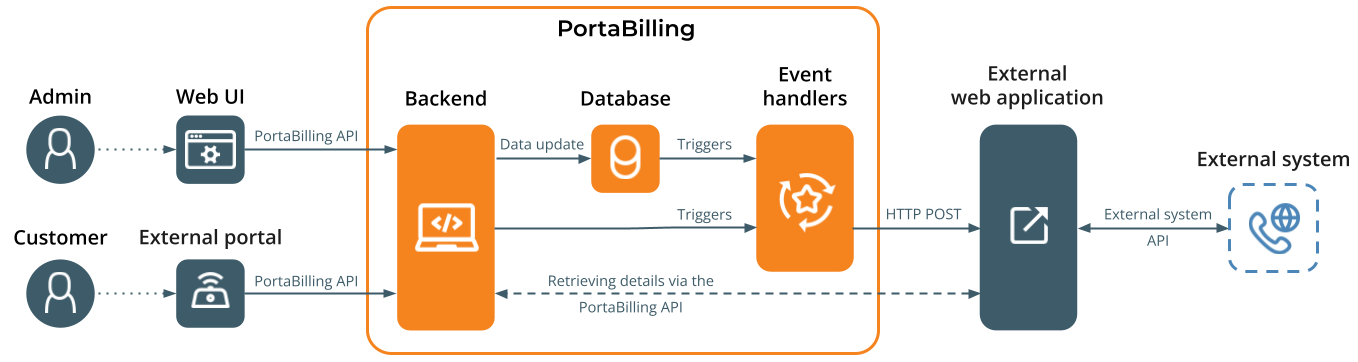
- Admin subscribes the event handler to the provisioning events, e.g., Account/New.
- A database trigger is created for a specific table, which is automatically executed in response to certain data changes, e.g., a new account is added.
- When the data changes, the trigger inserts a record into the Event_Queue_Combined table for each event handler subscribed to the event.This design allows multiple event handlers to subscribe to and process the same event.
- A handler subscribed to this provisioning event reads the record from the table and notifies the external application using webhooks.
- The external application processes it by retrieving the required information using the PortaBilling API.
- The external application provisions both the event and the associated data to the external system and receives a return code, indicating whether the event was processed successfully or not.
- If the return code is successful, then ESPF changes the event status to "finished" for that handler in the Event_Queue_Combined table. Otherwise, the handler tries to provision the event again until it either succeeds or the number of retries reaches its limit.
- When all handlers have provisioned the event, ESPF removes it from the Event_Queue_Combined table.
Configuration
Depending on an application’s logic, you can configure the EventSender handler to send a desired version of the events. For this, open the PortaBilling web interface, go to the EventSender handler page, select Configuration, and set the version:
- Event v.1 – for low-level events
- Event v.2 – for high-level events

For detailed instructions, refer to the ESPF configuration handbook.
Request structure
PortaBilling sends the HTTP request that includes:
The SIM card was reactivated after being suspended, or the data plan was changed in PortaBilling. The following notification is sent to the external application:
POST /api HTTP/1.1
Date: Fri, 05 Sep 2025 07:40:33 GMT
User-agent: Mozilla/5.0 (compatible; U; AnyEvent-HTTP/2.21; + http://software.schmorp.de/pkg/AnyEvent)
Content-length: 134
Authorization: Basic QmFzaWNBdXRoLnVzZXI6QmFzaWNBdXRoLmtleQ==
Content-type: application/json
Host: 1.1.1.1:4000
{"variables":{"imsi":"999990123456789","event_time":"2025-09-05 07:40:29","i_account":1001886,"i_event":2}, "event_type":"SIM/Updated"}
Headers
The request includes the following mandatory headers:
- Date – this is the originating date and time of the request message in the HTTP-date format.
- Authorization – this is the authorization method by which PortaBilling authorizes itself to the external application.
- Content-Type – this is the format of the event body (e.g., application/json).
Authorization methods
The EventSender handler supports these HTTP authorization schemes:
- Basic (default) – using the user ID and password.
- Signature – using the signature key and key ID.
- Custom – using a custom authorization type and credentials, e.g., an access token.
- None – not recommended for security purposes.
Custom authorization by access token
An access token is an encrypted string, generated by the server in response to a login request. The access token contains info identifying the API user (e.g., i_user, i_env) that can be decoded (but not modified) and used in external applications. This is useful when access to the database must be restricted for external applications. To use an access token for authorization in an external application using the EventSender handler, specify the following details:
- EventSender.CustomAuth.Type – set Bearer
The "Bearer" scheme can be understood as "give access to the bearer of this token".
- EventSender.CustomAuth.Credentials – specify the real token to access the external system
Refer to the ESPF configuration handbook for the configuration steps.
Body
The body of the request includes:
- variables – this is additional information about the entity that has been modified in PortaBilling. For instance, it can be the unique ID of the entity such as i_account, i_customer, i_invoice to differentiate the entity, or the unique identifier of the event, i_event, to recognize whether it is a new request or a repeat request and adjust the provisioning flow.
- event_type – this is the type of event (created, updated, deleted) that has been applied to a specific entity in PortaBilling; see more details about the supported event types here.
Response
The external application receives the event and responds with the HTTP Status Codes. The ESPF receives the code and should act as follows:
- 200 OK – the event has been processed. The ESPF removes the event from the provisioning queue.
- 4xx Client Error (e.g., 400 Bad Request) – the event could not be provisioned. The ESPF removes the event from the provisioning queue.
- Other status code (e.g., 304 Not Modified or 500 Internal Server Error) – an issue appeared on the application side during provisioning. The ESPF re-sends the event.
If the external application does not respond within the configured timeout (e.g., 30 seconds), the ESPF resends the same provisioning event. The default timeout is 300 seconds, but you can change this value in the event handler settings ( RequestTimeout option) in the PortaBilling web interface.
Make sure your application can accept the same provisioning event multiple times. By default, the ESPF retries delivery up to 10 times. You can adjust the limit in the Configuration web server interface in the EventQueue.RetryLimit option.
Admins can track the event status in the PortaBilling UI, including retry attempts and provisioning progress. If needed (e.g., when automatic retries fail due to a temporary issue on the external system side), admins can rerun provisioning manually.
Full provisioning flow example
An admin creates a new account record in PortaBilling. The ESPF maps it to the corresponding event type and sends the HTTP POST request to the external application. Your application receives the request, retrieves the account service configuration information (SIM card details such as IMSI, MSISDN) using PortaBilling API, and provisions it to the mobile core to activate the SIM card. The details of the requests are:
- PortaBilling sends the POST request with Subscriber/Created event type and the i_account to the application.
Date: Fri, 11 May 2018 13:28:08 GMT< Authorization: Bearer eyJhbGciOiJSUzI1NiJ9.eyJleHAiOjE2NjE2OTIwNTAsImlfdXNlciI6NDQwLCJpX2VudiI6NDEsImxvZ2luIjoiZGVtbyIsInNjb3BlcyI6ImVzcGYuYXBpOndyaXRlIGVzcGYuaGFuZGxlcnM6d3JpdGUiLCJpYXQiOjE2NjE1MTkyNTAsImp0aSI6ImZiNDhiMTgwNTM5NTI5NDk3ZjM0NzVjNzFlMGJkYzY2IiwicmVhbG0iOiJhZG1pbiIsImF1ZCI6WyJwb3J0YWJpbGxpbmctYXBpIiwicG9ydGFzaXAtYXBpIiwiZXNwZi1hcGkiXSwiaXNfc3VwZXJfdXNlciI6MH0.Qou3zbdFvF5bGup0tGrAvPAjoaeoeTMZQN3awMVOJAIKZGSLWL7kmhm3Xzjr05xZPQp3vrwtv4y4SygnXkzrcbYiIzzV-dcrANhRbOTnTPUMMU_t2rgNCG9Qo2eVzUv-4u_g1mVuBqx_8pIZs93g7C8-6O7XP_hg9Oo0BilB4W0jp0zjTxdp46sQ2aP2q7HZNLO6USL5vchxPGWPQp2VPL9cW4RRO71Ok2a4eGRir60ytvUz98fAlHtf-AUDFd3BkEltRN4BYyGGuWCeihengU0Z8DBucCmcQdAeUBbzo65D6V5ubSWOwUNvnjfHmmsqfS50G_7-GMKYaBqMfBRPmw Host: 192.168.243.244:5000 Referrer: http://192.168.243.244:5000/ TE: trailers Content-Length: 83 Content-Type: application/json { "event_type": "Subscriber/Created", "variables": { "i_account": 1000889, "i_event": "5" } } - The application receives the request and sends a POST request to PortaBilling to establish an API session.
Used parameters: params={"login":"demo","password":"exAmple"}
POST /rest/Session/login HTTP/1.1
Host: demo.portaone.com
Content-Type: application/x-www-form-urlencoded

Content-Length: 70

params=%7B%22login%22%3A%22demo%22%2C%22password%22%3A%22exAmple%22%7D
- Once the session is established, the application calls the PortaBilling API to retrieve subscriber details such as service (e.g., LTE) and SIM card details (e.g., MSISDN, IMSI). The API methods are:
- Account/get_account_info to get the list of included services and ensure that the LTE service is enabled for this subscriber.
- SIMCard/get_card_list to get the MSISDN and IMSI.
- Once the subscriber’s information is received, the application interacts with the mobile core to add a new subscriber with the following parameters:
- MSISDN: 12065551122
- IMSI: 310019901000045
- Profile name: LTE
Once the subscriber is provisioned, the application receives this status from the mobile core and then sends the 200 OK response to PortaBilling.
Asynchronous and synchronous provisioning
PortaBilling uses asynchronous mode by default when provisioning via webhooks, e.g., with systems like HSS. In this mode, PortaBilling sends requests without waiting for the provisioning result, so events can be processed independently. This is useful for systems where provisioning may be delayed, for example, when status updates are returned an hour later. When account details are changed, PortaBilling sends a notification to an external application via EventSender. The application confirms receipt of the request, but the actual network-side provisioning status is not available immediately.
Asynchronous mode allows service providers to send provisioning requests immediately and track the final result when it becomes available.
If you need immediate confirmation for each request, you can use synchronous mode instead, where each provisioning request is processed immediately. PortaBilling sends the request and waits for a response from the external application before proceeding to the next one. This provides real-time feedback, but it may slow down processing if the external system responds slowly or is temporarily unavailable. To use synchronous mode, disable the AsyncMode option in the PortaBilling web interface.
Regardless of the processing mode, PortaBilling applies the Token Bucket algorithm to control request flow and to prevent overloading the external application or the network:
- TokenRate defines how many requests per second are allowed (default: ~10/sec).
- TokenBurstiness limits how many requests can be sent in a short burst (default: 100).

Each request consumes a token. If there aren’t enough tokens in the bucket, PortaBilling temporarily pauses sending until more tokens are available. This ensures smooth and safe delivery of provisioning events, even under high load.
This combination of asynchronous delivery and token-based rate control allows PortaBilling to efficiently handle large volumes of provisioning events while respecting the capacity of the external systems.
Provisioning status updates by external applications
In asynchronous mode, when a change occurs in PortaBilling, a notification is sent to an external provisioning application through EventSender. The application immediately confirms receipt of the request. For example, when the account details are changed, the application accepts the request and initiates subscriber updates in the mobile network. Once the mobile network finishes processing the request, it reports the result back to the application, which then forwards it to PortaBilling via the ESPF API.
This allows admins to monitor the actual provisioning status – success, in progress, or failed – instead of relying on assumptions.

PortaBilling can store one of the following statuses for each provisioning request:
- SUCCESS (OK) – provisioning completed successfully
- IN_PROGRESS – the request is still being processed
- FAILED, RETRYING (RETRY) – initial attempt failed, a retry is triggered
- FAILED – all attempts failed
Provisioning records are grouped by service group to simplify monitoring across multiple external platforms. This allows the external application to easily determine where provisioning happens and what its status is – whether it’s HSS for mobile services, IPTV, VoIP, PCRF, WiMAX, NumberPortability, LawfulInterception, Netaccess, or a custom group like DPI. Custom service groups may also be created via the ESPF API for future provisioning updates. With service groups, tracking becomes more structured and filterable.
When a full overview of provisioning progress across a specific account is needed, the application can retrieve it via the PortaBilling API, ensuring that support teams, operations staff, and automation systems always know what is happening, where delays exist, and when something needs attention.
The service provider (MVNO) operates on the network infrastructure of a host Mobile Network Operator (MNO). To provision subscriber data in the mobile core, MVNO uses an external application integrated with the MNO’s PCRF (Policy and Charging Rules Function). Once the account record is manually blocked in PortaBilling, the EventSender handler processes this event and sends it to the mobile core through the external application.
In a minute, once provisioning is finished, the external application sends the account provisioning status to PortaBilling via the ESPF API. The status of provisioning and any related errors are stored in the database under the PCRF service group.
Provisioning of custom events via ESPF API
PortaBilling supports both standard and custom events. If you need to notify an external application about changes not covered by standard events, you can add custom events via the ESPF API. Custom events send additional information to an external application and trigger actions based on custom rules (e.g., grant additional services on a customer’s first anniversary). They are typically applied when provisioning must be executed at a specific time rather than immediately, for example, at the start of a billing cycle, after a trial period, or during a maintenance window.
Custom events are added to the provisioning queue via the ESPF API with a scheduled processing time. ESPF stores these events and triggers them at the scheduled time in PortaBilling. Afterward, ESPF forwards the events to the external application for further processing, such as updating network equipment configurations or modifying service parameters.
On February 20, 2026, an admin creates a new subscriber record in the CRM system, which automatically creates the corresponding customer and account in PortaBilling. The system stores this as the customer’s service start date to support a first-anniversary loyalty benefit – granting one day of unlimited internet.
In the background, the CRM system schedules a custom event ( Custom/Anniversary/TurboInternet) via the ESPF API with an execution time of 00:00 on February 20 of the following year, 2027. At midnight on that date, ESPF triggers the scheduled event, and the handler sends it to the external application, which then changes the service policy in the PCRF.
As a result, the new service policy ensures an increase in internet speed for the subscriber service on the day of their anniversary, February 20.
Configuration
Configure the external application to connect via ESPF API to PortaBilling to subscribe the handler to the required events. Using the ESPF API methods, create the event handler or update the existing handler, and subscribe to the Custom/Anniversary/TurboInternet and Account/New events.
When the application receives a notification about the Account/New event, it schedules the Custom/Anniversary/Turbointernet event via ESPF API, with a start time of February 20, 2027, 00:00 and i_account attribute.


