



An account represents an end user or endpoint consuming services. Each account has a unique identifier – the account ID – that identifies each user or endpoint in the system.
For example, an account can represent:
- a PBX extension or mobile subscriber (account ID is a phone number)
- a SIP trunk (account ID is an IP address of PBX/softswitch)
- an internet user (account ID is user@domain)
Accounts are organized under a customer: one customer can own one or more accounts, but each account belongs to exactly one customer.
PortaBilling supports two main account types: debit and credit, and one auxiliary type: voucher.
For an overview of account type usage in common business scenarios, see Balance models for common business scenarios.
Debit
Debit accounts have their own prepaid balance. Any transactions of a debit account do not affect the customer's balance.
Debit accounts can be created with a zero balance, but usually start with a positive balance – for example, the amount a subscriber pays when purchasing a prepaid SIM card. When an account is charged, its balance decreases. When the balance reaches zero, the account can no longer be used.
Typically used for: prepaid mobile services.

Credit
Credit accounts are generally used when a single customer balance is shared among multiple users or devices. Credit accounts can be used for both prepaid and postpaid services, depending on the customer's balance control.
Typically used for: Cloud PBX and SIP trunking.
The description above refers to the subordinate balance control model, which is the most commonly used. PortaBilling also supports an individual credit limit model, where each credit account has its own balance and credit limit.
Subordinate credit accounts
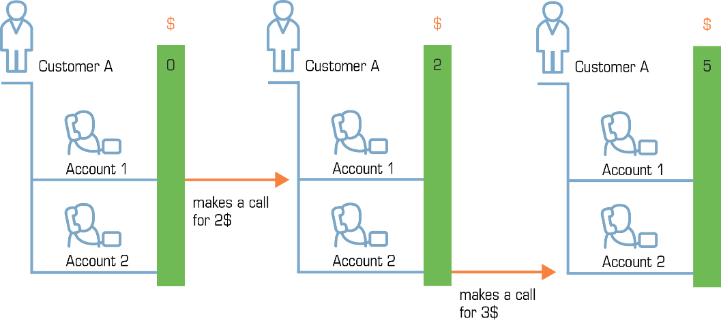
Subordinate credit accounts are used when one customer pays for multiple accounts and controls spending at the customer level. Individual account balances are not tracked. All charges are accumulated on the customer's balance.
Credit accounts with individual credit limit
With this model, each account has its own balance and credit limit. The balance reflects the amount owed by the account owner for the services used. It starts at zero, increases as services are used, and decreases when a payment is received. All transactions on such accounts also affect the customer's balance.
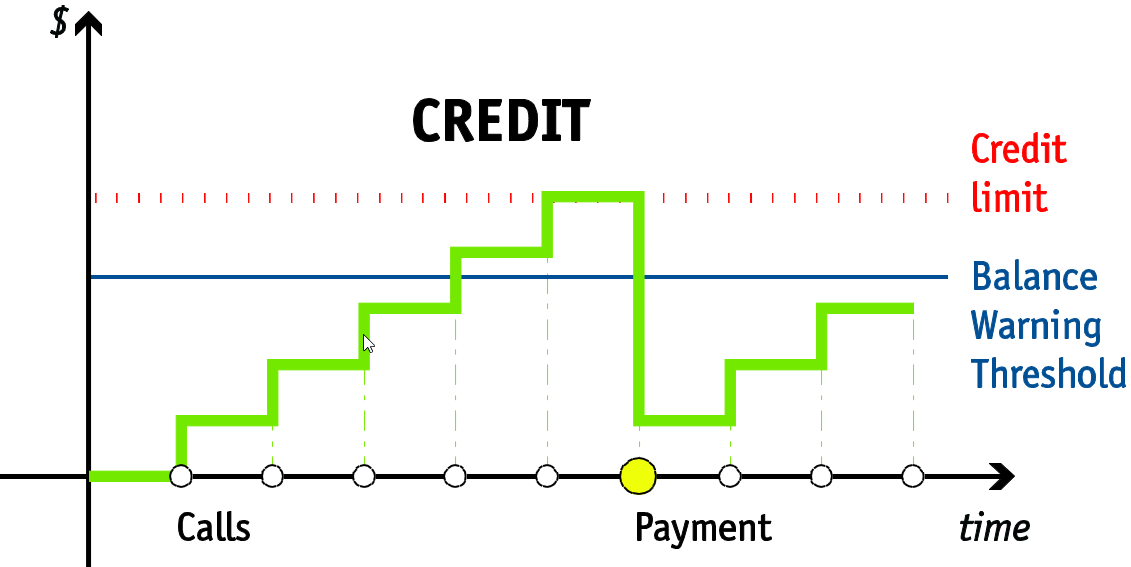
The services become unavailable when the balance reaches the defined credit limit. If a credit limit is also set at the customer level, services are blocked when either limit is reached.
Owl Telecom provides cloud PBX services to ABC Company. Each employee has a separate extension configured as an account.
Most extensions are managed under ABC Company's balance. However, ABC Company assigns a temporary sales contractor a separate phone line for outgoing calls. To control spending on this line, Owl Telecom sets an individual credit limit for the corresponding account.
As the contractor makes calls, charges accumulate on that account's balance. When the balance reaches the credit limit, the contractor can no longer use the service until the balance decreases (e.g., after a payment is made) or the credit limit is increased.
Voucher
A voucher is used to top up a credit or a debit account. In this case, the voucher balance is transferred to the target account. A voucher account cannot be used for services such as making calls.
Top-up can be performed on the account self-care web interface or via a dedicated voice application.
An account can be topped up only with a voucher that has the same realm in its account ID.
Typically used for: top-up cards used to refill SIM card balances.
Vouchers with encrypted PINs
Vouchers with encrypted PINs help prevent theft by restricting access to voucher passwords for certain PortaBilling users (within access roles). Such vouchers use a compound PIN that consists of the voucher ID and an auto-generated password, which is stored in encrypted form in the database.
The balance top-up process is the same as for regular vouchers. To top up the balance, the end user enters the compound PIN, for example, from a scratch card. This PIN is generated by combining the account ID with the non-encrypted service password. When the voucher PIN is entered via the self-care web interface or voice application, PortaBilling decrypts the stored password, validates the PIN, and tops up the balance.
To enable the generation of vouchers with PIN encryption, set the following options on the Configuration server web interface:
- Security.EncryptPasswords – set to Yes.
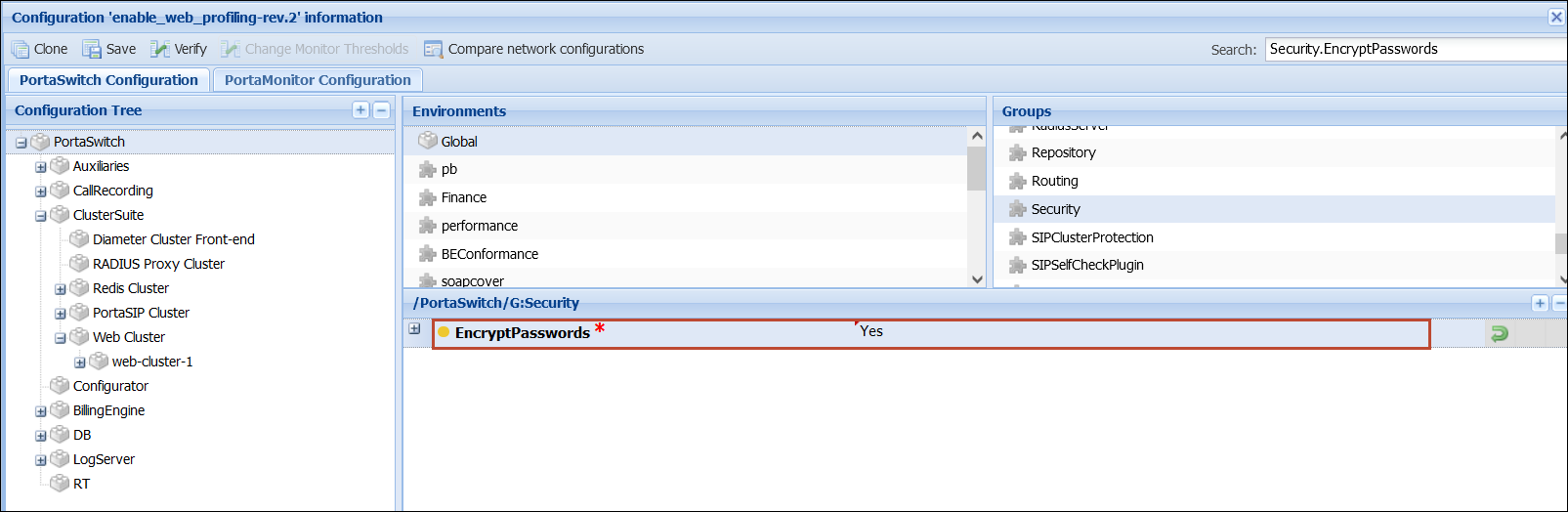
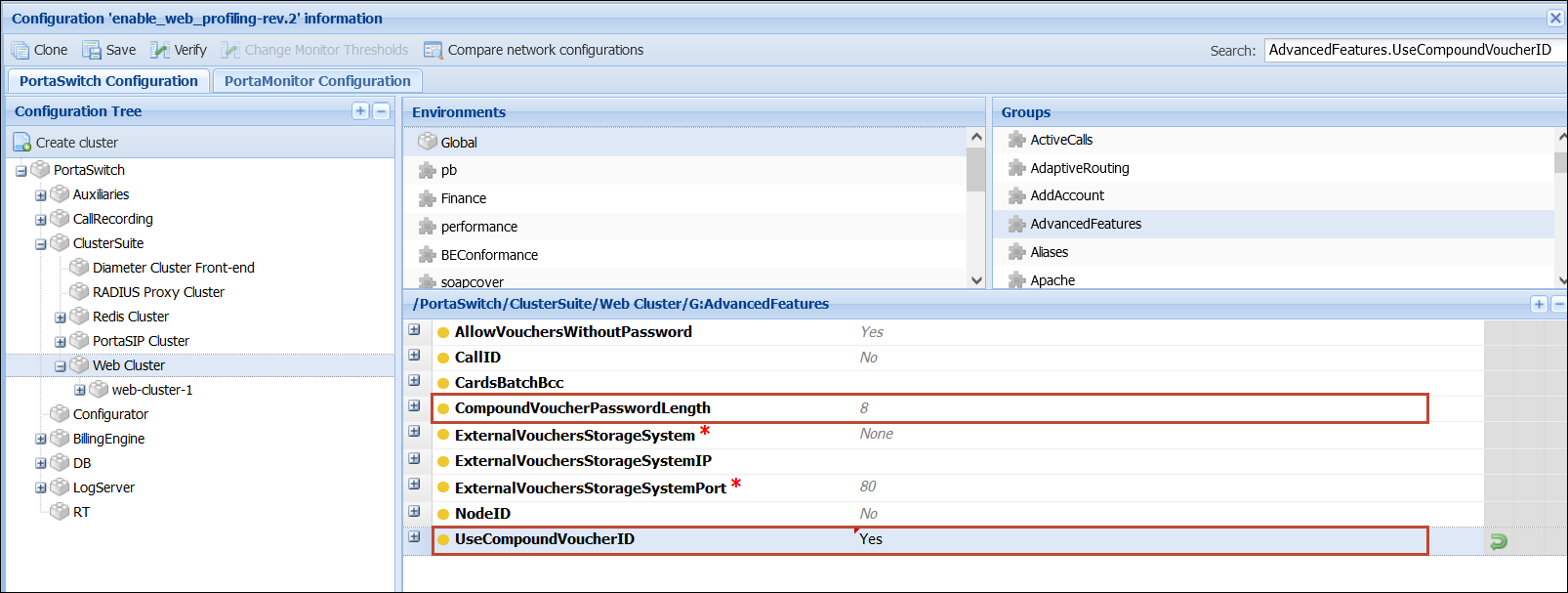
- AdvancedFeatures.UseCompoundVoucherID – set to Yes.
- AdvancedFeatures.CompoundVoucherPasswordLength – specify the password length.
By default, voucher passwords are visible in the web interface after vouchers have been generated. To restrict access to voucher passwords for specific users, such as helpdesk operators, configure permissions for the corresponding role:
- Open My company > Roles > open the needed role, e.g., Helpdesk > go to Permissions tab.
- Turn on the Advanced mode toggle and select Modify for System access.
- Open the Customer section > Account > General info > Additional info > Additional information and select Restrict for Service password.

If you need to print scratch cards for many generated vouchers, you may need to retrieve voucher IDs and passwords in bulk. To do this, use the get_account_list method in the PortaBilling API to retrieve the id and h323_password values for each voucher.
For example, the API response may contain the following voucher data:
- "id": "85275446188@pin"
- "h323_password": "53552477"
To generate the voucher PIN, combine the account ID without the @pin suffix and the h323_password value. In this example, the voucher PIN is 8527544618853552477.
For more information about available API methods, refer to the API Reference Guide.
Account top-up using external vouchers
PortaBilling supports integration with external top-up voucher systems. This allows service providers to accept vouchers supplied by external distributors (e.g., voucher networks) while also generating their own vouchers in PortaBilling.
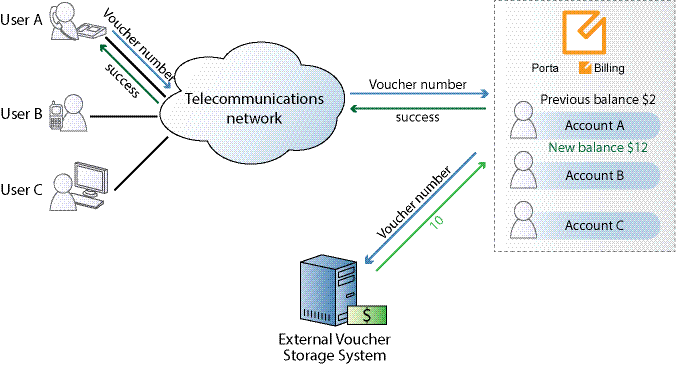
When an end user tops up their account by voucher via the voice application or the account self-care web interface, PortaBilling processes the request as follows:
- PortaBilling checks whether the voucher exists among its own vouchers.
- If the voucher is not found, PortaBilling treats it as an external voucher and sends the voucher number to the external voucher storage system.
- The external system validates the voucher and returns the result to PortaBilling.
- If the voucher is valid, PortaBilling tops up the account balance by the voucher amount and the external system marks the voucher as used.
This integration allows service providers to accept vouchers from external distributors without migrating voucher management into PortaBilling.


