



PortaBilling sends notifications to admins, customers, and resellers via email or SMS. Each notification is triggered by a specific system event – for example, when a report is generated, or a route becomes unavailable.
Notification content is defined by templates. Templates are grouped into notification sets and assigned either to a customer class (for customer and reseller notifications) or directly to a PortaBilling user (for admin notifications).
Each template contains static text and placeholders for variables. When a notification is sent, PortaBilling replaces each placeholder with the actual value – for example, Dear <% $customer_name %> becomes Dear John Doe.
Notification templates
Each notification template, which includes the email subject, email body, and SMS text, is editable in the PortaBilling web interface.
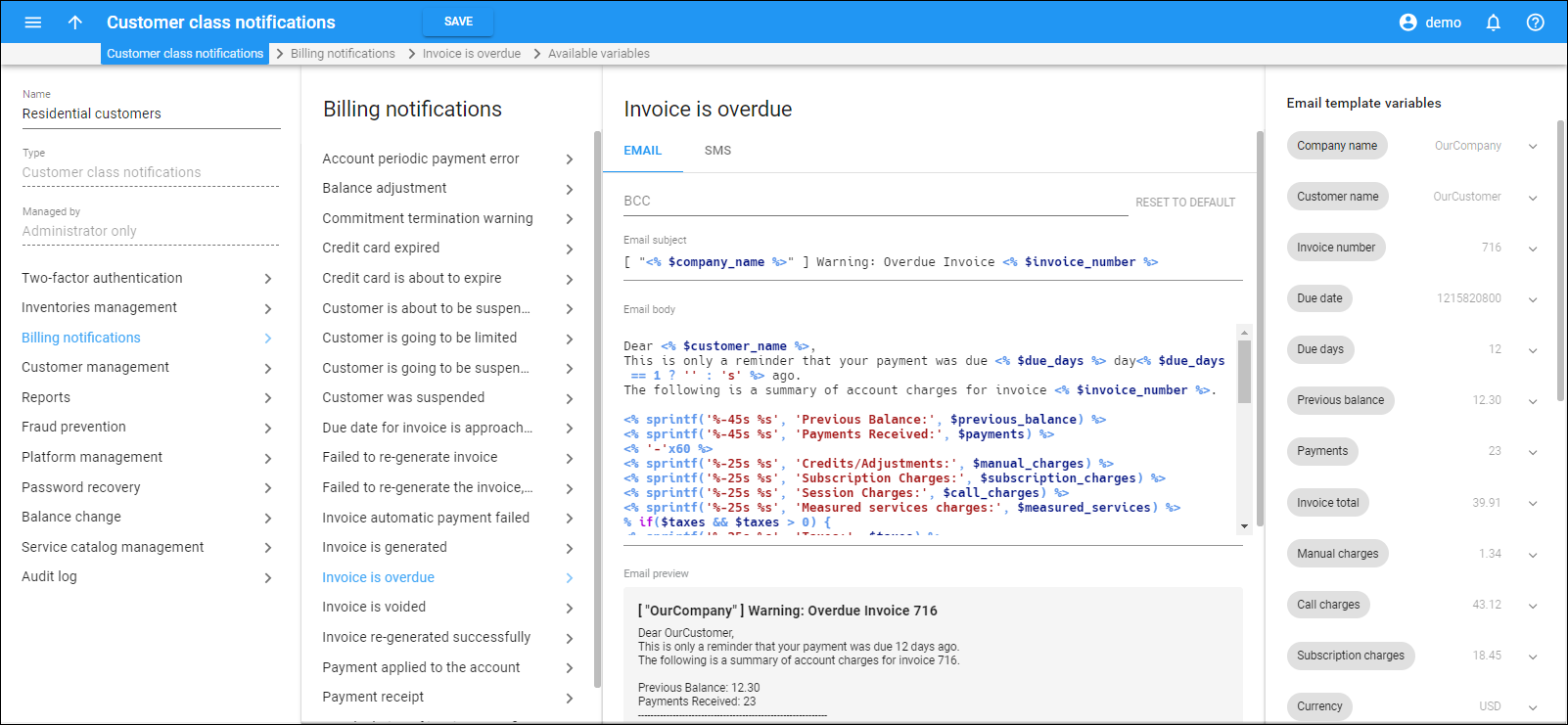
Templates support multiple languages so you can assign customers a notification set in their language.
Templates contain variables – such as "Company name," "Invoice number," or "Amount due" – that PortaBilling replaces with actual values when the notification is sent. To insert a variable, drag it from the panel on the right side of the editor. Templates are composed using the HTML::Mason syntax.
To preview a notification, click Send me a sample. PortaBilling sends a test notification to the email address specified in the Email field and the phone number specified in the Alt. phone field on the user page.
If you use an external service such as Twilio (available via Add-on Mart) to send SMS notifications, long messages may be split into multiple parts. To control this, update the Notifications.MaxSMSLength option on the Configuration server web interface. This option defines the maximum number of UTF-8 characters allowed in an SMS template body, including variable names and special characters. If a message exceeds the configured limit, the message is sent, and a warning is saved to the log. The default value is 0 (no limit).
Notification set
A notification set is a collection of templates for all available notifications. Templates are grouped into categories, such as "Billing notifications" or "Password recovery." When assigning a notification set to a customer class or a PortaBilling user, you can enable or disable individual notifications or entire categories.
For example, if an admin in the finance department only requires report generation notifications, you can disable all other categories for that user.
Types of notification sets
PortaBilling provides two types of notification sets:
- Customer class notifications – defines notifications sent to customers and their accounts (for example, when an invoice is overdue or a quota is exhausted). Since resellers are treated as customers, this type also covers reseller notifications. A customer class notification set is assigned to a customer class, which is then linked to a specific customer or reseller.
- User notifications – defines notifications sent to administrators. This type is assigned directly to a PortaBilling user.
Notification configuration
To set up customer notifications:
- Create a notification set of the "Customer class notifications" type.
- Assign the notification set to a customer class.
- Within the assigned notification set, select the notification categories or specific notifications to send via email or SMS.
For detailed instructions, see How to manage customer class notifications.
Notification messages syntax
Variables in the message text – such as "Company name," "Invoice number," or "Amount due" – are enclosed in <% %> tags. Perl expressions are supported within these tags. For example, the following conditional statement displays the company name if one is defined, or the customer name otherwise:
<% $companyname ? $companyname : $name %>
The following functions are available:
- column (text, width => N, align => 'left'|'right') – generates a padded string of specified width; text is left-aligned by default. Parameters:
- text – the text to output
- N – the width of the padding space
- align – text alignment: left or right
- line (char, width) – outputs a string of repeated characters (for example, dashes to underline text). Parameters:
- char – the character to repeat
- width – the number of times to repeat the character
For example:
<% column('Previous Balance:', width => 45) %> <% column($previous_balance, width => 10, align => 'right') %> <% line('-', 25) %>
produces the following output:
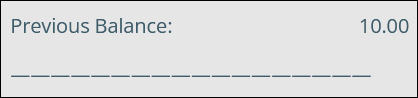
- "Previous Balance:" is left-aligned within a 45-character wide space.
- The value of $previous_balance ("10.00") is right-aligned within a 10-character wide space.
- A line of 25 dashes is generated below the text.
Available customer notifications
The following table lists the customer notification messages available in PortaBilling.
Inventories management
| Notification name | This notification states that | SMS | Also sent to accounts | |
| CPE data upload | The CPE data upload has been completed. The message contains the number of CPEs that were added, deleted, and failed to upload. | + | ||
| SIM cards upload | The SIM cards upload has been completed. The message contains a summary of the total SIM cards processed. | + |
Billing notifications
| Notification name | This notification states that | SMS | Also sent to accounts | |
| Due date for invoice is approaching | The due date for the invoice is approaching. The message contains a summary of account charges for the invoice. | + | + | |
| Invoice is overdue | The invoice is overdue. The message contains a summary of account charges for the invoice. | + | + | |
| Invoice automatic payment failed | There was an error with an invoice payment transaction. | + | + | |
| Customer is about to be suspended | The customer is about to be suspended because of an outstanding invoice. | + | + | |
| Customer was suspended | The customer is suspended because of an unpaid invoice or insufficient funds. | + | + | |
| Customer is going to be suspended again (no payment) | The customer is suspended again because of an outstanding invoice. | + | + | |
| Payment applied to the account | The customer's credit card was successfully charged. The message contains information about the current balance. | + | + | + |
| Invoice is generated | The invoice was generated. The message contains a summary of charges for the invoice and information about the current balance. | + | + | |
| Balance adjustment | The balance was adjusted. The message contains information about the current balance. | + | + | + |
| Credit card is about to expire | The credit card is about to expire. | + | + | |
| Credit card expired | The credit card has expired. | + | + | |
| Recalculation of invoices was finished | The recalculation of invoices was successfully completed. | + | ||
| Failed to re-generate the invoice, no invoice number or customer ID | Invoice re-generation failed because the invoice number or customer ID was not identified. | + | ||
| Failed to re-generate invoice | The attempt to re-generate the invoice failed. | + | ||
| Invoice re-generated successfully | The invoice was regenerated successfully. | + | ||
| Payment receipt | This notification contains the payment receipt. | + | + | + |
| Account periodic payment error | A periodic error occurred during payment. | + | + | + |
| Invoice is voided | The invoice sent previously is voided. | + | + | |
| Commitment termination warning | The account commitment is going to be terminated. | + | + | |
| Customer is going to be limited | The customer service is about to be limited because of an overdue invoice. | + | + |
Customer management
| Notification name | This notification states that | SMS | Also sent to accounts | |
| Customer accounts closed | Some customer accounts have been closed. | + | ||
| Customer is about to be closed | A customer is about to be closed. | + | + | |
| Customer is closed | A customer has been closed. | + | + | |
| Number porting complete | A customer's number has been successfully ported in. | + | + | + |
| Accounts generation error, cannot fetch customer name | The customer was deleted by admin during account batch generation. | + | ||
| Accounts generation error, cannot open file | A report file used during account generation cannot be opened. | + | ||
| Accounts generation error, cannot access directory | The directory used during account generation cannot be accessed due to issues with permissions. | + | ||
| Accounts generation error, unknown customer | The account batch cannot be generated because the customer was not found in PortaBilling. It is possible that the customer was terminated after the account generation procedure was scheduled. | + | ||
| Accounts generation error, cannot create directory | The directory required for account generation does not exist and an attempt to create it failed. | + | ||
| Accounts generation error, cannot create a new batch | Batch generation failed. | + | ||
| Accounts generation error, batch exists | The batch name the admin is trying to use already exists. | + | ||
| Accounts generation error, exceeded generation attempts | Batch generation failed due to an excessive number of generation attempts. | + | ||
| Accounts generation error, number of available account exceeded | The batch cannot be generated because the amount of available DID numbers in the selected DID batch has been exceeded. | + | ||
| Accounts generation finished | The accounts have been successfully created. | + | ||
| Accounts generation error, cannot fetch product name | The wrong product was selected to generate the account batch. For example, when the batch was being generated, the product was deleted by another administrator. | + | ||
| Spending plan limit exceeded | The spending limit has been reached. | + | + | |
| Accounts generation error, batch control number overflow | The account generation procedure failed due to a batch control number overflow. | + | ||
| Spending plan limit ratio exceeded | The threshold configured for their spending plan has been reached. | + | + |
Platform management
| Notification name | This notification states that | SMS | Also sent to accounts | |
| Accounts without ZIP codes were found during tax calculations | Accounts without ZIP codes were found for a customer during tax calculations; the customer's ZIP code is used for such accounts. | + | + | |
| Alarm: the ZIP code is missing or invalid | A customer's zip code can be missing or invalid; therefore, the invoice can contain an incorrect tax amount. | + | + | |
| Payment processing error | An error occurred during payment processing via the payment processor. | + | + | |
| Taxation failed due to the missing ZIP code | The scheduled tax calculation failed due to the missing ZIP code. | + | + | |
| The customer has accounts without a calls limit | Accounts without outgoing calls limit were found during the scheduled tax calculations for a customer. | + | + | |
| The taxes for the customer were calculated successfully, with non-critical errors | Taxes for a customer were calculated successfully but with non-critical errors that may require the user's attention. | + | + |
Fraud prevention
| Notification name | This notification states that | SMS | Also sent to accounts | |
| Account screened | An account's status is changed to screened. The notification contains information about the reason for account screening. | + | ||
| Account: fraudulent activity detected | Suspicious activity has been detected on behalf of your account. | + | + | |
| Customer's account: fraudulent activity detected | An account attempted to use the service from an unusual location. | + | ||
| Account quarantined | The account was quarantined because of suspicious activity. | + | + | |
| Session unauthorized location | Customer's account attempted to use the service from an unauthorized IP address. | + | + | + |
Service catalog management
| Notification name | This notification states that | SMS | Also sent to accounts | |
| Product cloned successfully | The product was successfully cloned. | + | + | |
| Failed to clone product | An attempt to clone the product failed. | + | + | |
| Tariff cloned successfully | The tariff was successfully cloned. | + | + | |
| Failed to clone tariff | An attempt to clone the tariff failed. | + | + | |
| Failed to clone rates | An attempt to clone rates failed. | + | + | |
| Tariff upload failed | Some update operations failed during tariff upload. The file including the data which has not been imported is attached to the message. | + | ||
| Tariff uploaded | The tariff has been successfully uploaded. The message includes a summary of the total rates processed. | + | ||
| Reapplying subscriptions for product | The product's subscription has been reapplied. This message includes the number of affected accounts. | + | ||
| Accounts generation error, invalid add-on products combination | The account batch generation failed because the provided add-on products combination cannot be used with the main product. | + |
Reports
| Notification name | This notification states that | SMS | Also sent to accounts | |
| Custom report | This notification includes the results of custom report execution. | + | ||
| Call statistics | This notification includes the call statistics for a specific period. | + | ||
| New call recording is available | This notification includes a new call recording file for a specific call. | + | + |
Password recovery
| Notification name | This notification states that | SMS | Also sent to accounts | |
| Web self-care password change | A customer changes their password on the web interface. The message contains the new password. | + | + | + |
| Web password change link | The "Password recovery" feature on the web interface has been used. This message contains the reset password link. | + | + | |
| Individual credentials created | The credentials are created. The message contains the login and password. | + |
Balance change
| Notification name | This notification states that | SMS | Also sent to accounts | |
| Balance warning threshold crossed | The current credit limit is almost reached. | + | + | |
| Bundle activation failure | A customer/account is not charged for a bundle activation due to an error. | + | + | |
| Bundle activation success | The bundle has been activated successfully. | + | + | |
| Bundle status | The balance-dependent renewable bundle has a specific configuration (the notification includes bundle details such as bundle lifetime, activation fee, and whether auto-renewal is enabled). | + | + | |
| Credit limit exceeded | The current balance has reached its credit limit and service for the customer's credit accounts is now blocked. | + | + | |
| Bundle threshold crossed | The allocated service volume has been depleted, so the customer's service will be blocked, limited (for internet access), or charged at a pay-as-you-go rate (depending on the bundle item configuration). | + | + | + |
| Bundle threshold will be crossed soon | The allocated service volume is close to being used up. | + | + | + |
| The bundle item expired | Unused balance of a bundle item has expired. | + | + | + |
| The bundle item is about to expire | Unused balance of a bundle item is about to expire. | + | + | + |
| Units successfully transferred from sender's bundle item | Units have been successfully transferred from the sender's bundle item. This message contains information about a current balance. | + | + | + |
| Units successfully transferred to recipient's bundle item | Units have been successfully transferred to the recipient's bundle item. This message contains information about a current balance. | + | + | + |
| Bundle item top up report | Notification about bundle item top-ups and the current balance. | + | + | |
| The funds were transferred to the account balance | Funds were successfully transferred to the account balance. This message contains information about the current balance. | + | + | + |
| The funds were transferred from the account balance | Funds were successfully transferred from the account balance. This message contains information about the current balance. | + | + | + |
| The verification code for the transfer of funds | This notification contains the verification code for the transfer of funds. | + | + | + |
| The verification code for the transfer of bundle item | This notification contains the verification code for the transfer of bundle item. | + | + | + |
Two-factor authentication
| Notification name | This notification states that | SMS | Also sent to accounts | |
| The maximum number of two-factor authentication attempts exceeded | The maximum number of attempts to enter a valid two-factor (2FA) code has been exceeded. | + | + | + |
| The user entered an invalid OTP | An invalid two-factor (2FA) code has been provided to your account. | + | + | + |
| Two-factor authentication is configured | Two-factor authentication (2FA) has been configured for your account. | + | + | + |
| Two-factor authentication is disabled | Two-factor authentication (2FA) has been disabled for your account. | + | + | + |
| Two-factor authentication is reset | Two-factor authentication (2FA) code has been reset for your account. | + | + | + |


