



Different operations are available for different types of users who access the system (also, the abilities of an individual user can be adjusted via his role settings). In general, administrators (users in PortaBilling) can potentially perform all possible configuration tasks, while others are limited to their own entity and related objects only. For instance, a reseller can access any of his subcustomers or their accounts, while a subcustomer can only their access information and their accounts on the self-care pages.
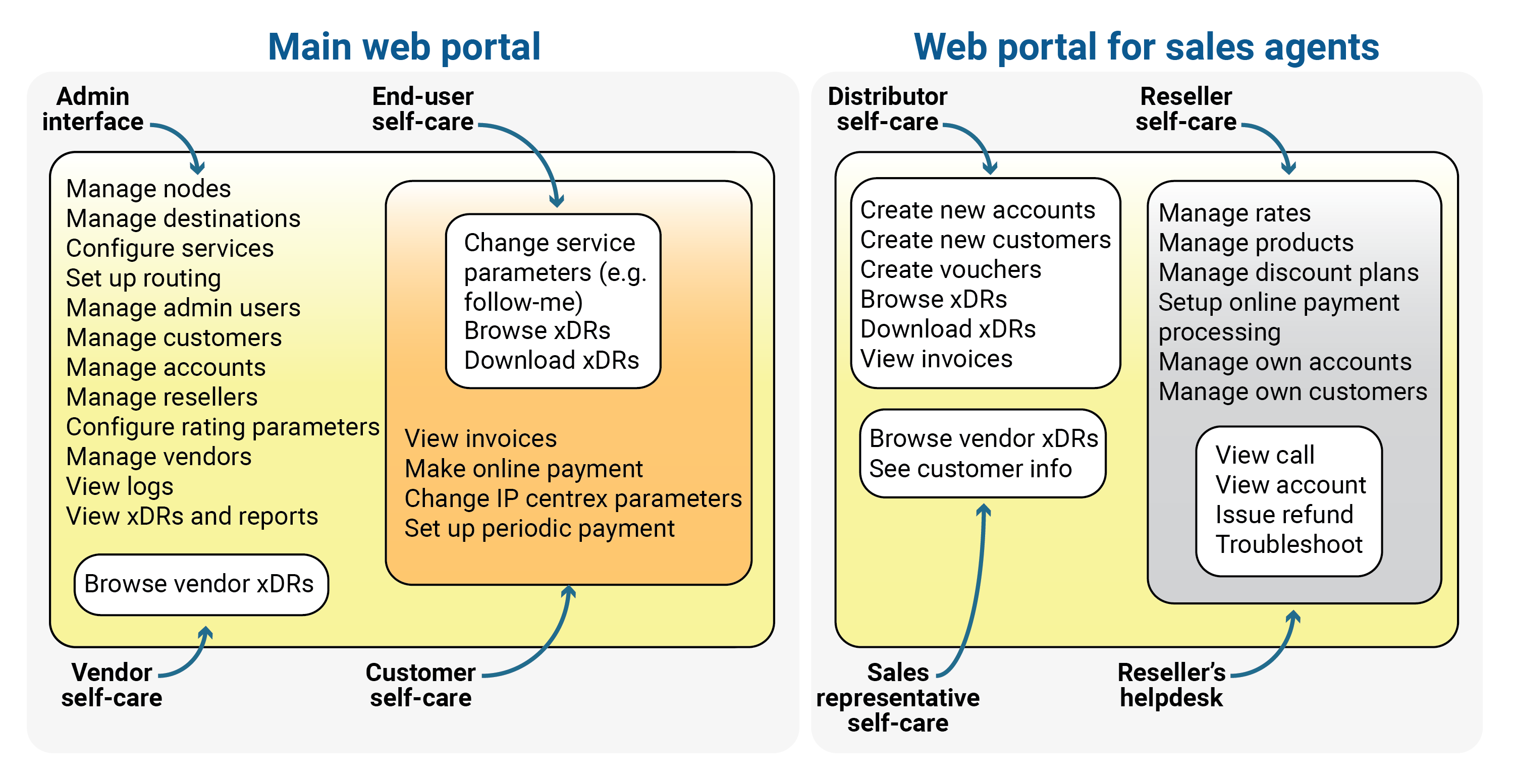
The self-care interface imposes multiple security-related limitations on a user’s activity, e.g., a subcustomer can view credit limit on the self-care pages, but cannot modify it.
Admin can perform the following operations from their interface:
- Manage nodes
- Manage rate codes
- Configure currency and taxation
- Configure rates
- Configure services
- Manage bundles
- Manage subscriptions
- Set up routing
- Configure user permissions
- Manage admin users
- Manage customers
- Manage accounts
- Manage resellers
- Manage vendors
- Manage distributors
- Manage resellers
- Manage representatives
- View logs
- Browse xDRs and reports
In addition, admin can also perform the actions allowed for the customer and account:
- Customer self-care:
- View invoices
- Make online payment
- Change PBX configuration
- Set up periodic payment
- Account self-care:
- Change personal info
- Change service parameters, e.g., follow-me
- Browse xDRs
- Download xDRs
If you provide services through partners, your admins can also perform actions allowed for the resellers, distributors, and representatives:
- Reseller interface:
- Configure rates
- Configure products
- Manage own bundles
- Manage own subscriptions
- Set up online payment processing
- Manage accounts
- Manage customers
- Manage distributors
- Manage representatives
- Manage subresellers
- Distributor interface:
- Create new accounts
- Create new customers
- Create vouchers
- Browse xDRs
- Download xDRs
- View invoices
- Browse info about own customers (modify only personal info)
- Browse info about own accounts (modify only personal info)
- Manage subdistributors
- Representative interface:
- See customer info
- See commission plan info
For improved security, the PortaBilling web interface is divided into several separate areas, each serving its own purpose. Thus, a login name and password that allows a user to access the customer self-care interface cannot be used to log in to the admin interface; the login name and password for the account’s (end-user’s) self-care interface are not applicable to the customer self-care interface; and so forth.
Built-in AI assistant
Admins can use the built-in AI assistant to get answers to their questions (e.g., how to configure a bundle with top-ups, what a specific option means, or how to troubleshoot a service) directly from the PortaBilling web interface. The assistant provides version-specific answers by combining relevant details from PortaOne documentation into a single, clear response. This reduces the need to open a support ticket or to spend time searching through documentation. Each admin sees only their own chat history.
To access the assistant, click Help on the toolbar and enter a question in the AI chat.
How it works
When an admin submits a question in the built-in AI chat:
- The request is sent to a secure cloud-based API gateway hosted by PortaOne.
- The API gateway sends the request to the AI assistant for processing.
- The AI assistant generates a response, which is sent back through the same secure gateway.
- The response is displayed in the AI chat for the admin to review.
Requirements
To use the built-in AI assistant, the following requirements must be met:
- You need an active PortaCare subscription.
- Access to the API gateway's IP address must be allowed in your network.
- Your server hosting the admin web interface must be accessible from the API gateway's IP address.
Specifics
- The built-in AI assistant runs on an OpenAI Responses API and uses information from the latest LTS (Long Time Support) release documentation on docs.portaone.com.
Limitations
Use of the AI assistant is subject to a Fair Usage Policy. The number of requests is limited for each user.


