


PortaBilling applies taxes to charges using one of two methods:
Whether the prices include tax defines which method is used. The method determines how taxes are calculated and whether PortaBilling creates separate tax xDRs.
The following charges can be tax-exclusive or tax-inclusive:
- usage charges (such as pay-as-you-go charges for calls, data, messaging)
- subscription fees
- DID number usage
- manual charges
- measured service charges
Taxes for these charges are calculated according to the taxation settings of the customer class, including the taxation plug-in. To define these settings:
- Select when taxes are applied in the Apply taxes option: At the end of the billing period or At time of payment.
- Select the needed taxation plug-in.
- To use the tax-inclusive method, enable the Taxes included into rates/fees option. To use the tax-exclusive method, leave this option disabled.
These settings apply to every customer in that class. Alternatively, you can override taxation settings for an individual customer.
Tax-exclusive charges
With tax-exclusive charges, the prices defined for services do not include tax. PortaBilling calculates the tax and adds it to the actual charge amounts. This is a common practice in the US and Canada, where customers see service charges and taxes as separate lines on their invoice.
How it works for postpaid customers
For postpaid customers, taxes are calculated at the end of the billing period, after applying all recurring charges. The flow is as follows:
- PortaBilling records xDRs for each charge.
- At the end of the billing period, PortaBilling sends all customer xDRs to the taxation plug-in.
- Some plug-ins calculate the taxes in PortaBilling. Other plug-ins, such as SureTax and CSI, use an external taxation service. These plug-ins send the xDRs to the taxation service, which calculates the taxes. The plug-ins then report the tax amounts to PortaBilling.
- PortaBilling records the tax amounts as separate tax xDRs, updates the customer's balance, and lists charges and taxes separately on the invoice.
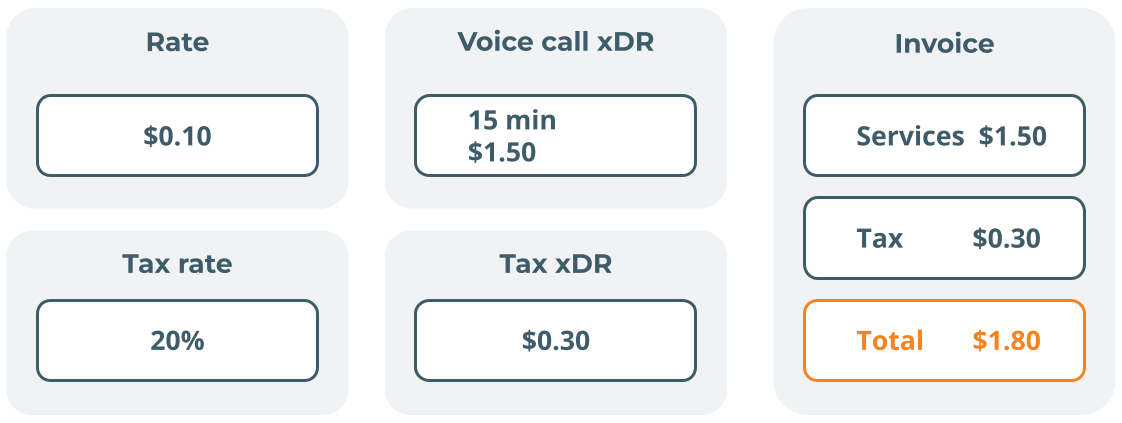
A postpaid customer, John Doe from Chicago, activates a pay-as-you-go voice package on June 30. The rate for calls to Germany is $0.10 per minute, which excludes all taxes. The service provider uses the SureTax plug-in to calculate taxes.
John makes a 15-minute call to 493011232567. PortaBilling charges John $1.50 (15 × $0.10) and records an xDR for this amount. John’s balance (the amount he owes) increases by $1.50.
The next day, July 1, John’s billing period is closed. PortaBilling sends the charge data to SureTax. SureTax calculates the tax ($0.30) and returns it to PortaBilling. PortaBilling records it as a separate tax xDR. John’s balance increases by $0.30. The invoice lists the call charge as $1.50 and the tax as $0.30. The invoice total is $1.80.

How it works for prepaid customers and debit accounts
For prepaid customers and debit accounts, tax-inclusive prices are typically used. Such prices result in tax-inclusive charges, so no tax calculation is required. Tax-exclusive prices can also be used for prepaid customers. In this case, PortaBilling can apply taxes to payments and top-ups instead of charges. For more details, see Taxes upon payment.
Plug-ins that support tax-exclusive charges
You can use the following plug-ins for tax-exclusive charges:
- VAT (fixed percentage)
- Custom taxation
- GST (Malaysia)
- GST (Singapore)
- Avalara
- SureTax
- Compliance Solutions (CSI)
Tax-inclusive charges
With tax-inclusive charges, the defined service prices already include tax: the customer is charged a single amount that covers both the service and the tax. Tax-inclusive charges are common outside the US and Canada for individual customers, who are used to seeing final prices with tax included.
How it works for postpaid customers
For postpaid customers, PortaBilling updates the balance as soon as the customer uses the service. It extracts the tax from the charges when it generates the invoice. The flow is as follows:
- Each time PortaBilling charges the customer, it records a single xDR for the full amount, including tax, and immediately updates the customer's balance.
- At the end of the billing period, if the customer has invoicing enabled, PortaBilling sends the xDRs for the billing period to the taxation plug-in.
- The taxation plug-in extracts the amount of tax included in the invoice total and returns it to PortaBilling.
- PortaBilling lists the tax separately on the invoice and shows the charges without tax. PortaBilling does not create separate tax xDRs.
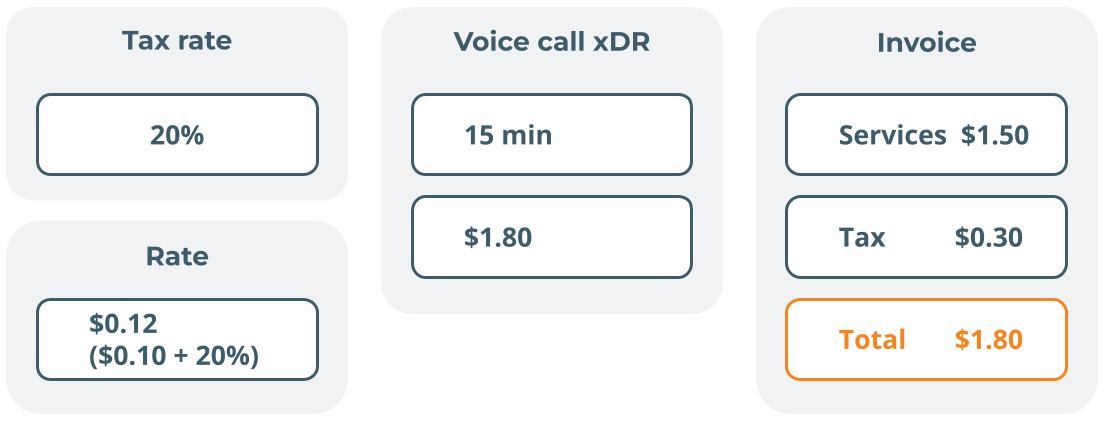
A postpaid customer, John Doe from London, subscribes to a pay-as-you-go voice package on June 30. The rate for calls to Canada is £0.12/min (£0.10 + 20% VAT).
John makes a 15-minute call to 14165550123. PortaBilling charges John £1.80 (15 × £0.12) and records a single xDR for this amount. John's balance increases by £1.80.
The next day, July 1, John’s billing period is closed. The taxation plug-in back-calculates the tax from the total charges using this formula: total charges − total charges / (1 + VAT rate as a decimal). For John’s charges, the calculation has two steps:
£1.80 / (1 + 0.20) = £1.50 (the amount without tax)
£1.80 − £1.50 = £0.30 (the tax)
The invoice lists the call charge as £1.50 and the tax as £0.30. The invoice total is £1.80.

How it works for prepaid customers and debit accounts
The tax-inclusive method is commonly used for prepaid customers: every xDR already contains the tax, so PortaBilling deducts the full amount from available funds as soon as the customer uses the service. Prepaid customers usually do not have invoicing enabled, so PortaBilling does not calculate the tax amount.
Plug-ins that support tax-inclusive charges
You can use the following plug-ins for tax-inclusive charges:


 Back to main menu