

Without protective measures, robocallers can easily alter or "spoof" phone numbers to make them appear as if they are from familiar sources, such as a neighbor. As a result, users often answer these unwanted calls. To comply with local regulators in the US and Canada, and stop robocalls, service providers can authenticate outgoing calls and verify incoming calls using Secure Telephony Identity Revisited (STIR) and Signature-based Handling of Asserted information using toKENs (SHAKEN). STIR/SHAKEN ensures the authenticity of the calling numbers. With STIR/SHAKEN, users will see the verified V-sign that lets them know they can trust the calling number they see on their phones. If the calling number is not verified, they won’t see the V-sign, and they can choose for themselves whether or not to answer.
PortaSwitch is integrated with TransNexus, a certification authority and a service provider of authentication and verification services.
To implement STIR/SHAKEN, service providers perform the following steps:
- Register with the Policy Administrator on the Service Provider page to receive a Service Provider Code Token, which identifies legitimate voice service providers.
Note that before beginning the registration process, it is recommended to review the Service Provider Guidelines, which outline enrollment procedures, and to fill out certification in the FCC Robocall Mitigation Database.
- Set up an account with an approved certification authority such as TransNexus to obtain a digital certificate necessary to sign the calls with a digital signature. Add PortaSIP cluster virtual IP addresses (VIPAs) to the TransNexus ClearIP system allowlist. For assistance, contact TransNexus.
- Configure PortaSwitch to authenticate and verify calls.
Benefits
- Compliance with the local regulations for service providers.
- Users can trust the verified calling numbers and decide whether to answer the other calls.
Let’s see how STIR/SHAKEN works for the authentication of outgoing calls and verification of incoming calls.
Authentication of outgoing calls
The service provider is responsible for authenticating all the calls they originate. Since the level of trust in the caller identity may differ, service providers choose the following trust gradation for the calls:
- Full attestation. The service provider authenticates the user making the call and confirms they are authorized to use the phone number. For example, the authenticated user makes a call using the phone number allocated by the service provider.
- Partial attestation. The service provider authenticates the customer making the call but cannot confirm that the calling party is authorized to use the phone number. For example, a call is initiated by your PBX customer from a non-authorized number.
- Gateway attestation. The service provider indicates that they let the call enter on their network, but they cannot verify the call originator. For example, a call is received from an international gateway or a wholesale partner.
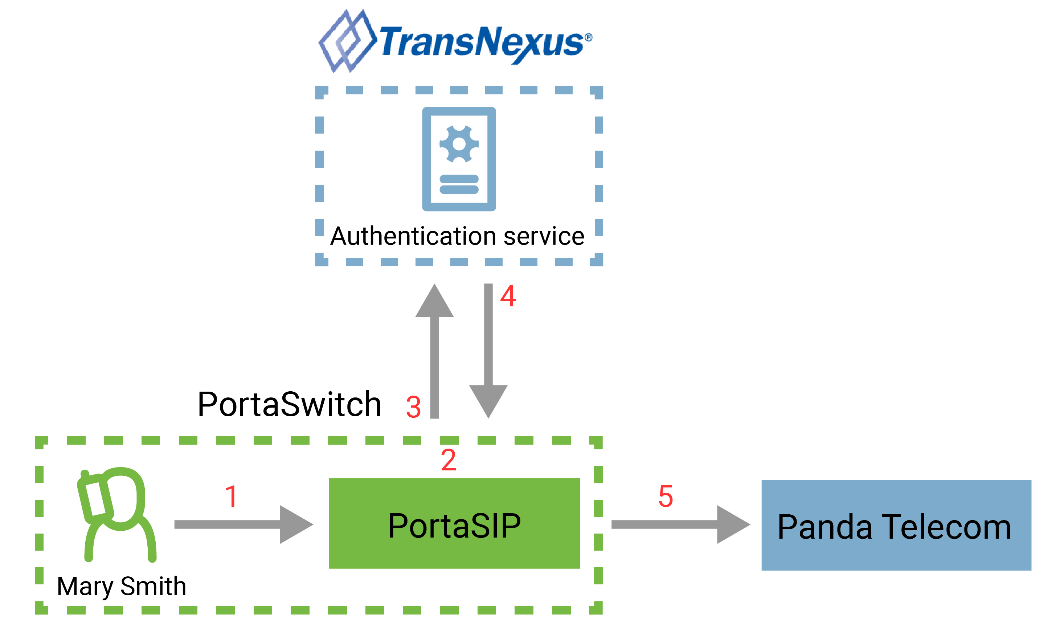
Let’s consider an example. Mary Smith, your PortaSwitch user, makes a call to John Doe, a user of your vendor, Panda Telecom. Mary’s account is set for full attestation. When Mary calls John, PortaSIP first authorizes the outgoing call and gets the call signed with a digital signature and then sends the call to Panda Telecom.
The authentication flow for the call looks like this:
- PortaSIP receives the SIP INVITE request from Mary.
- PortaSIP checks the attestation level to determine whether to attest the call.
- PortaSIP adds the verified caller identity (P-Asserted Identity) to the SIP INVITE request and sends the request to TransNexus, the authentication service, to receive the signature in the SIP Identity header.
- TransNexus sends a 302 ("Moved Temporarily") response, which includes the SIP Identity header. This means that a call is signed.
- PortaSIP sends the SIP INVITE request with the SIP Identity header to Panda Telecom.
Verification of incoming calls
The service provider is responsible for verifying the calls that enter their network. The service provider passes the Identity header and the digital signature received from the origination service provider to TransNexus for verification.
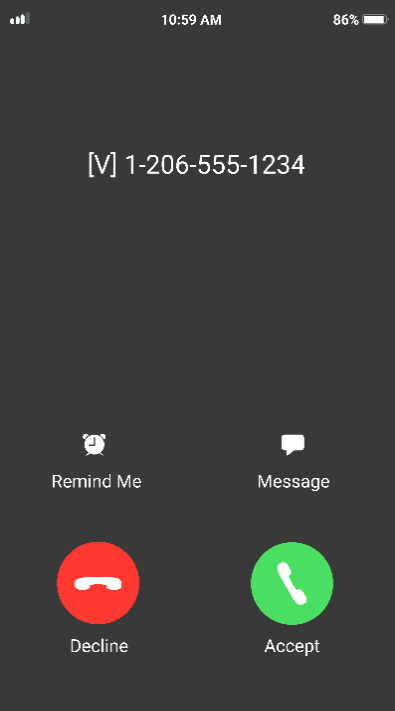
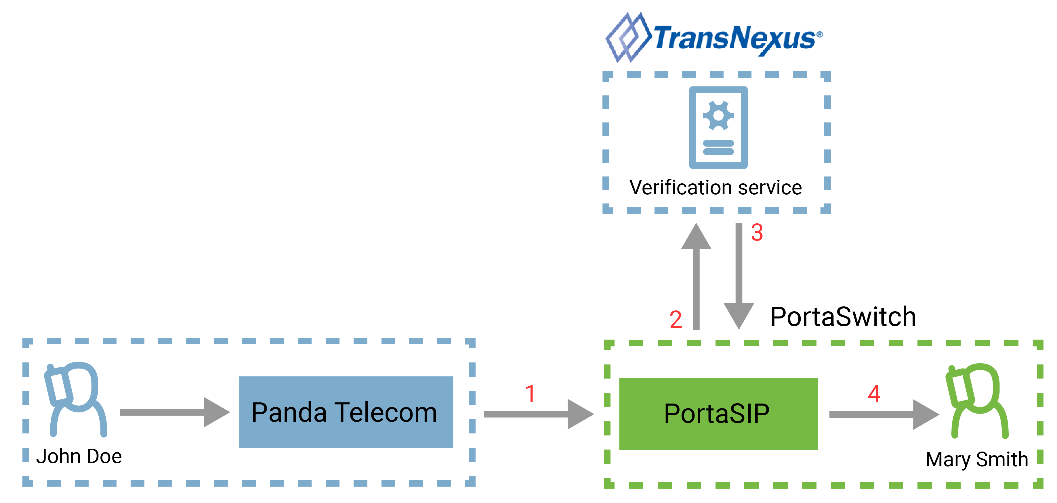
Let’s say, the account of Mary Smith, your PortaSwitch user, is configured to verify all the incoming calls. When John Doe (the user of Panda Telecom service provider) calls Mary Smith, PortaSIP first verifies the incoming call from John in TransNexus. If the call passes the verification, Mary sees that she can trust the calling number: she sees [V] sign before the phone number.
The verification flow for the call looks like this:
- PortaSIP receives the SIP INVITE request, which includes the SIP Identity header and the signature.
- PortaSIP sends the SIP INVITE request to TransNexus for verification.
- TransNexus responds PortaSIP that verification is successful.
- PortaSIP adds [V] sign before the calling number and sends the incoming call to Mary Smith.
- Mary sees [V] 12065551234, meaning that the call from John is verified.
Note that the verification sign [V] is only displayed for users if the calling phone number has the full attestation level.
Configuration
Before you proceed, obtain the addresses of TransNexus ClearIP's servers for SIP attestation and SIP verification.
Log in to the Configuration server web interface and perform the following steps:
- Clone the existing configuration to modify it.
- From the Configuration tree, go to ClusterSuite > PortaSIP Cluster and select the needed cluster. Open the SIPProxy group and set “Yes” for the enable_tcp_transport option.

- Select MUB2bua group and define the addresses of the TransNexus ClearIP's servers:
- sti_attestation_server_address used for attestation, e.g., TCP:sip.clearip.com:5060
- sti_verification_server_address used for verification, e.g., TCP:sip.clearip.com:5060

- Click Save and then Verify.
- Verify the new configuration and click Check/Apply.
Log in to the PortaBilling web interface and perform the following steps:
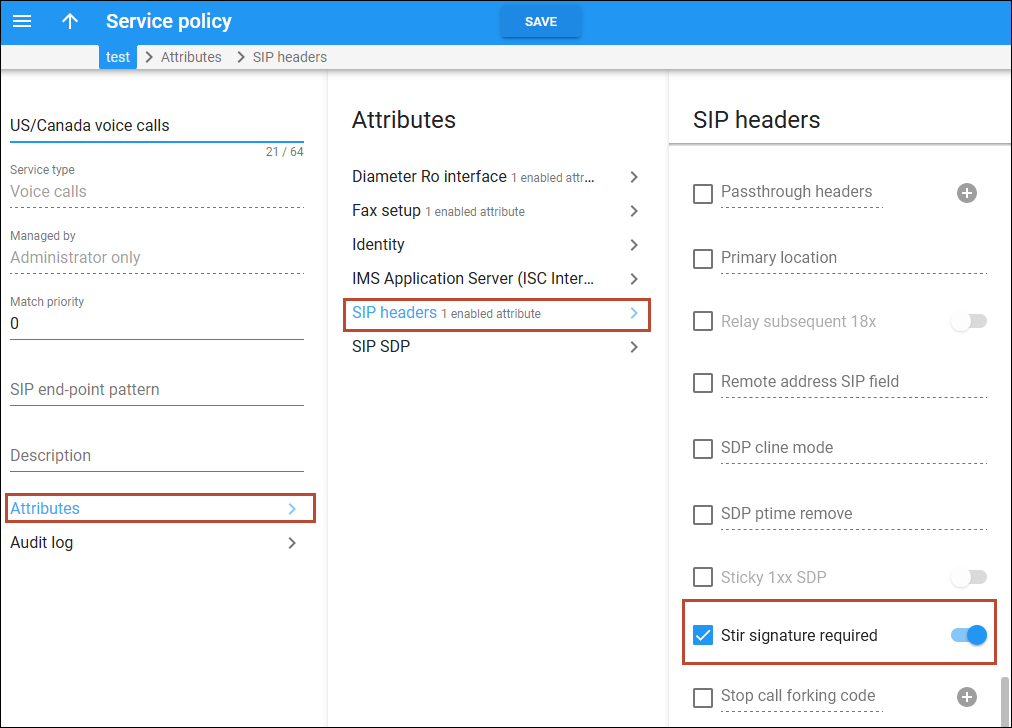
- Updates the service policy that is assigned to the Internal vendor connection and connections of the US and Canada vendors that support STIR/SHAKEN:
- Open the Service policy > Attributes > SIP headers.
- Select the checkbox for the Stir signature required option and turn on the toggle.
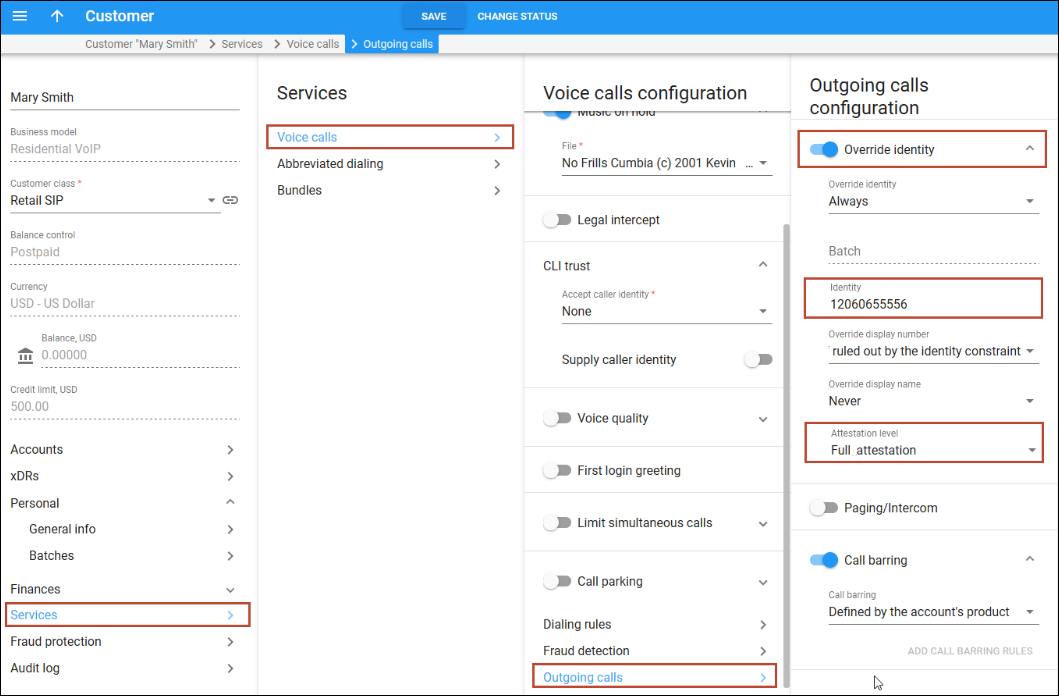
- Configure the Override identity feature for outgoing calls:
- Open Mary’s Customer > Services > Voice calls > Outgoing calls.
- Turn on the toggle to enable the Override identity feature.
- Specify 12060655556 in the Identity field.
If the number in the Identity field is not set, account ID is used.
- Set the Attestation level to Full attestation.
To configure the incoming call verification in PortaBilling, the administrator:
- Opens Mary’s Product > Services > Voice calls > Incoming calls.
- Turns on the toggle to enable the Perform caller verification feature.
- Sets the Display name indicator as Caller name and SIP headers.

Alternatively, you can configure the incoming call verification for each account separately.


