Skip to the content
Release
mr132
mr131
mr130
mr129
mr128
mr127
mr126
mr125
mr124
mr123
mr122
mr121
mr120
mr119
mr118
mr117
mr116
mr115
mr114
mr113
mr112
mr111
mr110
mr109
mr108
mr107
mr106
mr105
mr104
mr103
mr102
mr101
mr100
mr99
mr98
mr97
mr96
mr95
mr90
mr85
mr80
mr75
mr70
mr65
mr60
mr55
mr132 (latest)
mr132
(latest)
mr131
mr130
mr129
mr128
mr127
mr126
mr125
mr124
mr123
mr122
mr121
mr120
mr119
mr118
mr117
mr116
mr115
mr114
mr113
mr112
mr111
mr110
mr109
mr108
mr107
mr106
mr105
mr104
mr103
mr102
mr101
mr100
mr99
mr98
mr97
mr96
mr95
mr90
mr85
mr80
mr75
mr70
mr65
mr60
mr55
mr132
(latest)
mr131
mr130
mr129
mr128
mr127
mr126
mr125
mr124
mr123
mr122
mr121
mr120
mr119
mr118
mr117
mr116
mr115
mr114
mr113
mr112
mr111
mr110
mr109
mr108
mr107
mr106
mr105
mr104
mr103
mr102
mr101
mr100
mr99
mr98
mr97
mr96
mr95
mr90
mr85
mr80
mr75
mr70
mr65
mr60
mr55
Search
Search
Search
Documentation
portaone.com
Documentation
portaone.com
What's new in MR132
What’s new in MR132
Admin manuals
Architecture & concepts
Billing administration & invoicing
Carrier management & routing
Connection to / interoperability with external systems
Installation, maintenance & security
MNO / MVNE / MVNO
IoT/M2M
Other telco services (FTTH, IPTV, etc.)
Product catalog / rating configuration
Voice service configuration on PortaSIP (cloud PBX, SIP trunking, etc.)
Handbooks
Distributors
Initial Configuration
Callback Services
Advanced Configuration
DID Provisioning
Emergency Services
Cloud PBX and SIP Trunking Services
External System Provisioning
General Configuration Tools
Internet, WiFi, IPTV Provisioning
Management and Monitoring
Messaging Services
Invoicing and Payments
MVNO
Prepaid Services
Resellers
Residential VoIP Services
Routing Configuration
Troubleshooting
Unified Communications
xDR import
Wholesale Services
UI help
Admin interface
Account self-care interface
Customer self-care interface
Reseller interface
Distributor self-care interface
Representative self-care interface
Developers documentation
PortaBilling API
PortaSIP API
Call Control API
ESPF API
PortaBilling API 2.0
Provisioning Application Reference Guide
Installation, maintenance & security
Hardware and software requirements
Disk space requirements
PortaSwitch hardware and software requirements
PortaBilling hardware and software requirements
PortaBilling with Oracle Real Application Cluster hardware and software requirements
PortaSIP hardware and software requirements
Installation
How to...
What is the recommended setup for the PortaSwitch behind a firewall?
… Install PortaSwitch using USB DVD ROM?
… Create a bootable USB flash drive from a PortaSwitch ISO file?
… Create bootable USB flash drives from PortaSwitch ISO files ? (obsolete method)
… Perform basic troubleshooting?
… Activate the configuration server?
Installation
Oracularius installation
Deploying PortaSwitch on an Extended Distance Oracle RAC
Servers installation and interconnection
Maximizing DB availability using Oracle Data Guard
PortaSwitch installation
Installation process
Overview
Step 1: Power-up, boot order setup
Step 2: Insert the installation medium into the computer
Step 3: Starting installation
Step 4: Installation summary page
Step 5: Installation source
Step 6: Software selection
Step 7: Installation destination
Step 8: Network & host name
Step 9: Root password
Step 10: Begin installation
Step 11: Change installation medium (applicable only for local installation from two ISO files)
Step 12: Reboot
Step 13: Hardware check
Step 14: Check if system can reboot to normal state
Step 15: Prepare the system for transportation (optional)
Step 16: Perform initial configuration of PortaSwitch (when all servers have been installed)
Network configuration
Security and system access
Overview
Third-party software in PortaBilling/PortaSwitch
How PortaOne Support accesses PortaBilling/PortaSwitch and installed software
Password protection
Restrict system access to trusted IP addresses only
Protection against brute-force attacks via SSH
Operations
Deliver one-time password (OTP) via branded emails
Reduced database load by batch update of balances
PortaBilling server health monitoring
User notifications
Web interface administration
Branding web interfaces
Multi-language support
Role-based access control
Two-factor user authentication
Allow customers to control self-care access with individual credentials and roles
Control what custom portal functionality is visible according to user permissions
Limits management for administrative users
Custom fields
Personal data protection. GDPR compliance
White labeling
Troubleshooting
Trace session
Log viewer
Troubleshooting tools
Troubleshooting common problems
FAQ
Statistics and reporting
Custom reports
Date and time information
VoIP network performance statistics
xDR summary
PortaSwitch Configuration server web reference
Introduction
Login to the Configuration server interface
Initial configuration of PortaSwitch
System management
Servers
Sites
Docker Swarm
Configurations
Environments
Users
Update
Custom
Deposit
UI plug-ins
Task monitor
How to …
... Prevent service downtime when applying a new configuration
… Add an alias to the PortaSIP cluster’s IP address
… Change configuration options
… Configure a MySQL database white list
… Configure a backup procedure
… Configure an adaptec RAID health monitoring
… Configure dispatching SBC?
… Configure several PortaSIP clusters in PortaSwitch
… Configure site-to-site VPN tunnels for PortaSwitch
… Create new billing environments
… Define new default ACLs
… Delete an active billing environment
… Display provisioning event status for ESPF on the PortaBilling web interface
… Control emergency number validation
… Migrate an IP address
… Migrate an instance
… Promote the secondary site to the main site
… Сonfigure PortaBilling to interact with the Microsoft Active Directory
…Configure DNS server addresses
…Control billing environment deletion
Installation, maintenance & security
Installation
Installation process
Step 6: Software selection
Link copied to clipboard
October 7, 2026
1 minute to read
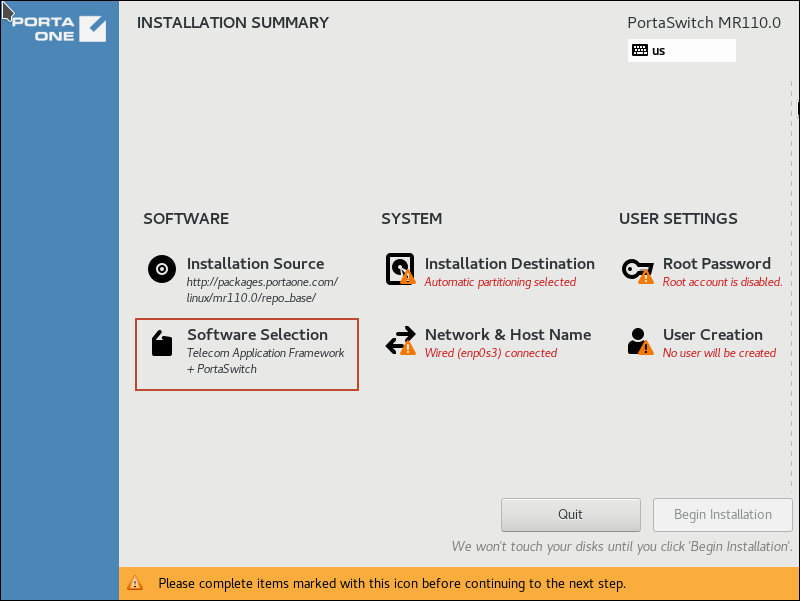
On the
Installation summary
page, choose
Software selection
.
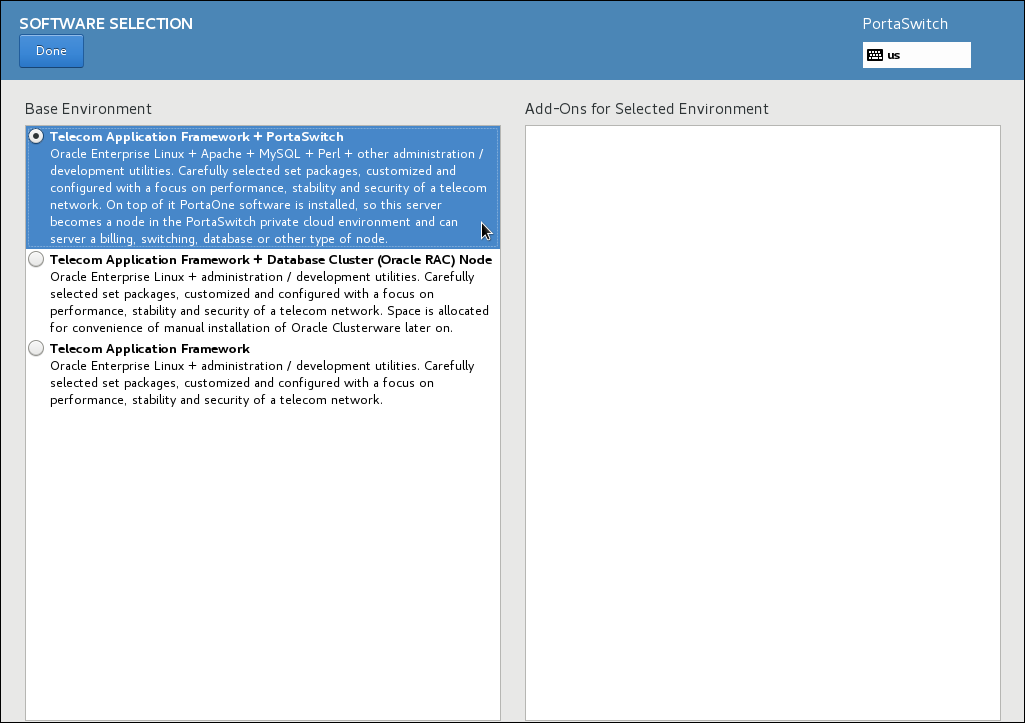
In the
Base Environment
section, choose
Telecom Application Framework + PortaSwitch
.
Click
Done
.
top
On this page
What's new in MR132
Admin manuals
Handbooks
UI help
Developers documentation
Search Documentation
Search
Enter a search string that is at least
1 symbol long
Docs for
Any
Any
mr132 (latest)
mr131
mr130
mr129
mr128
mr127
mr126
mr125
mr124
mr123
mr122
mr121
mr120
mr119
mr118
mr117
mr116
mr115
mr114
mr113
mr112
mr111
mr110
mr109
mr108
mr107
mr106
mr105
mr104
mr103
mr102
mr101
mr100
mr99
mr98
mr97
mr96
What's new
Admin manuals
Handbooks
UI help
Developers documentation
Back to main menu
Admin manuals
Architecture & concepts
PortaSwitch system architecture
Overview
Components
Centralized configuration management
Custom modification management
Deploying PortaSwitch across multiple sites
Per-configuration licensing: flexibility and control
Deployment in a cloud
Updating the system to a new version
Zero-downtime update
PortaBilling system architecture
Overview
Components
High availability
Performance
Web interface
PortaBilling with Oracle Real Application Cluster concept
Basic information
Migrate on-premise PortaSwitch (Oracle database) to Oracle Cloud Infrastructure (OCI)
Oracle licensing
PortaBilling with Oracle Real Application Cluster vs. PortaBilling
Scaling up
What does the PortaBilling with Oracle Real Application Cluster license give you?
PortaSIP system architecture
Overview
Conceptual elements
Geographically dispersed installation
IP aliasing
Architecture
Dispatching SBC (DSBC)
Performance
Support of domain names
Supported services
Supported SIP RFCs
FAQ
Dual Version PortaSwitch
Dual Version in a nutshell
FAQ
Is Dual Version for me
What do I need for Dual Version migration
Preparation steps
During migration
Dual Version in numbers
Overview
Migration steps and timeline
Engineer’s guide to Dual Version
FAQ
Dual Version architecture
Syncing internal elements
Syncing external apps
Entity change restrictions during migration
Source system decommission
Routing configuration between source and target systems in Dual Version
Call delivery in Dual Version PortaSwitch
Seamless web UI operations for admins, customers, and other entities
Enabling applications to function within the two-system setup
Adapting external applications to Dual Version PortaSwitch
Customer data transfer
Number porting requests processing
Proxying Diameter requests
RADIUS Proxy
Considerations and limitations in Dual Version PortaSwitch
Add-on Mart
Add-on Mart overview
CPE provisioning via Add-on Mart
Payment processor integrations via Add-on Mart
PortaPhone
PortaOne Workflows: NSPS vs. Boomi low-code platform
FAQs
ESPF overview
Virtual environments
Glossary/list of abbreviations
Billing administration & invoicing
Invoicing and taxation
Taxation
Processing taxes
Tax calculation based on user location
Per-line tax calculation
Avalara
Compliance Solutions Inc.
Custom taxation
GST (Malaysia)
GST (Singapore)
SureTax
Billing, invoicing, and taxes
VAT
Payment collection process
Overview
Key dates
Payment terms
Collection threshold
Automatic credit card charging
Notifications and actions if payment is past due
Automatic rescheduling service limitation/suspension for working days
Manually changing the service limitation/suspension date for a specific customer
Collection process for on-demand invoices
Invoicing
Invoicing overview
Invoice types
Invoice attributes
Invoice payment statuses
Invoice number sequence
Invoice rounding
Enabling invoicing in PortaBilling
Operations with invoices
Review of invoices
Advanced invoicing configuration
Unallocated payments
Process invoices and payments externally
Customizing invoice layout
Template concepts
Template components
Template groups
Template parameters
Template data fields
Things to remember
Layout designer
Changing text attributes
General document properties
Layout designer
Placing data elements
Working with images
External invoice templates
Creating an external invoice template
Advanced template customizations
External invoice templates
Updating an earlier uploaded template
Uploading an invoice template to PortaBilling
Variables and methods that can be used in an external invoice template
Invoice layout
Recurring charging
DID provisioning and billing
Overview
DID statuses
Billing for DID number usage
Inventory-based DID provisioning
On-demand DID provisioning and billing
Subscriptions
Subscriptions overview
Subscription activation and charging methods
How much to charge for subscriptions
Sale modes based on business scenarios
Applying subscriptions in advance
Applying or waiving subscription charges
Billing based on measured resource consumption
Invoice pre-processing
Commitments
Carrier management & routing
Rate management
Overview
Rate download
Rate upload
Upload and download origin-based rate decks
Vendors
Call routing
Prohibit the routing of calls with invalid CLI
Number portability lookups
Porting numbers from/to PortaBilling via Neustar
Passing number portability parameters in outgoing calls
Connection to / interoperability with external systems
Interoperability with third-party VoIP equipment
Phone auto-provisioning
Customer Premises Equipment (CPE) provisioning and inventory
Client’s Yealink configuration for PortaSIP
SIP devices with auto-provisioning
Comfort ringtone generation
Ringback tone generation and early media relaying
Service policies
Support ticketing system
Integration with Zendesk
Charging for services provided by third-party equipment
PortaBilling Diameter interface
Diameter protocol
Examples of Diameter communication
Supported Diameter RFCs
PortaBilling RADIUS interface
RADIUS protocol
RADIUS attributes
RADIUS attributes for Internet billing
PortaBilling custom attributes
RADIUS return codes
Examples of RADIUS communication
Examples of SIP communication
Description of xDR record fields
Supported RADIUS RFCs
Change-of-Authorization (CoA) and Disconnect Message (DM) packets supported by PortaBilling
Configurable subscriber identification in Diameter requests for MVNOs/MNOs
CRM/ERP
Integration with the Microsoft Active Directory
Invoice data export to SAP Business One ERP
Sending invoice-related events to Odoo CRM
Integration via API
Overview
API for data operations
API for computer-telephony integration services
Integrating external systems with UI plug-ins
Provisioning data to external systems
Installation, maintenance & security
Hardware and software requirements
Disk space requirements
PortaSwitch hardware and software requirements
PortaBilling hardware and software requirements
PortaBilling with Oracle Real Application Cluster hardware and software requirements
PortaSIP hardware and software requirements
Installation
How to...
What is the recommended setup for the PortaSwitch behind a firewall?
… Install PortaSwitch using USB DVD ROM?
… Create a bootable USB flash drive from a PortaSwitch ISO file?
… Create bootable USB flash drives from PortaSwitch ISO files ? (obsolete method)
… Perform basic troubleshooting?
… Activate the configuration server?
Installation
Oracularius installation
Deploying PortaSwitch on an Extended Distance Oracle RAC
Servers installation and interconnection
Maximizing DB availability using Oracle Data Guard
PortaSwitch installation
Installation process
Overview
Step 1: Power-up, boot order setup
Step 2: Insert the installation medium into the computer
Step 3: Starting installation
Step 4: Installation summary page
Step 5: Installation source
Step 6: Software selection
Step 7: Installation destination
Step 8: Network & host name
Step 9: Root password
Step 10: Begin installation
Step 11: Change installation medium (applicable only for local installation from two ISO files)
Step 12: Reboot
Step 13: Hardware check
Step 14: Check if system can reboot to normal state
Step 15: Prepare the system for transportation (optional)
Step 16: Perform initial configuration of PortaSwitch (when all servers have been installed)
Network configuration
Security and system access
Overview
Third-party software in PortaBilling/PortaSwitch
How PortaOne Support accesses PortaBilling/PortaSwitch and installed software
Password protection
Restrict system access to trusted IP addresses only
Protection against brute-force attacks via SSH
Operations
Deliver one-time password (OTP) via branded emails
Reduced database load by batch update of balances
PortaBilling server health monitoring
User notifications
Web interface administration
Branding web interfaces
Multi-language support
Role-based access control
Two-factor user authentication
Allow customers to control self-care access with individual credentials and roles
Control what custom portal functionality is visible according to user permissions
Limits management for administrative users
Custom fields
Personal data protection. GDPR compliance
White labeling
Troubleshooting
Trace session
Log viewer
Troubleshooting tools
Troubleshooting common problems
FAQ
Statistics and reporting
Custom reports
Date and time information
VoIP network performance statistics
xDR summary
PortaSwitch Configuration server web reference
Introduction
Login to the Configuration server interface
Initial configuration of PortaSwitch
System management
Servers
Sites
Docker Swarm
Configurations
Environments
Users
Update
Custom
Deposit
UI plug-ins
Task monitor
How to …
... Prevent service downtime when applying a new configuration
… Add an alias to the PortaSIP cluster’s IP address
… Change configuration options
… Configure a MySQL database white list
… Configure a backup procedure
… Configure an adaptec RAID health monitoring
… Configure dispatching SBC?
… Configure several PortaSIP clusters in PortaSwitch
… Configure site-to-site VPN tunnels for PortaSwitch
… Create new billing environments
… Define new default ACLs
… Delete an active billing environment
… Display provisioning event status for ESPF on the PortaBilling web interface
… Control emergency number validation
… Migrate an IP address
… Migrate an instance
… Promote the secondary site to the main site
… Сonfigure PortaBilling to interact with the Microsoft Active Directory
…Configure DNS server addresses
…Control billing environment deletion
MNO / MVNE / MVNO
PortaBilling for mobile operators
Overview
Real-time charging via Diameter interfaces
Subscriber provisioning
Mobile Account Self-Care App for subscribers
Integration with 4G/LTE networks
Integration with 5G networks
SIM cards
SIM card inventory
Mobile account batch generation for SIM card distribution
Twin card / data card services
Protection of sensitive SIM card data
Services
LTE service provisioning and billing
VoLTE
USSD services with the third-party USSD gateway
Mobile PBX solution
Fixed Mobile Convergence
Roaming
Trigger alerts on high-cost data usage
Online charging for roaming services
Roaming identification in xDRs
Voice over WiFi solution for roaming users
Mobile core components and gateways supported off the shelf
CAMEL
Pharos CIG
Third-party CAMEL gateway
YateUCN CAMEL gateway
EPC
Adax EPC
Huawei EPC
ZTE EPC
Overview
Aricent HSS
BroadForward BFX Interface Gateway
Cisco ASR 5700
Huawei MOne
Internet bandwidth control using the netElastic virtual Broadband Network Gateway
IPLOOK
MTN (Ericsson) for fixed LTE service
MTN for VoLTE and VoWiFi services
NetNumber Titan HSS
Qualution
Real-time content-based charging with the third-party P-GW
Third-party HLR/HSS and PCRF
Third-party SMSC
WTL (Wireless Technology Labs)
YateHSS/HLR and YateUCN
FAQs
IoT/M2M
Shared data pools for IoT/M2M SIM cards
Manage combined service volumes for IoT/M2M SIM cards
Integration with Cisco Jasper
Other telco services (FTTH, IPTV, etc.)
Internet provisioning
Fiber to the home service provisioning via Calix ONT
Integration with Alcatel-Lucent Service Router
Integration with Cisco PDSN
Integration with Cisco SCE (Service Control Engine)
Integration with Huawei BRAS CX600 Router
Integration with the Juniper MX960 Router
Integration with the netElastic virtual Broadband Network Gateway
Satellite data provisioning over Newtec Dialog platform
Traffic management via Sandvine SPB
Internet service provisioning for ADSL users via Cisco 7000/7200 series routers
IPTV provisioning
IPTV
Integration with Minerva IPTV platform
Integration with Telebreeze IPTV platform
Integration with the MatrixStream IPTV platform
Messaging services
Instant messaging and SMS combination
Message processing conditions
SMS message processing
Internet service
Broadband Internet access service
Captive portal for WiFi hotspots
Overview
Product catalog / rating configuration
xDR calculation and import
xDR calculation
xDR import
xDR import configuration specifics
xDR recalculation
Customers, accounts & channel partners
Customers
Notifications
Notifications in PortaBilling
Send SMS notifications to customers via Add-On Mart (Twilio)
Balance control: prepaid and postpaid
Billing periods
Business models
Customer class
Customer hierarchy
Accounts
Credit/debit accounts and vouchers
Roles
Aliases
Batches
Life cycle
Beneficiary accounts
Customer and account statuses
Overview
Customer statuses
Account statuses
Payments and balance adjustments
Payments
Overview
Payment processors
Payment methods
Payment flow
Troubleshooting online payments
Balance transfers
Balance transfer between user accounts
Mobile payment remittance
Balance adjustment
Selling through partners
Resellers
Overview
Reseller portal access and user management
Usage-based billing
Bundles and recurring charges
Entities for common use by multiple resellers
Multi-level resellers
Distributors
Representatives
Overview
Control which call duration data is shown in customer CDRs
Product catalog
Products
Custom service features
Nodes
Service types and services
Product groups
Add-on products
Service provisioning
Rating & charging
Bundles
Overview
Balance-dependent renewable bundles
Renewable by calendar bundles
One-off with top-ups bundles
Service restrictions when service volume is used up
End-user notifications for bundles
Bundle priorities
Change of bundle for an account or customer
Split xDRs if a session spans over several rating periods
Transfer service volumes between end users
Bundles with precise 24-hour validity and hourly/minute notifications
Rate code matching in bundles
Apply bundles precisely with destination- and origination-based charging
Billing configuration
Rate codes, rates, and tariffs
Override tariff
Bulk tariff update with a new rate
Code group sets
Billing for time-based services
Billing for quantity-based services
Billing diagrams
Advanced charging features
Favorite number billing
Flexible definition of the party to charge
OLI-based billing
Origin-based rates
Origin-based pricing for European rate codes
Overdraft protection
US inter/intra-state billing
Using different protocols (SIP and H323)
Multi-currency support
Voice service configuration on PortaSIP (cloud PBX, SIP trunking, etc.)
Cloud PBX (Hosted PBX) / Cloud Call Center solution
Cloud PBX concepts
Cloud Call Center solution overview
Call center supervisor role
Additional authorization for toll calls
Auto attendant
Automated call wrap-up scheduling
Call activity reports
Call barring
Call forking
Call forwarding
Call parking
Call pull
Call identification in Mobile PBX
Call queues
Call recording
Call screening
Call supervision
Call transfer
Custom ringback tone
Voicemail
Instant messaging
Multiple pickup groups
Paging/Intercom calls
Hunt groups
PBX feature management
PBX feature summary
“Phone book” for each phone line
Shared line appearance
Stop/resume receiving hunt group calls
PortaSIP: SBC
PortaSIP: SBC
NAT traversal guidelines
NAT keepalive
Support of end points on IPv6 networks
Traffic density control
Interactive Connectivity Establishment (ICE) support
Secure calling
PortaSIP and emergency services (E911)
Route emergency calls passing user location data from MS Teams and other endpoints that support PIDF-LO
Legal call intercept
Support of STIR/SHAKEN standards
Service policies
Service policy configuration for ringback tone generation and early media relaying
Call disconnection and disconnect reasons
PortaSIP as the IMS Telephony Application Server
Choosing UDP or TCP protocol based on SIP message size
SIP Trunking
Overview
Call delivery to a PBX with dynamic IP address
Delivering calls to customers with redirect servers
Simultaneous call limit for off-PBX calls
Authorization, charging and billing entities
Bandwidth-based simultaneous call limit
Cloud PBX call rating
Call authorization rules
Enabling product self-activation by a customer
Keepalive call monitoring
Limiting per-account simultaneous calls on a product
Special access codes
Special rate codes
User authentication
Voice on-net rating
Fraud protection tools
Tools for prevention of VoIP fraud
Protection from DoS attacks
Toll fraud prevention
Fraud traffic profiles
Binding a user session to an IP address
Legacy services and products
Callback
Legacy PortaPhone mobile application
Prepaid card application
Registration for PINless dialing service via SMS
Media server/IVR
Built-in IVR applications
Global settings for voice applications
Self-care IVR applications
Prepaid calling IVR applications
Hosted PBX IVR applications
Brand prompts
Transcoding and transrating
Supported DTMF methods
Supported languages for voice prompts
Currencies used in voice prompts depending on the preferred language
IVR flow diagrams
Managing IVR applications via Web GUI
Conferencing
Presence/BLF
Busy Lamp Field (BLF)
SIP devices with supported BLF
Presence
Voice calls processing
Call control via IVR
Call flow between multiple PortaSIP clusters
Call process/supported services
Calls from vendor via SIP
Number translation
Automated removal of the "+" prefix
Understanding SIP call routing
Video calls via SIP
Troubleshooting
Call quality monitoring
PortaSIP error codes
Service announcements via the media server
Active call monitoring
Advanced features
Real-Time Text (RTT) for accessible communication
Add account identification to P-Charge-Info SIP header
Integration with Mida Queue Manager
SIP identity
Support for privacy flags
SIP TAPI
Special prompt for calls to ported number
Caller ID (CNAM) lookup
“Diversion” removal on multiple call forwarding
API for computer-telephony integration services
Call control from external apps in site-redundant PortaSwitch
Process call events (connected, queued, etc.) for calls initiated via an auto-dialer app
Auto-provisioning IP phones
Self-provisioning of programmable phone keys by customers
Self-provisioning of corporate phone books by customers
Successful SIP phone activation greeting
Bandwidth-aware limitation on concurrent calls permitted
Fax transmission-supported codecs
2nd number service
Ability to speed up the voicemail message notifications
Search
Search
Menu
Main page
The Connector
PortaOne Blog
PortaOne.com
This website uses cookies. By continuing to use our website, you are agreeing to our
cookie policy
.
Accept and close
Decline