Skip to the content
Release
mr132
mr131
mr130
mr129
mr128
mr127
mr126
mr125
mr124
mr123
mr122
mr121
mr120
mr119
mr118
mr117
mr116
mr115
mr114
mr113
mr112
mr111
mr110
mr109
mr108
mr107
mr106
mr105
mr104
mr103
mr102
mr101
mr100
mr99
mr98
mr97
mr96
mr95
mr90
mr85
mr80
mr75
mr70
mr65
mr60
mr55
mr103
mr132
(latest)
mr131
mr130
mr129
mr128
mr127
mr126
mr125
mr124
mr123
mr122
mr121
mr120
mr119
mr118
mr117
mr116
mr115
mr114
mr113
mr112
mr111
mr110
mr109
mr108
mr107
mr106
mr105
mr104
mr103
mr102
mr101
mr100
mr99
mr98
mr97
mr96
mr95
mr90
mr85
mr80
mr75
mr70
mr65
mr60
mr55
mr132
(latest)
mr131
mr130
mr129
mr128
mr127
mr126
mr125
mr124
mr123
mr122
mr121
mr120
mr119
mr118
mr117
mr116
mr115
mr114
mr113
mr112
mr111
mr110
mr109
mr108
mr107
mr106
mr105
mr104
mr103
mr102
mr101
mr100
mr99
mr98
mr97
mr96
mr95
mr90
mr85
mr80
mr75
mr70
mr65
mr60
mr55
Search
Search
Search
Documentation
portaone.com
Documentation
portaone.com
What's new in MR103
What’s new in MR103
Admin manuals
Architecture & concepts
Billing administration & invoicing
Carrier management & routing
Connection to / interoperability with external systems
Installation, maintenance & security
MNO / MVNO / LTE billing
Other telco services (FTTH, IPTV, etc.)
Product catalog / rating configuration
Voice service configuration on PortaSIP (cloud PBX, SIP trunking, etc.)
Handbooks
Initial Configuration
Advanced Configuration
Emergency Services
Callback Services
Cloud PBX and SIP Trunking Services
DID Provisioning
External System Provisioning
General Configuration Tools
Internet, WiFi, IPTV Provisioning
Invoicing and Payments
LTE Provisioning
Management and Monitoring
Messaging Services
MVNO
Online Signup
Prepaid Services
Resellers
Residential VoIP Services
Routing Configuration
Troubleshooting
Unified Communications
Wholesale Services
xDR import
API documentation
API reference
External System Interfaces Guide
Provisioning Application Reference Guide
UI help
Admin interface
Customer self-care interface
Account self-care interface
Reseller self-care interface
Distributor self-care interface
Vendor self-care interface
Representative self-care interface
Customer care staff interface
Installation, maintenance & security
Administration
Trace session
Log viewer
Troubleshooting tools
Troubleshooting common problems
FAQ
Hardware and software requirements
Disk space requirements
PortaSwitch hardware and software requirements
PortaBilling hardware and software requirements
PortaBilling with Oracle Real Application Cluster hardware and software requirements
PortaSIP hardware and software requirements
Installation
How to...
What is the recommended setup for the PortaSwitch behind a firewall?
… Install PortaSwitch using USB DVD ROM?
… Create a bootable USB flash drive from a PortaSwitch ISO file?
… Perform basic troubleshooting?
… Activate the configuration server?
Installation
Oracularius installation
Servers installation and interconnection
Maximizing DB availability using Oracle Data Guard
Deploying PortaSwitch on an Extended Distance Oracle RAC
PortaSwitch installation
Installation process
Step 01: Power-up, boot order setup
Step 02: Insert the installation medium into the computer
Step 03: Starting installation
Step 04: Installation summary page
Step 05: Installation source
Step 06: Software selection
Step 07: Installation destination
Step 08: Network & host name
Step 09: Begin installation
Step 10: Root password
Step 11: Change installation medium
Step 12: Reboot
Step 13: Hardware check
Step 14: Check if system can reboot to normal state
Step 15: Prepare the system for transportation (optional)
Step 16: Perform initial configuration of PortaSwitch (when all servers have been installed)
Network configuration
Network configuration
Introduction
Operations
Password protection
PortaSwitch Configuration server web reference
Introduction
Login to the Configuration server interface
Initial configuration of PortaSwitch
Initial configuration of PortaSwitch
System management
Servers
Sites
Docker Swarm
Configurations
Environments
Users
Update
Custom
Deposit
UI plug-ins
Task monitor
How to …
… Add an alias to the PortaSIP cluster’s IP address
… Change configuration options
… Configure a MySQL database white list
… Configure a backup procedure
… Configure an adaptec RAID health monitoring
… Configure dispatching SBC?
… Configure several PortaSIP clusters in PortaSwitch
… Configure site-to-site VPN tunnels for PortaSwitch
… Create new billing environments
… Define new default ACLs
… Delete an active billing environment
… Display provisioning event status for ESPF on the PortaBilling web interface
… Enable additional validation of dialing rule emergency numbers
… Migrate an IP address
… Migrate an instance
… Promote the secondary site to the main site
… Сonfigure PortaBilling to interact with the Microsoft Active Directory
…Configure DNS server addresses
…Control billing environment deletion
Security recommendations
Protection against brute-force attacks via SSH
Templates for outgoing notification messages
Notifications in PortaBilling
Available notification messages
Web interface administration
Multi-language support
Role-based access control
Two-factor user authentication
Allow customers to control self-care access with individual credentials and roles
Control what custom portal functionality is visible according to user permissions
Limits management for administrative users
Custom fields
Personal data protection. GDPR compliance
White labeling
Installation, maintenance & security
Installation
Installation process
Step 06: Software selection
Step 06: Software selection
Link copied to clipboard
November 17, 2022
1 minute to read
This page for the latest version (MR132)
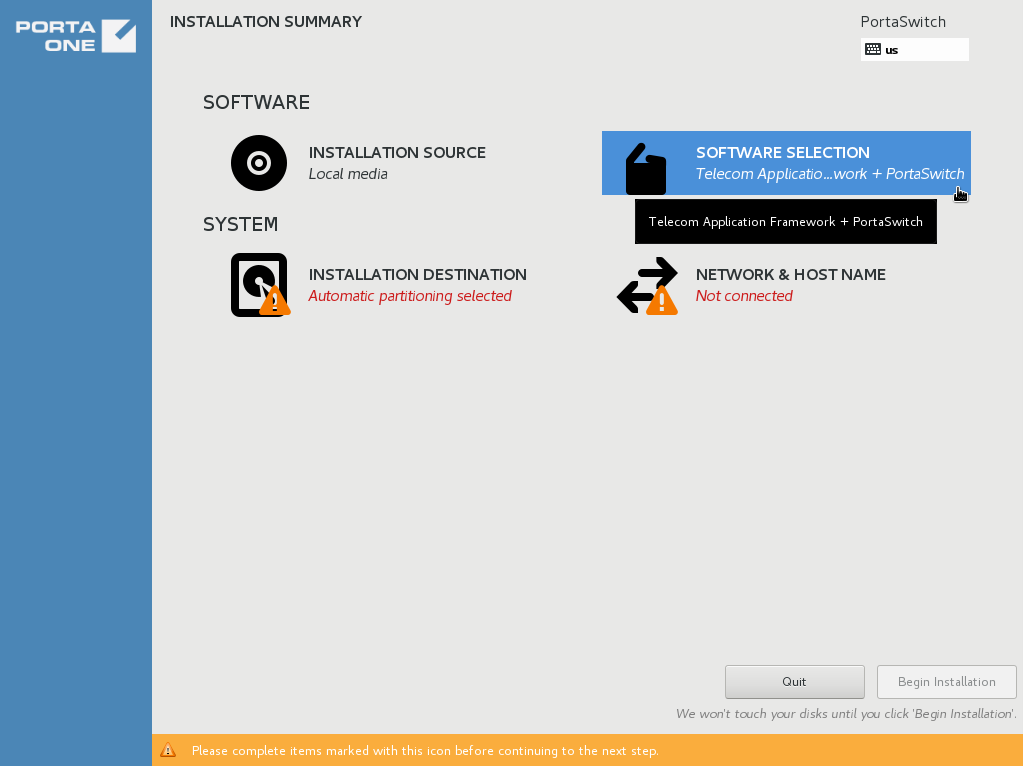
On the
Installation summary
page, choose
Software selection
.
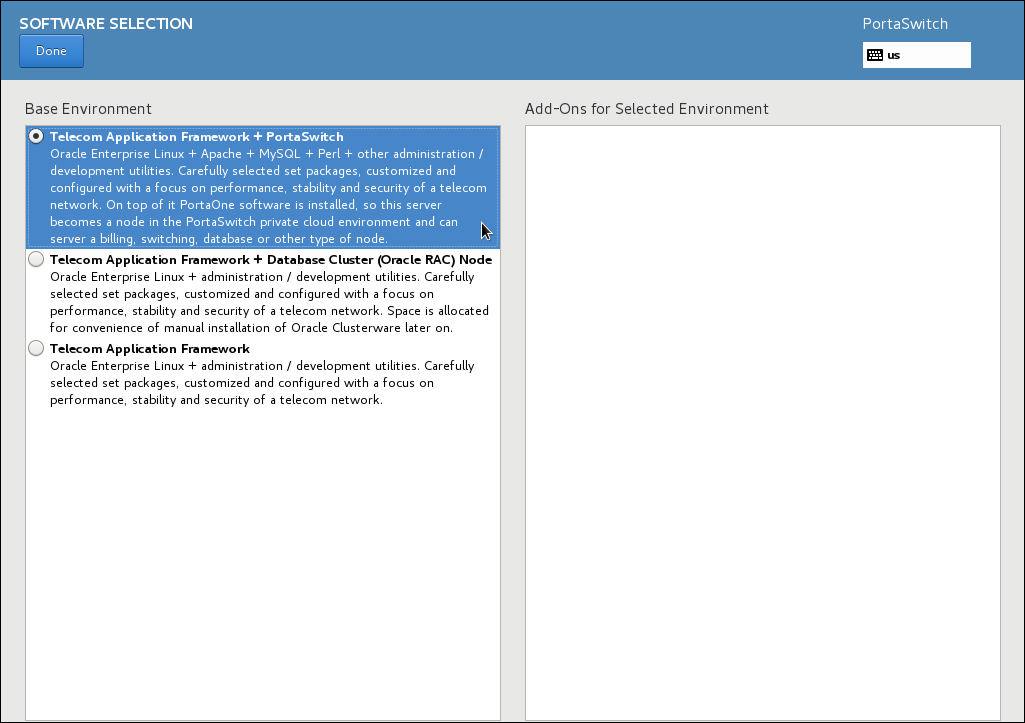
In the
Base Environment
section, choose
Telecom Application Framework + PortaSwitch
.
Click
Done
.
See Also
How to perform basic troubleshooting?
top
On this page
Search Documentation
Search
Enter a search string that is at least
1 symbol long
Docs for
Any
Any
mr132 (latest)
mr131
mr130
mr129
mr128
mr127
mr126
mr125
mr124
mr123
mr122
mr121
mr120
mr119
mr118
mr117
mr116
mr115
mr114
mr113
mr112
mr111
mr110
mr109
mr108
mr107
mr106
mr105
mr104
mr103
mr102
mr101
mr100
mr99
mr98
mr97
mr96
What's new
Admin manuals
Handbooks
UI help
Developers documentation
Search
Search
Menu
Main page
The Connector
PortaOne Blog
PortaOne.com
This website uses cookies. By continuing to use our website, you are agreeing to our
cookie policy
.
Accept and close
Decline