Payment initiation
Customer-initiated payments
Customer-initiated payments are paid by the customers themselves, without system triggers or administrator involvement. These payments are made manually, for example, through the self-care portal, and are typically used for top-ups and invoices.
Payments made entirely in the self-care interface
To make a payment in the self-care interface (e.g., via the Cloud PBX Self-Care Portal or Mobile Account Self-Care App), a customer enters the payment amount and card details, then clicks Pay.
The entered card details can also be saved as the default payment method for future customer payments or for automatic payments.

Payments with redirection to the payment processor website
Some online payment processors redirect the customer to the payment processor’s website to complete the payment (e.g., PayPal).
A customer logs in to the self-care portal, defines a payment amount, and selects a specific payment method to make a payment. The customer is then redirected to the payment processor’s website. After confirming the payment details on the external page, they are redirected back to the self-care interface, where they can check their balance.
For details on payment processors that require user redirection and their configuration specifics, see Supported payment processors.
System-initiated payments (automatic payments)
System-initiated payments (automatic payments) are triggered by PortaBilling and processed automatically, without any action from the customer at the time of payment. PortaBilling charges the customer’s credit card and applies the payment to the customer’s balance based on predefined rules (e.g., charge the invoice amount upon invoice generation).
Automatic payments can also be triggered by an external system via the API. For example, when a customer subscribes to a service package in an external system, they are charged in PortaBilling via API.
This reduces manual effort for both the customer and the service provider.
Auto-payments are only possible after PortaBilling is configured to accept token-based payments or card payments that do not require a card security code (CVV) for recurring transactions.
Find the configuration details in the Auto payments handbook.
Token-based payments
With token-based payments, service providers can process card payments without storing sensitive card data in PortaBilling. For token-based payments, full card details (including CVV) are required only for the first transaction. After a successful payment, the payment processor stores the card information and issues a card token for PortaBilling. PortaBilling uses this token for all future payments – the payment processor retrieves the card information by the token and handles the transaction.
As a result, service providers typically do not need to obtain PCI DSS (Payment Card Industry Data Security Standard) or similar certifications, which enables much faster automatic payments.
For the list of payment processors that support token-based payments, refer to the Supported payment processors.
For configuration details, refer to the Payment configuration handbook.
Automatic card payments without CVV
Service providers can process card payments while storing card data in PortaBilling, excluding CVV. When a customer makes the first payment, they enter the full card details, including the CVV. After the processor confirms the payment, PortaBilling saves the card details (e.g., card number, cardholder name) without the CVV.
For subsequent automatic payments, the payment processor uses the stored card data to process the transaction.
For configuration details, refer to the Auto payments handbook.
Payments via API or admin-initiated payments
A payment can be initiated via the PortaBilling API (for example, from a custom self-care portal or a point-of-sale system) or initiated by an admin on behalf of a customer.
For example, a customer visits a service provider’s retail shop to top up their PortaBilling balance. A shop clerk uses a point-of-sale (POS) system connected to PortaBilling via API:
- The clerk identifies the customer account in the POS system.
- The customer pays at the counter using a payment card.
- The POS system sends a payment request to PortaBilling via API on behalf of the admin.
- PortaBilling forwards the request to the configured payment processor.
- After a successful transaction, PortaBilling tops up the customer’s balance and records the payment in the payment history.
Payment processing
Payment processing via Add-on Mart
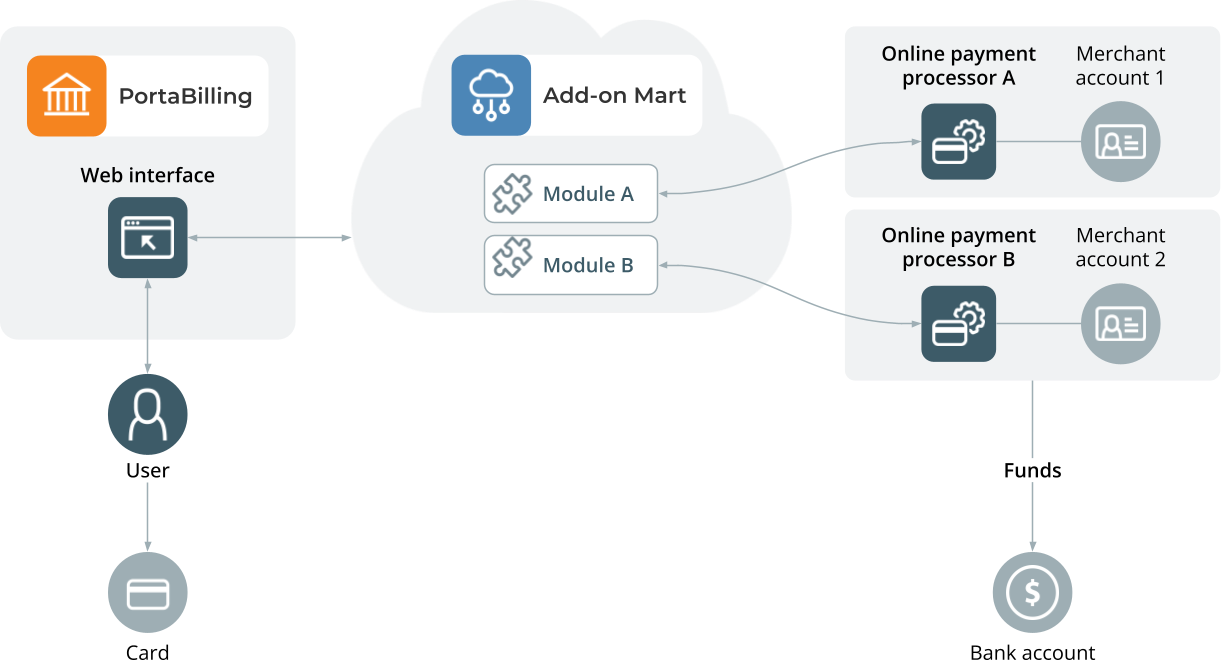
PortaBilling offers payment processing using payment processor integrations available via Add-on Mart. This removes the need to upgrade the system to access new functionality, reduces time to market, and helps service providers offer new payment options to customers faster.
The payment flow is as follows:
- The customer logs in to the self-care interface and enters the credit card details to set up auto-payments.
- When a payment is initiated (by the customer or by the system), PortaBilling triggers the corresponding Add-on Mart payment module (e.g., online payment processor A).
- The module forwards the payment data via API to the payment processor to handle the transaction.
- After the payment processor confirms a successful transaction, PortaBilling updates the customer’s balance.
- The payment processor transfers funds accumulated over a defined period to the service provider’s bank account.
To see the payment processors currently available in Add-on Mart, visit the Add-on Mart marketplace.
Payments via built-in payment processors
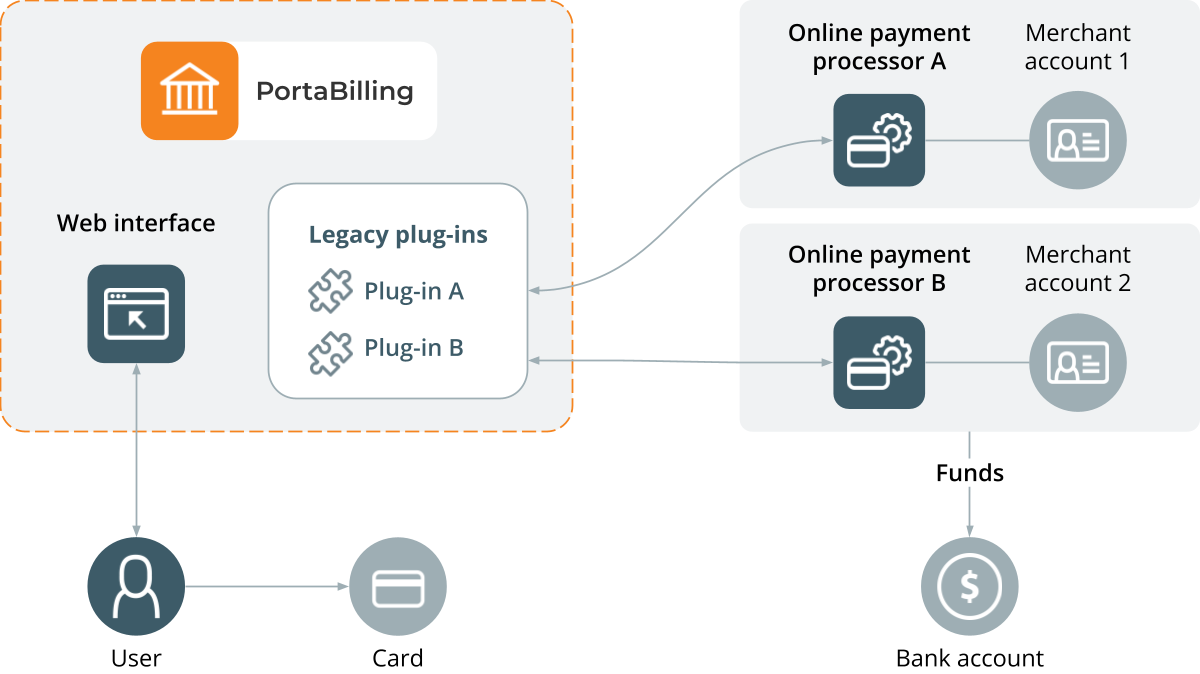
PortaBilling includes legacy built-in plug-ins for payment systems integrated before Add-on Mart was introduced. These include PayPal, Skrill, AuthorizeNet, and others. For the full list, see Supported payment processors.
For built-in plug-ins, the payment flow is as follows:
- When a payment is initiated (by the customer in the self-care interface or by auto-payment), PortaBilling connects to the payment processor (e.g., online payment processor B) and sends the amount and card information.
- The payment processor B verifies the card details and performs additional checks if required (for example, address verification or CVV control).
- After the payment processor B confirms a successful transaction, PortaBilling updates the customer’s balance.
- The payment processor transfers funds accumulated over a defined period to the service provider’s bank account.