



IoT/M2M service providers can offer their customers service volumes that can be shared between multiple SIM cards with the same plan (i.e., data pools). For example, when a customer activates 10 SIM cards with the “Data 30 GB” plan, their service volumes will be combined into a total of 300 GB (10 SIMs x 30 GB). If this customer activates 4 more SIM cards with a different plan, e.g., “Data 100 GB”, these will share a separate total volume of 400 GB (4 SIMs x 100 GB).
These combined service volumes can be calculated and applied to a customer only via an external application using the PortaBilling API. Alternatively, this can be implemented using PortaOne Workflows. So, when SIM cards are activated/deactivated under the same plan (e.g., by a customer on the IoT self-care portal, PortaBilling administrator, or external application via the PortaBilling API), the external workflow calculates the combined service volume and updates it on the customer level. Service providers that have portals built in-house can also use PortaOne Workflows or develop their own script to update combined service volumes. The external script must be able to:
- listen to PortaBilling events (e.g., a customer activates a new SIM card);
- calculate the combined service volume for the customer according to a specific logic (e.g., the service volume is prorated if a SIM card is activated in the middle of the billing period); and
- update the combined quota for the customer in PortaBilling.
The combined service volumes allow customers that use multiple SIM cards to optimize service usage between SIM cards with the same plan. Let’s say, the customer “ABC Security” provides motion detection cameras with SIM cards to their end users, and charges a fixed monthly fee for the security system service. The cameras may consume the internet traffic unevenly since they send an alert and pictures to a user only when a motion detector is triggered. One camera may use over 30 GB and another one may use only 10 GB. With the combined service volume, if one camera reaches 30 GB, it just continues consuming the remaining combined service volume (for 10 SIM cards it’s up to 300 GB). So, “ABC Security” is not charged by their service provider for excess usage (per MB) so long as the combined service volume (data) is available.
- Customers that use multiple SIM cards can avoid high excess usage charges by using combined service volumes instead of individual ones.
- IoT/M2M service providers can increase sales by offering combined service volumes to their prospects.
An IoT service provider “Panda IoT” uses a portal (for example, the IoT portal that is available in the Add-on Mart) where their customers can activate/deactivate SIM cards and choose a plan for them: “Data 5 GB” or “Data 100 GB”. For the SIM cards activated with the same plan, the monthly combined service volume is provided.“ABC Security”, a customer of “Panda IoT”, purchases SIM cards to set up home security systems for their clients. Adam Smith, a manager of “ABC Security”, opens the portal to activate 20 SIM cards with the “Data 5 GB” plan. The SIM cards are activated on September 21, so “ABC Security” is charged a prorated fee for 10 days of usage in the current month. Adam can see that the combined service volume for these SIM cards is 33.33 GB (20 SIMs x 5 GB x 10/30 days).
Let’s say, Adam deactivates 2 SIM cards on September 25 due to the client’s security system re-configuration. Since “ABC Security” has already paid for 33.33 GB, this combined service volume remains unchanged till the end of September (for 18 SIM cards). On October 1, the combined service volume is renewed and becomes 90 GB (18 SIMs x 5 GB x 31/31 days). “ABC Security” is charged for 18 SIM cards monthly usage.
Adam can trace the combined service volume usage on the usage history page.
- To implement combined service volumes, service providers need to sign up for PortaOne Workflows or use another external application. The external workflow or application script is required to dynamically update combined service volumes via the PortaBilling API.
- No matter whether accounts (SIM cards) are added/changed in PortaBilling via the PortaBilling web interface, the IoT self-care portal, or a custom service provider’s portal, these changes will then trigger the combined service volume update.
- A SIM card that uses plans for different service types simultaneously, e.g., "Data 30 MB", "Voice calls 10 min", and "20 SMS", can share multiple combined service volumes simultaneously – separately for each service type.
- Unused traffic of the combined plans (such as minutes, Internet traffic, messages) expires at the end of each usage period.
Configuration
The scenario mentioned above can be implemented using PortaOne Workflows or another external application that will update combined service volumes via the PortaBilling API based on events received from PortaBilling.
In PortaBilling, the administrator needs to perform the following steps:
- On the Configuration server:
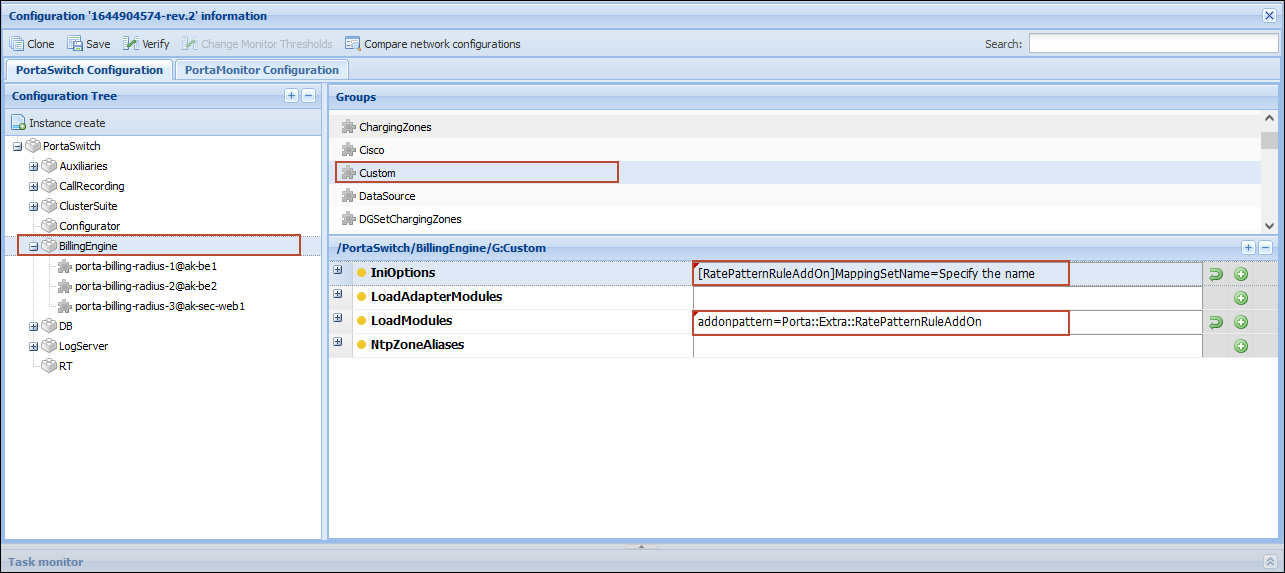
- Open BillingEngine > Custom group > LoadModules option > add the addonpattern=Porta::Extra::RatePatternRuleAddOn value.
- For the combined service volumes configuration, you will need to create a code group set (step 2.b) with the same name as specified on the Configuration server. Choose a name for the code group set and specify it: open BillingEngine > Custom group > IniOptions option > add the value [RatePatternRuleAddOn]MappingSetName=Specify the name.
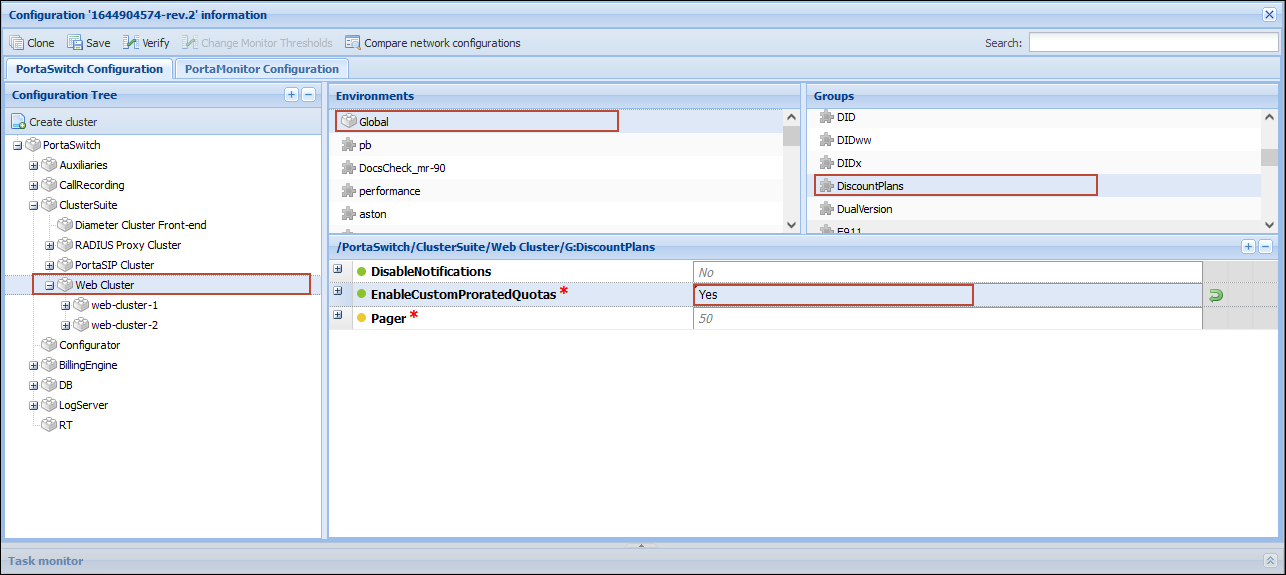
- Open WebCluster > Global environment > DiscountPlans group > set the CustomProratedQuotas option to Yes.
- On the PortaBilling web interface:
- Create custom rate codes NETACCESS*5G and NETACCESS*100G.
- Create a regular code group set with the name that you have specified in step 1.b.
If you haven’t specified a custom name for the code group set as described in step 1.b, use the default name “Add On Mapping” for the code group set.
- Within the code group set “Add On Mapping”, create code groups named “Data 5 GB” (with the rate code NETACCESS*5G) and “Data 100 GB” (with the rate code NETACCESS*100G).
- Create a bundle of the Renewable by calendar (new quota) type with the code group set “Add On Mapping”. This bundle will include all possible service volume options:
-
- Create two bundle items: one with the code group “Data 5 GB”, and one with “Data 100 GB”. Specify the corresponding service volumes for these bundle items – 5 GB and 100 GB.
- For each bundle item, open Configuration > Prorate thresholds for first usage period > select the Custom prorating for shared pools option.

-
- Create add-on products (plans) named “Data 5 GB” and “Data 100 GB”, and add these add-ons products to the customer’s agreement. This will allow the end users to select these add-ons products (plans) in the IoT portal.
The add-on products’ names must match the names of the code groups specified in step 2.c.
- To charge customers a monthly fee, create corresponding subscriptions and assign them to these add-ons.
- Enable combined service volumes for a customer by assigning the bundle created in step 2.d to them.
When an account (SIM card) with a specific add-on product (plan) is created, PortaBilling matches the name of the account’s add-on with the name of a code group associated with a service volume in the customer’s bundle. If there’s a match, the account uses the corresponding combined service volume from the customer’s bundle.
Introduction of a new plan
When IoT/M2M service provider wants to introduce a new plan, e.g., “Panda IoT” decides to offer “Data 50 GB” plan in addition to “Data 5 GB” and “Data 100 GB” plans, the administrator needs to perform the following steps in PortaBilling:
- Create a custom rate code NETACCESS*50G.
- Open the code group set “Add On Mapping”, and create a code group named “Data 50 GB” (with the rate code NETACCESS*50G)
- Open a bundle with the code group set “Add On Mapping”. This bundle already includes bundle items (plans) with the code groups “Data 5 GB” and “Data 100 GB”.
- Create new bundle item with the code group “Data 50 GB” and specify the parameters:
- Select Internet service, and the units to measure the service (GB).
- Select the code group “Data 50 GB”.
- Specify the corresponding service volume for the bundle item – 50 GB.

- Create an add-on product (plan) named “Data 50 GB” and add this add-on to the customer’s agreement. This will allow the end users to select this add-on product (plan) in the IoT portal.
The add-on product name must match the code group name specified in step 2.
- To charge a monthly fee for “Data 50 GB” plan, create a subscription and assign it to the corresponding add-on product.


