



This handbook demonstrates how to rate calls depending on which charging zone the call is made from/to. This kind of rating is popular in countries such as Australia, Turkey and Brazil.
A call between two subscribers who are both located in the same or adjoining charging zones is regarded as a local call. A special rate is applied to such calls.
All other calls within the country that are not defined as local are regarded as standard calls with a normal rate applied to them.
Let’s consider the following example:
- A country (Turkey in our example) is subdivided into charging zones that reflect the subscribers’ geographic locations.
- A special rate is applied for calls made within the same charging zone or between two adjoining charging zones.
- The price for calls between remote charging zones is defined as usual by tariff rates.
- The charging zone is determined by the subscriber’s phone number (Account ID for the caller).
Configuration overview
- Enable the feature on the Configuration server web interface
- Populate the domain_rating table with information about charging zones
- Create a code group set
- Create code groups that represent your charging zones
- Assign prefixes to the code group
- Add special rates to customer tariffs
- Use the associated account number instead of account ID (optional)
- Make a test call
Enable the feature on the Configuration server web interface
- Go to the Configurations tab on the configuration server, clone the effective configuration and open the cloned one.
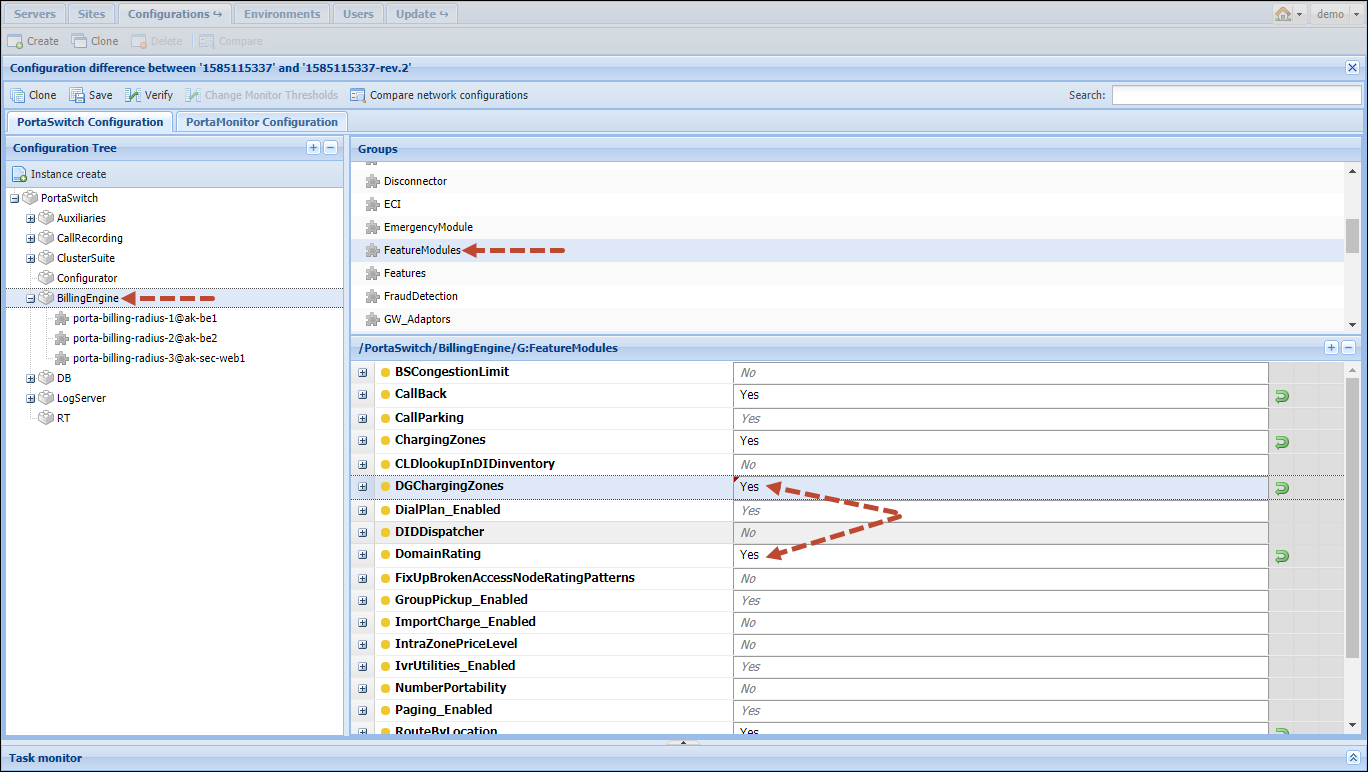
- Select BillingEngine from the Configuration tree, then select the FeatureModules group and enable the DGChargingZones and DomainRating features.
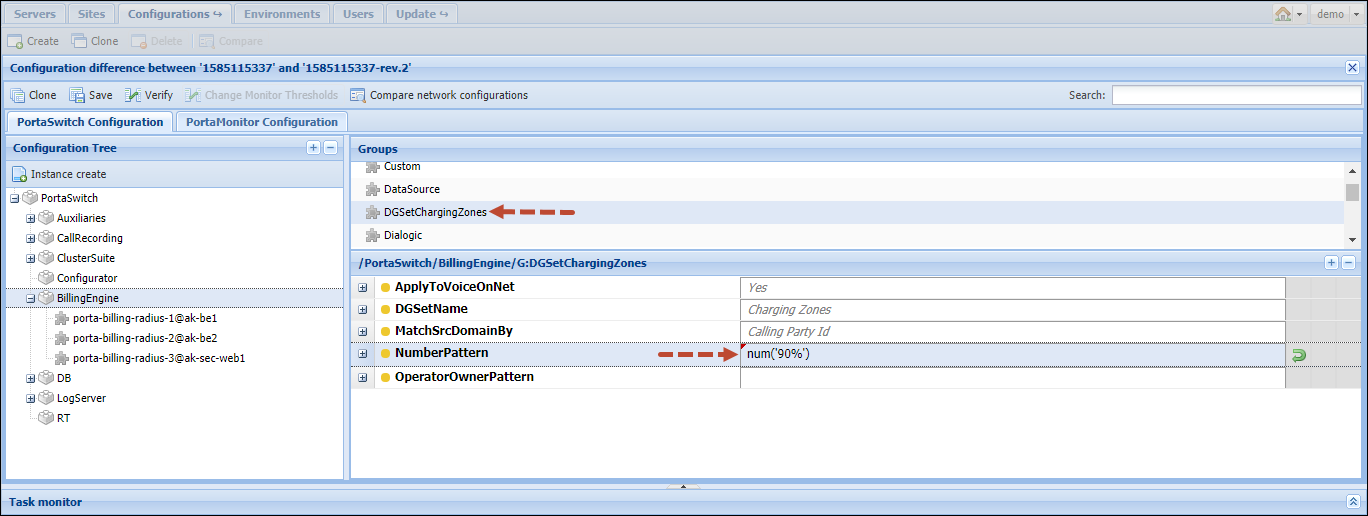
- Select the DGSetChargingZones group and check the DGSetName (the value Charging Zones will be used later on for the code group set name) and MatchSrcDomainBy (the Calling Party ID option is set) parameters.
- Specify phone prefixes for
which the special rating can be applied in the NumberPattern parameter. For example, Turkey’s country code is 90,
so the value will be num('90%').
Note that the special rate will be applied only to calls with a Turkish CLI and CLD.
- Click the Save
button and then the
 Verify button.
 - Verify the new configuration
and click the Check/Apply
button. Note that the RADIUS service will need to be restarted, so consider
applying the configuration during an off-peak time.
Populate the domain_rating table with information about charging zones
The Domain_Rating table has the following columns:
- i_domain_rating – the unique ID of the database record (1, 2, 3, etc.);
- i_env – the unique ID of the billing environment in which you will configure the special rating;
- src_rev_domain – a charging zone to match the CLI numbers (a code group with the same name will be created in PortaBilling);
- dst_rev_domain – a charging zone to match the CLD numbers (a code group with the same name will be created in PortaBilling);
- rate_match_code – the special rate pattern
applied for local calls. PortaBilling uses special rates from the customer’s
tariff according to it:
- VOICELOCAL – a rate for this special rate code covers calls within adjoining charging zones
- VOICELOCALL – a rate for this special
rate code covers calls within one charging zone
Thus, specify VOICE\LOCAL\L for each separate charging zone and specify VOICE\LOCAL\ for all combinations (going both directions, for example tur.Istanbul, tur.Ankara and tur.Ankara, tur.Istanbul) of adjoining charging zones.
- rate_match_prio – this parameter is reserved for future use; always specify D here.
Insert all charging zones and combinations of adjoining charging zones into the table using a MySQL query like this:
INSERT INTO Domain_Rating (i_domain_rating,i_env,src_rev_domain,dst_rev_domain,rate_match_code,rate_match_prio) VALUES(1,1,'tur.Ankara','tur.Ankara',"VOICE\\LOCAL\\L",'D');
Note the following charging zone name characteristics:
- charging zone names can only contain alphabetical characters (a-z and A-Z), numeric characters (0-9), the minus sign (-) and a period (.). If a name has spaces you can use the minus sign instead (e.g., São Paulo can be added as Sao-Paulo);
- a period is used to separate domain levels;
- domain levels are written in reversed order (e.g., tur.Ankara, au.Aberfoyle, etc.).
Please contact PortaOne support if you need help with this step.
Eventually you will have a table populated like the one in the following example:
|
i_domain_rating |
i_env |
src_rev_domain |
dst_rev_domain |
rate_match_code |
rate_match_prio |
|
1 |
1 |
tur.Ankara |
tur.Ankara |
VOICE\LOCAL\L |
D |
|
2 |
1 |
tur.Ankara |
tur.Istanbul |
VOICE\LOCAL\ |
D |
|
3 |
1 |
tur.Ankara |
tur.Antalya |
VOICE\LOCAL\ |
D |
|
4 |
1 |
tur.Istanbul |
tur. Istanbul |
VOICE\LOCAL\L |
D |
|
5 |
1 |
tur.Istanbul |
tur.Ankara |
VOICE\LOCAL\ |
D |
|
6 |
1 |
tur.Antalya |
tur.Ankara |
VOICE\LOCAL\ |
D |
Create a code group set
A code group set contains all charging zones with their specific phone prefixes.
- In the navigation menu, select Service catalog > Code group sets.
- Click Add and fill in the following code group set details:
- Name – type in a descriptive name for the code group set (e.g., Charging Zones);
- Rate match mode – select None.
- Type – select Regular.

- Click Save.
Create code groups that represent your charging zones
Create one code group per charging zone. Specify the names as in the Domain_Rating table above.
- Open the created code group set.
- Click Add and type in the code group name
and a short description.

- Click Save to save the code group.
- Repeat steps 2-3 to create more
code groups within this code group set.

Assign prefixes to the code group
Assuming that you have already defined all the required prefixes in the Rate codes section, you now just need to allocate them to code groups so that PortaBilling will know exactly which prefixes belong to which code group (therefore charging zone). In our example, 90312 will be added for Ankara, 90212 and 90216 for Istanbul, etc.

Add special rates to customer tariffs
For those tariffs that require local rates add rate codes with the rate codes VOICELOCAL (applied to calls within adjoining charging zones) and VOICELOCALL (applied to calls within one charging zone). The last one can be skipped if both types of local calls have the same rate.
Use the associated account number instead of account ID (optional)
Sometimes a subscriber’s Account ID doesn’t reflect their actual phone number. In this case you can use the account’s Associated Number field to specify either the subscriber’s actual phone number or even the charging zone, directly.
To select the subscriber’s phone number or charging zone from the Associated Number field perform the following adjustments to the above manual:
- Enable the use of the Associated Number field on the
configuration server web interface:
- Go to the Configurations tab on the configuration server, clone the effective configuration and open the cloned one.
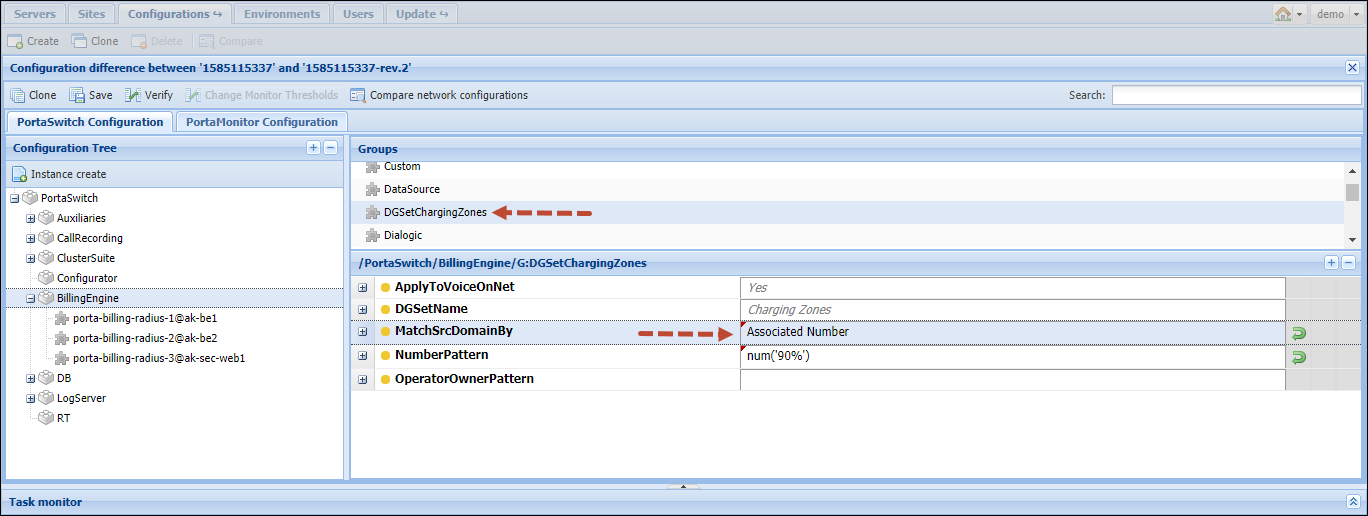
- Select Associated Number from the MatchSrcDomainBy
parameter.
- Apply the new configuration. Note that the RADIUS service will need to be restarted, so consider applying the configuration during an off-peak time.
- Fill in the Associated Number field on subscribers’ accounts in PortaBilling.
Either specify the subscriber’s phone number or the charging zone name in the LOC=<name> format (e.g., LOC=tur.Ankara). In the latter case, PortaBilling will use the charging zone name as src_rev_domain and skip the prefix lookup in code groups.

Make a test call
Now make a test call within the same charging zone or from one charging zone to an adjoining one. Make sure that a special rate is used to charge for this call.
In addition, note that this feature can be configured to work in conjunction with the Local number portability feature. Please contact PortaOne support if you need both features to work simultaneously.


