



PortaBilling is integrated with WTL (Wireless Technology Labs) mobile core infrastructure. WTL specializes in providing mobile core and small cell solutions for MVNOs. With this integration, mobile operators using WTL solutions can streamline the provisioning of subscriber data into the mobile network and enable real-time charging for internet access, voice calls, and SMS services.
| Integrated / Tested | |
| HLR/HSS provisioning |  |
| PCRF provisioning |  |
| Authorization and charging of calls | |
| Authorization and charging of internet sessions | |
| Authorization and charging for SMS | |
MVNOs/MVNEs can launch services using WTL’s flexible solutions.
Online charging via WTL
For real-time authorization and charging (AAA), the WTL’s mobile core and PortaBilling communicate via the Diameter protocol. When a user attempts to use a service, PortaBilling authenticates them, and authorizes the internet session, voice call, or SMS to verify that the user has sufficient balance/quota to use the service.
Configuration
- Contact the support team for assistance with provisioning configuration.
- On the PortaBilling web interface, configure the nodes for internet access and voice calls/SMS.
- For internet access, WTL Packet Data Network Gateway (P-GW) communicates with PortaBilling via the Diameter Gy interface.
To configure P-GW as a node, fill in the details:
- Manufacturer – select “PortaOne”
- Type – select “Generic”
- Node ID – specify the “host” value identifying the WTL’s P-GW (on the MNO’s side it’s specified in the Origin-Host AVP, e.g., node.company.com).
- Turn on the toggle Enable communication with billing
- Client protocol – select Diameter
- Realm – specify the “realm” value identifying the WTL’s P-GW (on the MNO’s side it’s the Origin-Realm value, e.g., company.com)
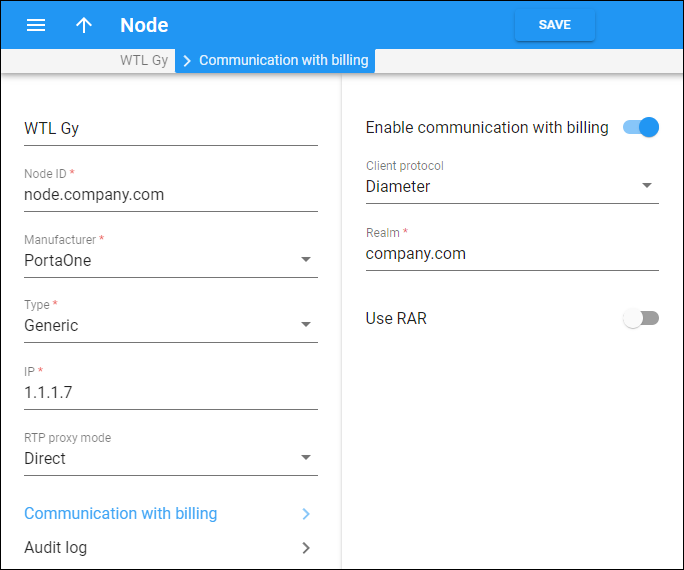
- For voice calls and SMS, WTL service control point (SCP) communicates with PortaBilling via the Diameter Ro interface.
To configure WTL’s SCP as a node, fill in the details:
- Manufacturer – – select “PortaOne”
- Type – select “Generic”
- Node ID – specify the “host” value identifying the WTL’s SCP (on the MNO’s side it’s specified in the Origin-Host AVP, e.g., scp.company.com).
- Turn on the toggle Enable communication with billing
- Client protocol – select Diameter
- Realm – specify the “realm” value identifying the WTL’s SCP (on the MNO’s side it’s the Origin-Realm value, e.g., company.com)
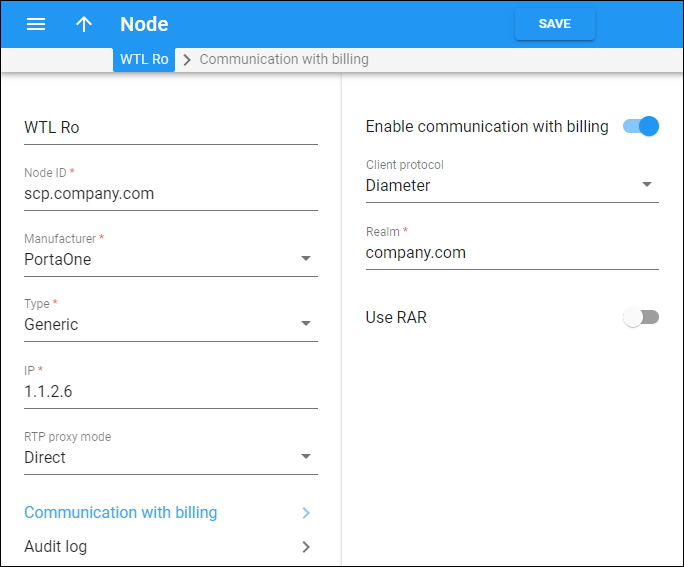
- For internet access, WTL Packet Data Network Gateway (P-GW) communicates with PortaBilling via the Diameter Gy interface.
Subscriber data provisioning via WTL’s HLR/HSS
The subscriber data provisioning to WTL’s HLR/HSS is performed based on PortaOne Workflows. Events such as SIM card assignment, account blocking/termination, or service package changes trigger corresponding updates in WTL’s system via an API. Contact our sales team if you need to provision additional data.
Configuration
Before configuring integration with WTL, obtain the names of the subscriber profiles preconfigured in the WTL HLR/HSS (CS profile for voice calls/SMS and EPS profile for data service). These profile names will be needed for service policy configuration in PortaBilling.
- Contact the support team for assistance with PortaOne Workflows.
- On the PortaBilling web interface, configure a service policy of the Internet access service type. Navigate to Attributes and select WTL HLR/HSS in the Vendor-specific attributes section. Specify the subscriber’s profile details:
- for the voice calls & SMS services – specify the subscriber CS profile’s name received from WTL in the CS profile field.
- for the data services – specify the subscriber EPS profile’s name received from WTL in the EPS profile field.

Then, assign this service policy to the product or directly to a user’s account.
Pecularities
| Supported features in WTL integration | Peculiarities |
| LTE service with content-based billing (Rating Groups) | Free traffic can either be accounted against some free Rating Group or completely ignored. |
| Using Re-Auth-Requests (RARs) to initiate service re-authorization if an account runs out of balance, exceeds its service volume, or a bundle expires | RAR initiates re-authorization for all configured Rating Groups. |
| Hotlining | A captive portal should be configured on the WTL side.
Users are redirected to this captive portal when the authorization fails. |
| Real-time charging for roaming calls/SMS | Charging of incoming SMS is not supported by PortaBilling. |



 Back to main menu