An administrator can browse a summary of xDRs for customers, accounts, vendors, resellers, and distributors within a selected date and time range. The xDR summary includes the following information:
- Total charges – the sum of charges (except taxes), broken down as:
- Service charges – the sum of all usage charges. Each service is listed separately with its total charges.
- Recurring charges – the sum of charges for subscriptions, DID usage, and measured services.
- Other charges – the sum of manual charges, one-time fees (such as bundle renewal fees, subscription activation fees, or bundle top-ups), and cleanup xDRs (consolidated records that replace the removed xDRs after the cleanup procedure). Calculated as: Total charges − (Service charges + Recurring charges).
- Taxes – the sum of all tax charges.
- Payments and credits include the following:
- Payments – the sum of all payments.
- Refunds – the sum of all refunds.
- Credits and promotions – the sum of all credits and promotions.

An administrator can download the xDRs for a specific period for further analysis, statistics purposes, etc. The output file is in the .csv format.
The data in the xDR file differs depending on the type of entity (e.g., customer, vendor) and the selected service. An administrator can select a specific service (e.g., voice call) or download xDRs for all available services including subscriptions, payments, taxes, DID usage, etc.
Customer xDRs
This is an example of the output file with the customer xDRs for voice calls service:

The following data is available:
- Account ID
- From (CLI or ANI)
- To (CLD or DNIS)
- Country
- Description
- Last hunting group
- Last extension
- Connect time
- Disconnect time
- Charged time (in hours:minutes:seconds)
- Amount (USD)
- Status
Vendor xDRs
It is very useful to have a detailed list of xDRs for a specific vendor in case of disputes over the amount of terminated traffic.
This is an example of the output file with vendor xDRs for voice calls service:
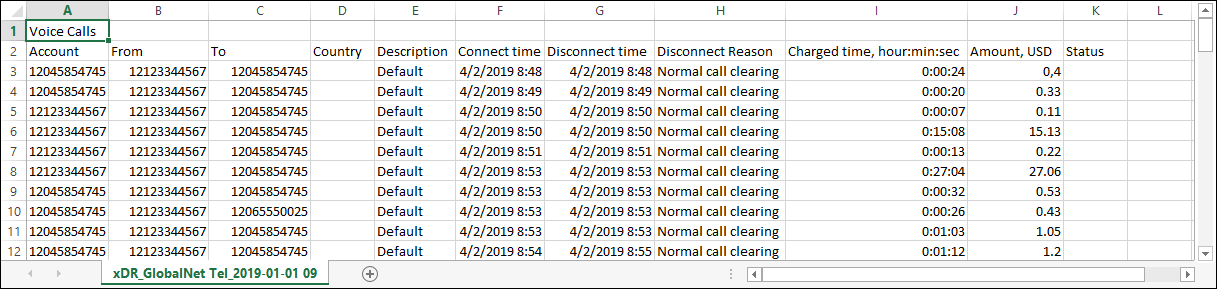
The following data is available:
- Account ID
- From (CLI or ANI)
- To (CLD or DNIS)
- Country
- Description
- Connect time
- Disconnect time
- Disconnect reason
- Charged time (in hours:minutes:seconds)
- Amount (USD)
- Status
xDRs are stored in the Main database and replicated to the Replica database. In order to prevent system overgrowth, xDRs are periodically cleaned up. This means that a special “Cleanup” xDR exists which accumulates charged amounts and times from all xDRs that are cleaned up for each account/customer/vendor. This xDR shows up as a “Cleaned up transaction” on the xDR history page of the web interface.
By default, the Cleanup procedure occurs during each off-peak period (every night) for all xDRs that are more than 2 months old, though these options are configurable to meet special requirements via the Configurator.
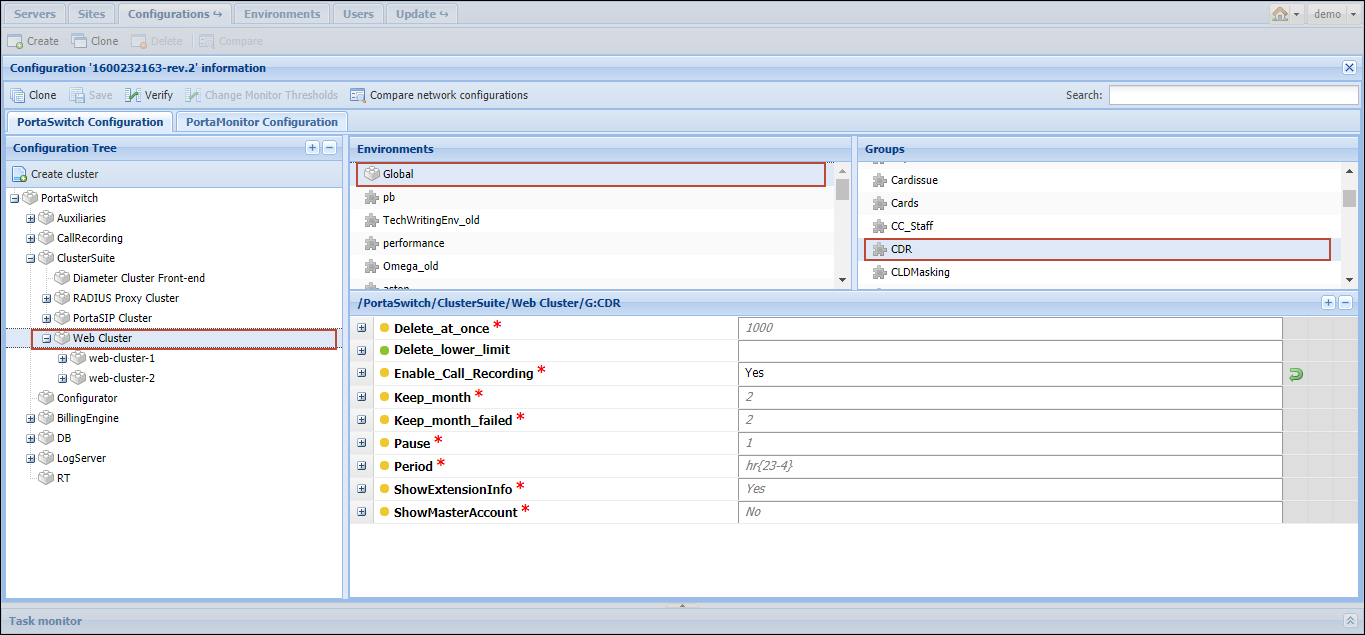
Although all the statistics/invoices are calculated up to the moment of the specified xDRs’ Cleanup, you can increase the period for keeping old xDRs according to your needs.
Setting longer storage period for payment xDRs
You can set a separate storage period for payment xDRs (for e-commerce, manual, and automatic credit card payments, as well as refunds). For instance, payment xDRs can be stored for 12 months, while other transactions, such as voice call charges, are cleaned up after 2 months.
Configuration
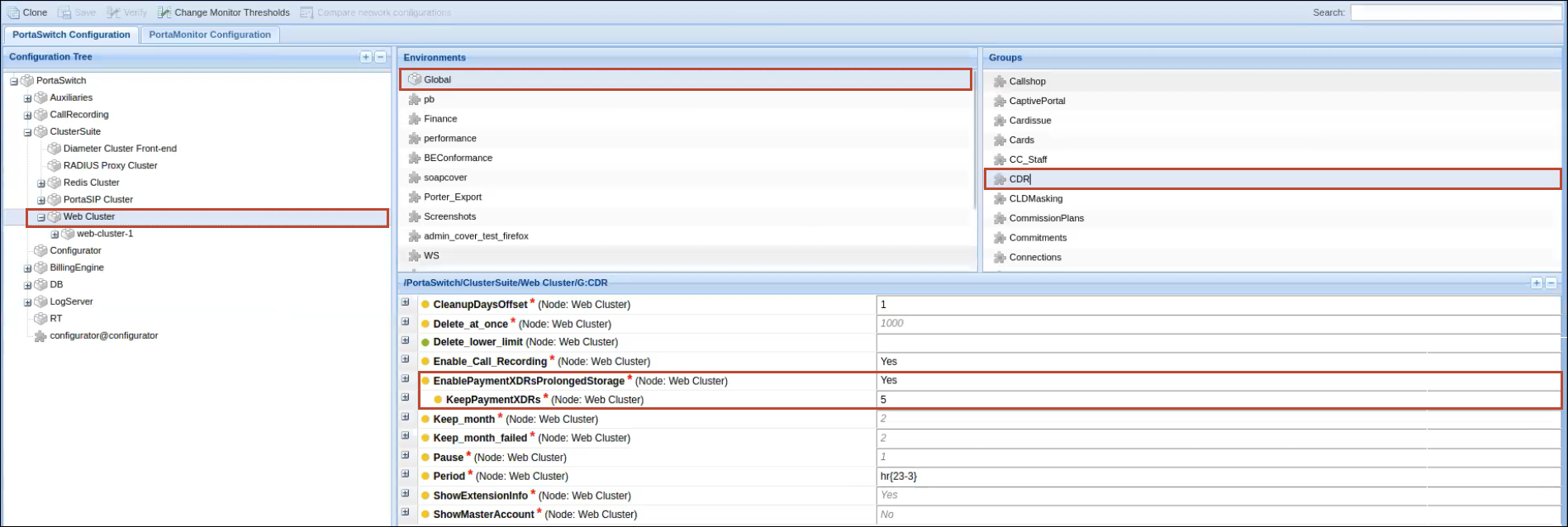
To set a longer storage period for payment xDRs, perform the following steps on the Configuration server web interface:
- Set the EnablePaymentXDRsProlongedStorage option to Yes.
- Specify the number of months for storing the payment xDRs in the KeepPaymentXDRs option.
The value of the KeepPaymentXDRs option must be greater than the Keep_month value (for other xDRs).