



Overview
The PortaSwitch site redundancy solution increases the reliability of communication services. It ensures that customers can continue using the service even if network connectivity is lost or if an entire hosting facility becomes unavailable.
With site redundancy, service providers can:
- Prevent downtime caused by network failures or hosting facility outages.
- Continue serving customers in multiple geographic regions, even if the network connectivity between those regions is lost.
- Perform software updates without service interruption. Outages are rare, but software upgrades are inevitable. Zero-downtime updates are therefore one of the benefits of deploying PortaSwitch across multiple sites.
This page focuses on ensuring service resilience during network failures or loss of connectivity.
The PortaSwitch site redundancy
Per-server redundancy (e.g., two physical servers each running a copy of PortaSIP) protects against single-server failures such as hardware faults. However, serious incidents, such as natural disasters, power outages at the hosting facility, or network routing errors, can disable all servers in the same location, from a single rack to an entire data center. The way to address this is through site redundancy: a backup system in another location ( a secondary site) that can completely take over if the main site fails.
In this situation, it is important that the secondary site not only activates and begins providing service as soon as possible, but also automatically synchronizes the changes (updates balances, xDRs, etc.) back to the main site once it becomes available.
How it works
To distribute requests among sites, the Dispatching SBC (DSBC) node is used. It allows manual switching of the voice traffic from one site to another. If one of the sites is down (e.g., due to connectivity loss), DSBC automatically redirects all traffic to the other site. Also, when maintenance is performed on the main site, DSBC sends all requests to the secondary site.
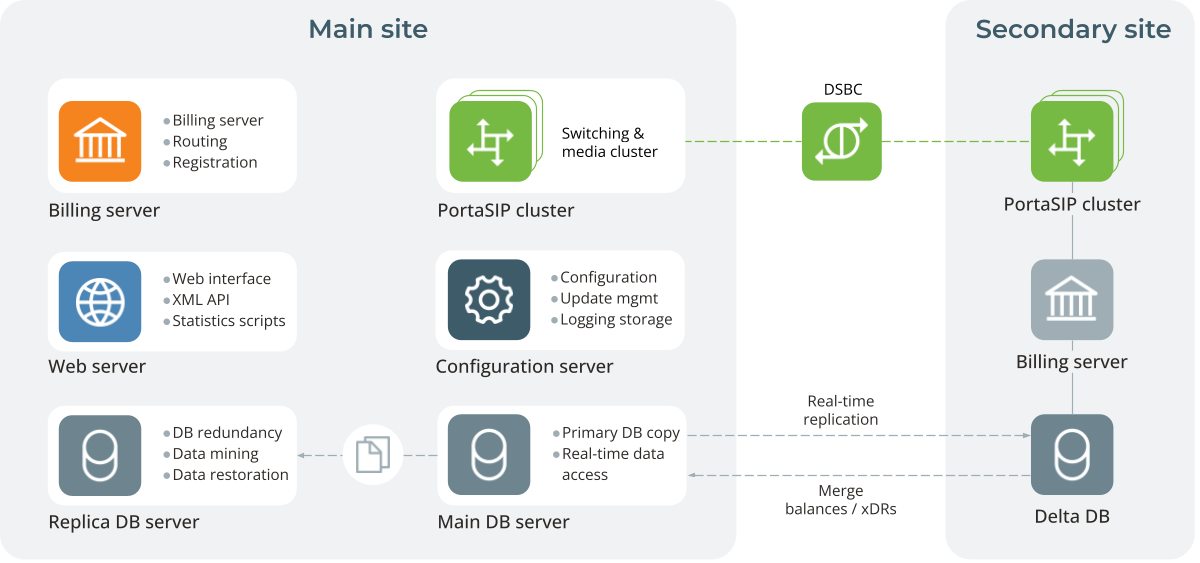
The PortaSwitch site redundancy architecture is shown in the diagram below.
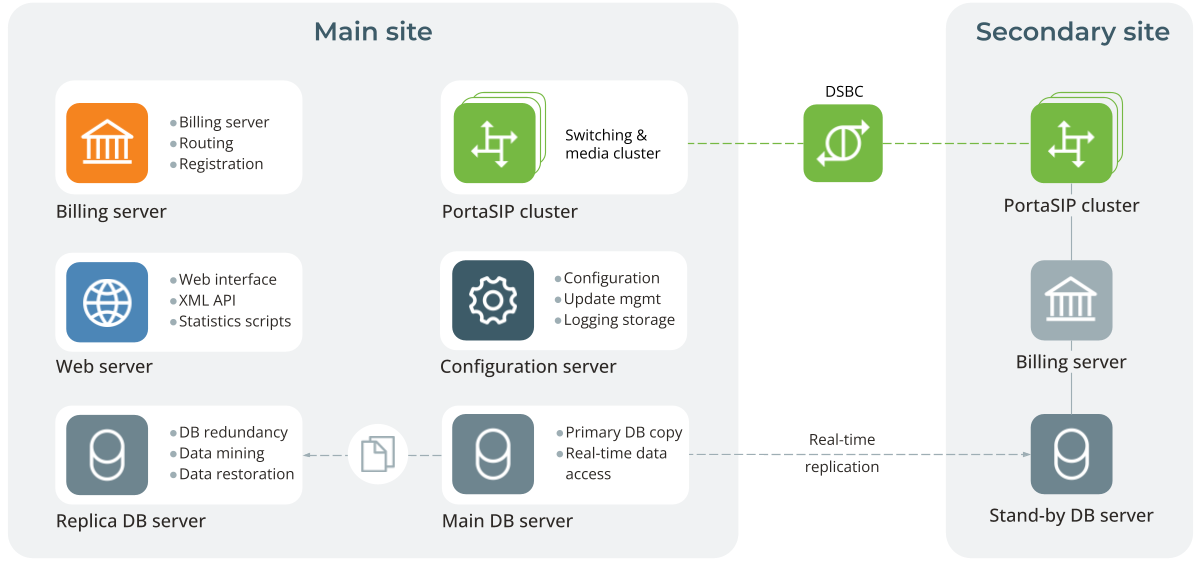
The main site hosts a standard clustered PortaSwitch: the Configuration server, the main and replica database servers, the billing cluster, the web cluster, and the PortaSIP cluster. The secondary site should only include the Stand-by DB server, the billing cluster, the web cluster, and the PortaSIP cluster.
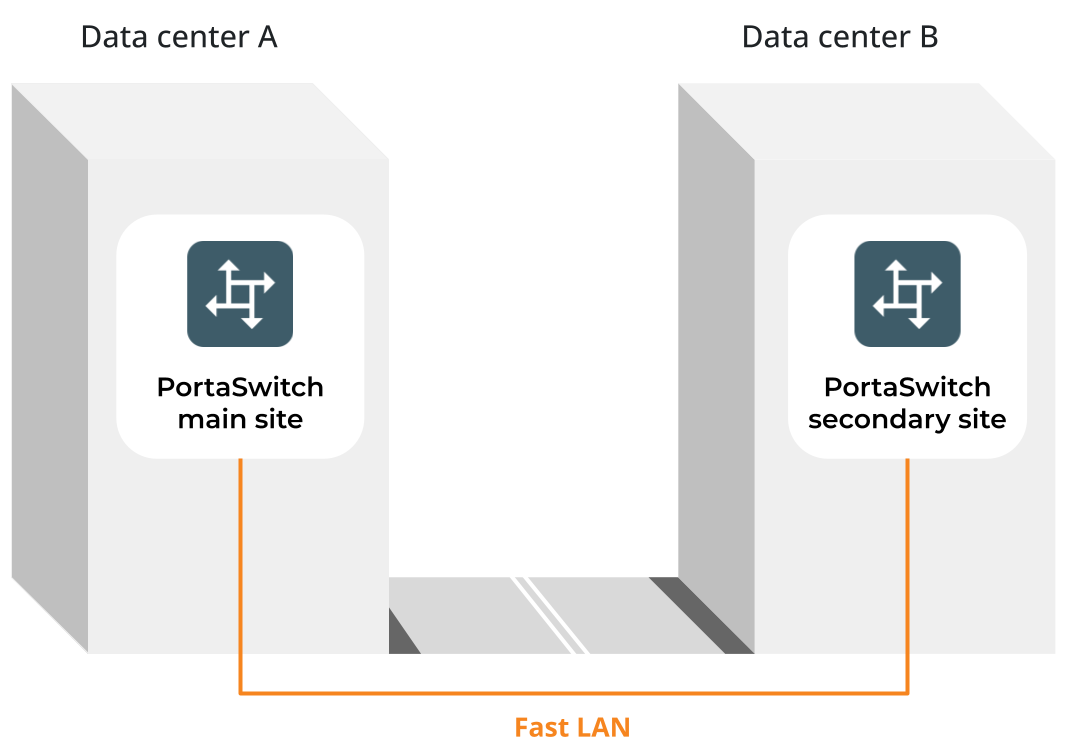
The main and secondary sites can be connected over a Local Area Network (LAN). A fully cloud-based deployment is also supported, where multiple sites can run in the cloud.
Another option is to deploy one or more secondary sites in a different city or country, using Wide Area Network (WAN) connectivity.
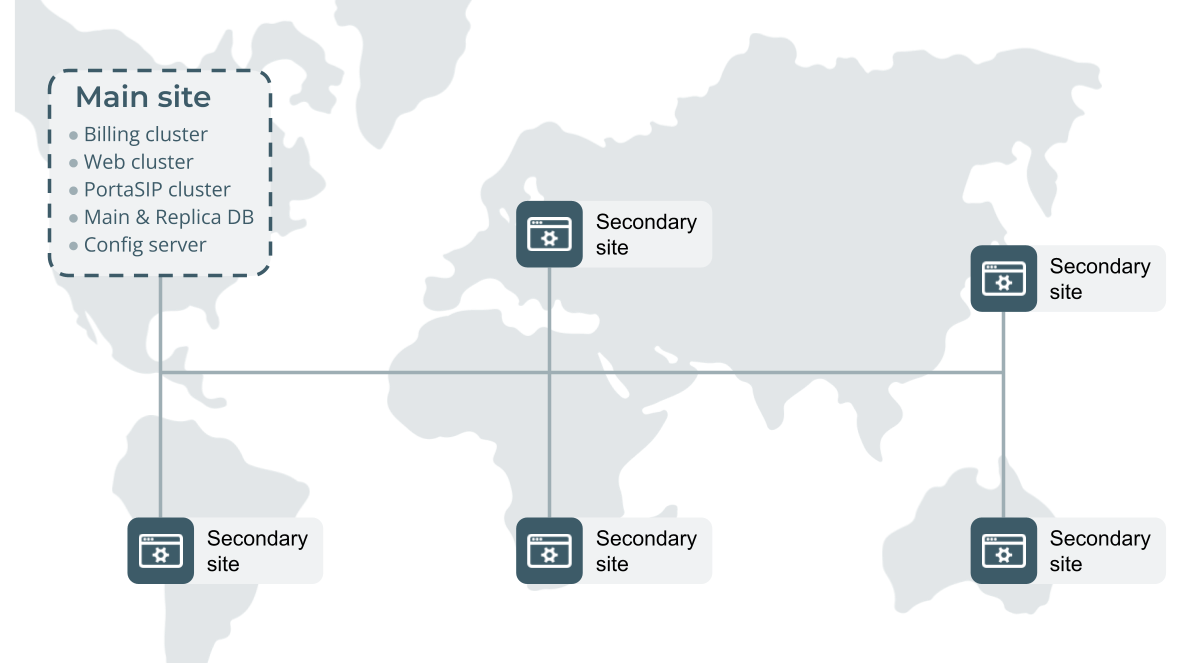
You can connect these sites into a single corporate network in various ways. Choose the technology that fits your current network infrastructure, equipment, or capabilities of your network provider. Regardless of the technology you choose, all PortaSwitch servers must be connected via virtual (or physical) Layer 2 connection(s) and be configured as hosts in a single virtual (or physical) private network – for example, a VPN that enables multiple sites to function as one network.
Operating modes
A secondary site can operate in two modes: “normal” or “stand-alone”.
Normal mode
When the main site is fully operational and running all services, the secondary site operates in normal mode.
In the normal mode of operation at the secondary site:
- The stand-by database server continually retrieves data changes from the main site, ensuring it always has an up-to-date snapshot of the main database.
- The billing and web clusters are in stand-by mode and do not actively process any requests.
- The PortaSIP cluster provides service as usual (processing incoming calls, playing the IVR, etc.). It uses the billing cluster at the main site for authorization and charging and writes any changes (e.g., updated SIP phone location) in the main database.
Stand-alone mode
The secondary site detects that the main site has become unavailable in the following cases:
- The main database server is down.
- All servers at the main site are unavailable (e.g., due to a power outage).
- The main site becomes unreachable from the secondary site due to a network issue.
In all these cases, the secondary site treats the situation the same way and switches to stand-alone mode.
Stand-alone mode ensures end users can continue using essential services, like placing and receiving calls, accessing voice applications, etc. The dispatching SBC redirects new calls and registrations to the secondary site for processing. The secondary site provides service to the end users using the latest service configuration replicated from the main site.
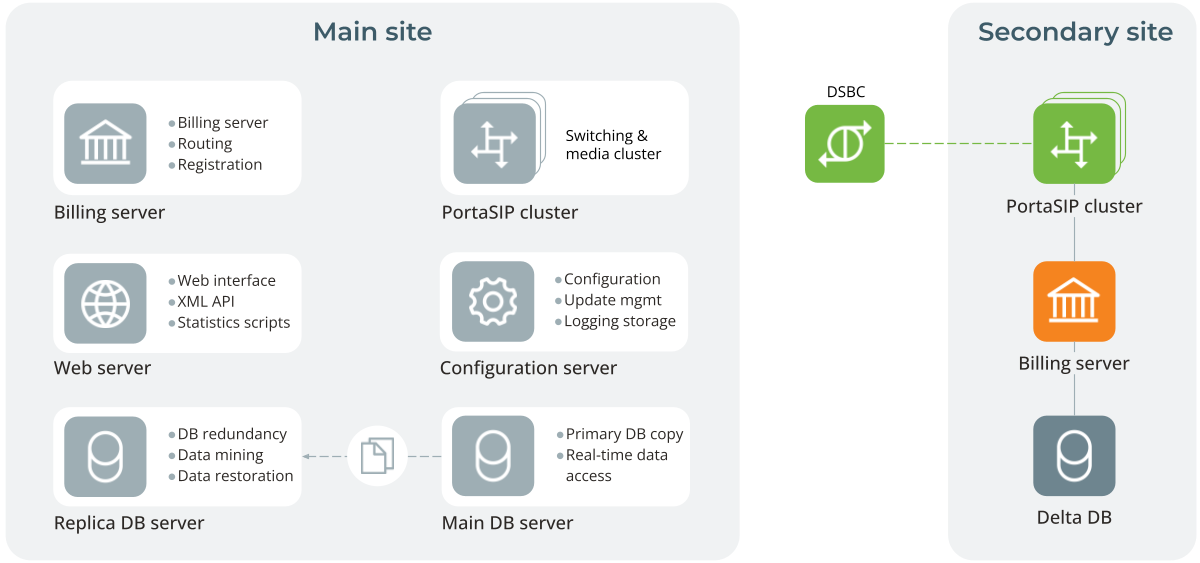
To keep customer billing information up-to-date in stand-alone mode, the system stores all xDRs for services and balance changes on the secondary site in a delta database (on the stand-by database server). These xDRs are considered for subsequent authorizations, ensuring there is no risk of balance overdraft.
When the main site is restored, the DSBC automatically redirects new calls and registrations back to it. The secondary site synchronizes all accumulated changes to the main site and then switches back to normal mode. This process is fully automated and requires no intervention from a PortaSwitch administrator, so end users may not even notice that there was an issue.
Refer to PortaSIP dispatching SBC (DSBC) chapter to read more about the DSBC functions in the PortaSwitch architecture.
- The secondary site detects this and switches to stand-alone mode. This activates its PortaBilling cluster and instructs the PortaSIP cluster to use local PortaBilling for all service authorizations.
For phones already registered to the secondary site, nothing changes.
- When the user makes an outgoing call, it is processed entirely on the secondary site: PortaSIP sends an authorization request to local PortaBilling.
- PortaBilling compares the customer's $98 balance against their $100 credit limit and authorizes the call for a maximum of 20 minutes.
- When the user hangs up after a 12-minute conversation, PortaBilling charges the customer $1.20.
- PortaBilling stores the balance adjustment and the xDR of that call (with all call details such as CLI, CLD, call connect time, etc.) in the delta database.
- When the user makes another call, PortaBilling considers the customer’s balance from the stand-by database ($98.00) and the balance adjustment stored in the delta database ($1.20). As the current balance is $99.20, PortaBilling authorizes the user for an 8-minute call.
- The user hangs up after 5 minutes, and a new xDR with a charge of $0.50 is stored in the delta database. The balance adjustment in the delta database is now $1.70.
- The next call will only be authorized for the remaining $0.30 until the credit limit is reached.
- When the main site is restored, the data is synchronized between the main and secondary sites:
- The amount of the balance adjustment ($1.70) is locked in the main database. If a customer tries to use the service on the main site, they will only be able to spend the remaining $0.30.
- The secondary site switches back to normal mode.
- The system transfers individual xDRs to the main database. If the secondary site has operated in stand-alone mode for a long time, it may have accumulated many xDRs, so replicating them to the main site takes time.
Restoration of the normal operations is done this way to prevent a balance overdraft on the main site.
Site redundancy peculiarities for Internet access services
If you provide Internet access services and want to use the PortaSwitch site redundancy solution, your NAS must support two connections – active and fallback. Your engineers should configure the active connection to send requests to the RADIUS server on the main site and the fallback connection to send requests to the RADIUS server on the secondary site.
When the main site is down, e.g., during ZDU, the NAS can automatically switch from the active to the fallback connection and back.
Stand-alone mode restrictions
If all operations were allowed on the secondary site in stand-alone mode, then, for example, two conflicting call-forwarding rules could be set for the same user:
- On the secondary site, the customer could set call forwarding to phone number 44711111111
- On the main site, the administrator could set call forwarding to phone number 44755555555 for the same account
This would create a data conflict once connectivity between the sites is restored, also known as a "split-brain" problem. It would be unclear which call forwarding number is the correct one.
That is why the secondary site does not allow all of the functions of the main site; stand-alone mode requires that some functionality be disabled.
In short, in stand-alone mode, the only operations allowed are those that change the balance and produce xDRs. All other changes (e.g., changing service configuration attributes or creating new entities) are prohibited.
Here is a list of unavailable (or partially available) services:
- Web interface for administrators, customers, and agents
- ESPF
- End-user notifications for bundles
- Call recording
- API – available in read-only mode
Voice applications' availability in stand-alone mode
- Voice applications that do not change the service or account configuration are fully available:
- Voice applications that modify the service or account configuration are available with limitations:
- Voicemail/auto attendant receives the recorded messages and places them in the Exim mail queue, but doesn’t save them to the voicemail storage (dbmail). Once the main site becomes reachable, the messages can be fully processed and stored, making them accessible to end users
- Call queues in auto attendant (the call for the first person in a queue may drop before the secondary site activates stand-alone mode)
- Screening IVR (fraud protection is disabled)
- Prepaid card calling (ANI/CLI registration is disabled)
- SMS callback trigger (ANI/CLI registration and change password commands are disabled)
- Callback calling (ANI/CLI registration is disabled)
- The following Voice applications change the service or account configuration and are unavailable:
- Account self-care
- Simplified account self-care
- Account top up via credit card
- Call forwarding management
- Own voice mailbox access (the recorded voicemails cannot be listened to by end users)
- Own voice mailbox access (PIN protected)
- Payment Remittance – TransferTo
- Sound quality check


