



To refresh the search results, click Reload data.
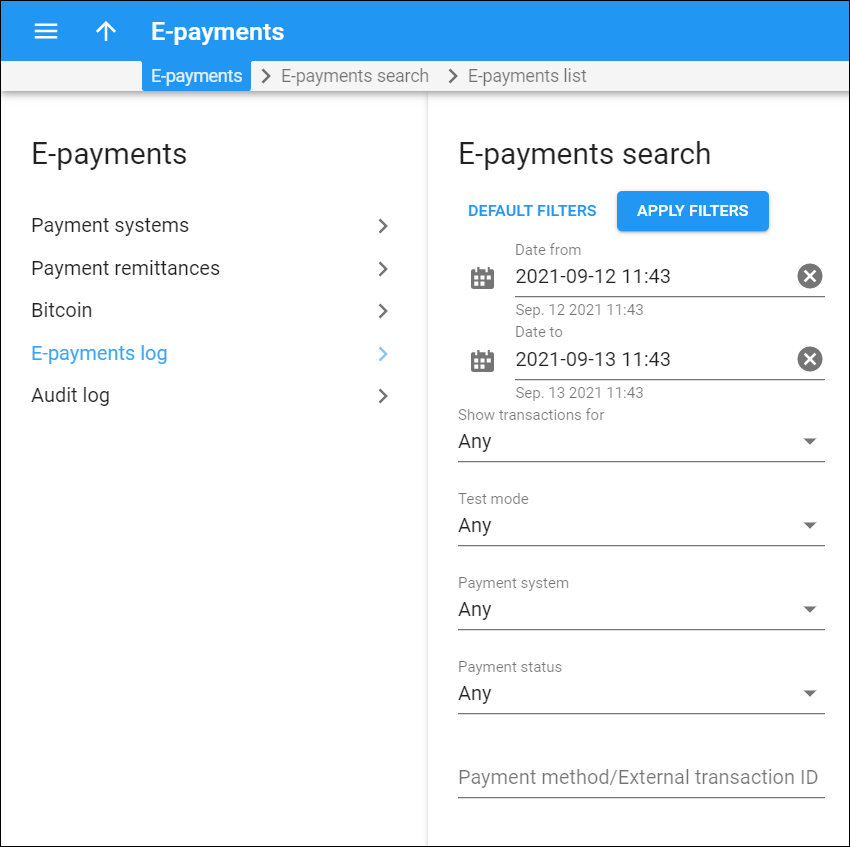
Date from/Date to
Search for e-payments by the period when they were made. Click Calendar  to select the date and time or type it in the “yyyy-mm-dd hh:mm” format (2019-03-19 00:00)
To clear the selected date, click Cancel  .
.
By default, PortaBilling filters payments made during the recent 24 hours up to the present moment.
Show transactions for
Filter e-payments related to a specific entity type:
- Any – e-payments made by all types of users.
- Direct customers – only the e-payments related to your direct customers. With this option selected, the Customer field appears, so you can choose a specific customer.
- Resellers – E-payments related to resellers. With this option selected, the Reseller field appears, so you can choose a specific reseller.
- Distributors – E-payments related to distributors. With this option selected, the Distributor field appears, so you can choose a specific distributor.
Test mode
This filter allows you to sort the e-payments made in the test mode from the ones made by real users.
- Any – shows all the payments.
- Yes – shows the payments made in test mode.
- No – shows the payments made by real users.
Payment system
Filter the e-payments by the payment system. You can select a specific payment system from the drop-down list
Payment status
Search for e-payments by their status:
- Any – all the payments disregarding their status.
- COMPLETED – successfully processed payments.
- AUTHORIZED – the transaction that a user made to reserve the funds is given the AUTHORIZED status. Using the “Authorize” command when making a payment, a user can reserve a part of the funds on their account. Afterward, they will be able to use those funds only if they know the authorization code.
- STARTED – not all payments are performed in one step, some need confirmation from the bank or user. When PortaBilling sends a request to the bank and waits for its processing, the payment is given the STARTED status.
- CANCELED – payments canceled by users before they were processed.
- FAILED – payments that PortaBilling failed to process.
- VOIDED – when a user cancels the “authorization” transaction by performing a “Void” command, the reserved funds become available without entering a special code. Such a transaction is given the VOIDED status.
Payment method/External transaction ID
Filter e-payments by payment method or external transaction ID. Each payment method has a number assigned to it and you can filter e-payments by typing the method’s number into this field. An external transaction ID is a special code that is automatically assigned to the transfer by the payment processor.


