



Flexible configuration for number portability lookups
Number porting allows users to switch from one service provider to another while keeping their phone number. When handling outbound calls from their subscribers, service providers need to identify whether the destination number has been ported to ensure that calls are routed to the correct operator and charged at the correct rate.
For example, John keeps his number when migrating from mobile operator A to operator B. So even though John’s phone number now looks like it belongs to operator A, the calls to this number should now be routed to mobile operator B and callers should be charged according to the rates defined for operator B.
The information about the ported number is stored in a ported numbers database.
To determine which network the number belongs to, service providers can either:
- Receive information about newly ported numbers from the central authority and insert that data into the internal PortaBilling database. This can be done by using PortaOne Workflows or other tools.
- Use third-party providers, such as Telnyx, which maintain a database of ported numbers by directly connecting to authorities and offering APIs to retrieve the porting status of specific phone numbers. Service providers typically incur costs for each lookup when checking the porting status.
PortaBilling has a built-in framework for number portability lookups, with flexible configuration options that help optimize costs associated with lookups in external number portability services.
The framework offers the following capabilities:
- Configure number portability lookups for voice calls and SMS in the internal PortaBilling database or in a preferred external service, such as Telnyx.This ensures that voice calls and SMS messages sent to ported numbers will be correctly routed, guaranteeing delivery to the end users without incurring additional costs for sending a call/SMS to an “incorrect” network.
- Configure how the number portability lookups are handled per virtual environment. For example, if you as a service provider operate virtual environments 1 and 2 and lease environments 3 and 4 to your partners, you can choose to limit paid lookups with an external service to environments 1 and 2. The partners can adjust their settings independently.
- It’s also possible to set up caching and even to use lookup results across environments for additional cost savings. For example, if a user in environment 1 just made a call to +4206021234567 and the lookup shows that a number has been ported to network A, it is highly unlikely that the number will get ported to another network within a few hours. Therefore, there’s no need for another paid lookup when sending a call or SMS to the same number +4206021234567 from any user in environment 1 (or any other environment) shortly after.
- In an environment setup, you can configure different number portability sources based on the destination. This allows you to apply least-cost number portability lookup, similar to least-cost call routing. For example, if “ABC” offers cheaper lookups for European numbers while “XYZ” provides cheaper lookups for North American numbers, then you can configure the system to use them respectively, thereby saving costs on number lookups.
- Route voice calls and SMS correctly based on up-to-date information from a preferred number portability data source.
- Tailor number portability lookups, optimizing for cost-effectiveness.
How it works
You can create a set of rules for number portability lookup for each environment. These rules define which predefined number portability data sources to use depending on the service (voice call or SMS) and the destination phone prefix. If there's no matching rule, no lookup will be performed, and the phone number will be treated as not ported.
Currently, you can use the following number portability data sources out-of-the-box:
- Internal database
- Telnyx (via ENUM/XML) for voice calls and SMS
- HLR lookup for SMS (if you operate with the E.212 format)
You can add your preferred number portability service, such as your local provider, that uses ENUM (Telephone Number Mapping) protocol.
Say you set up a rule for voice calls to route portability lookup requests for all US numbers to Telnyx. Here's what happens when a customer dials a US number 12063131234:
- PortaBilling checks the destination number against the configured number portability lookup rules for the environment, finds the matching rule, and sends a request to Telnyx.
- If the number is not ported, the Telnyx response indicates that the call should be routed based on the dialed number. However, let’s assume that the number is ported (e.g., it originally belonged to T-Mobile, but was ported to AT&T). In this case, Telnyx returns the Local Routing Number (LRN), e.g., 12065549080, which corresponds to the actual mobile operator. PortaBilling uses the LRN to route the call directly to the AT&T network.
- When the call ends, the system uses LRN (12065549080) to calculate the termination costs and the charges are applied to the customer (in this example, according to AT&T’s rates). The originally dialed number is stored in the corresponding CDR, so the customer will see “12063131234 – USA, AT&T” on the invoice.
Failover setup
To configure failover, you can create multiple rules for the same service and destination but with different number portability data sources. In this scenario, the system will prioritize these rules in the order they are configured. For instance, when delivering an SMS, the system will first attempt to use the portability data source from the first matching rule (e.g., Telnyx). However, if Telnyx is unavailable (e.g., due to a failed connection), the system will automatically try the next matching rule with another data source, such as the local database.
Caching lookup results
Cached lookup results can be stored and reused across environments, reducing unnecessary lookups (e.g., if a number has been ported recently, it’s unlikely it will be ported again soon).
Third-party providers usually include a Time To Live (TTL) value with portability lookup results, indicating how long the data remains valid before a new lookup is needed. The system stores cached results based on the received TTL. To prevent excessively long storage times, you can set a maximum caching duration of up to 24 hours.
Cached lookup results for a specific phone number can be used across virtual environments only if the same number portability data source (i.e., the same 3rd party provider of the data) is configured for those environments.
Configuration
To set up the number portability lookups, log in to the Configuration server web interface and perform the following steps:
- To enable the number portability framework, set the global option NumberPortability.Enabled to Yes.
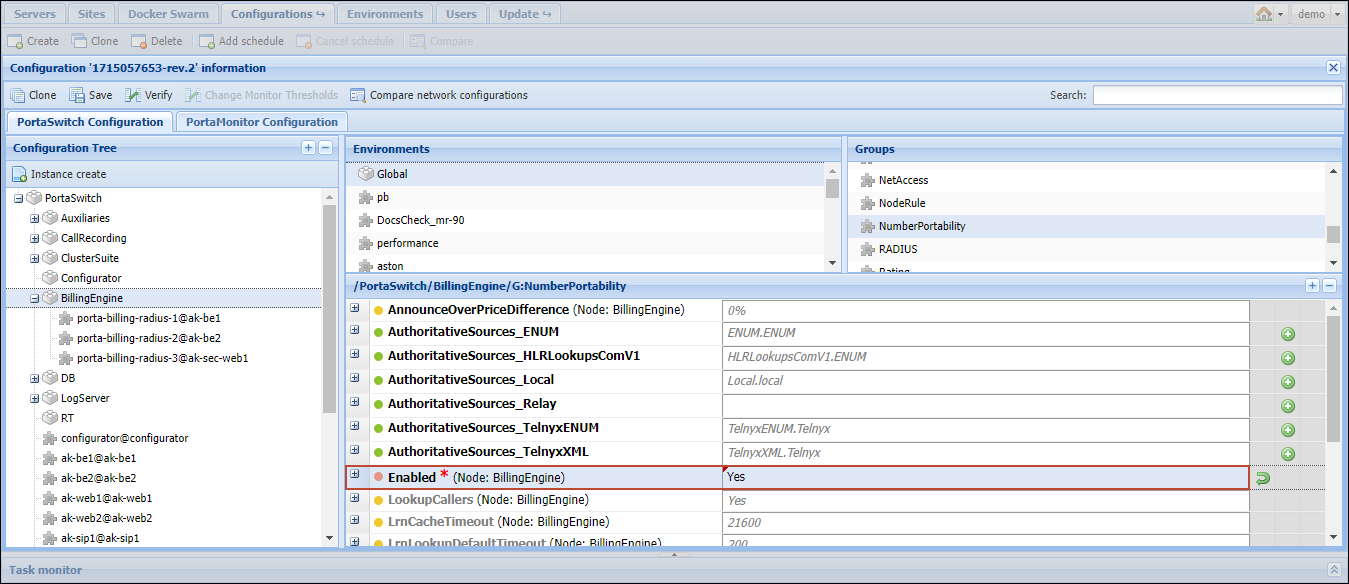
- Select a specific environment, and configure number portability data sources (“Authoritative Sources”) of the needed types, such as AuthoritativeSources_TelnyxENUM. You can add multiple authoritative sources of the same or different types.
To add an authoritative source, choose the needed type, and fill in the details.
You can add your preferred 3rd party data providers that support ENUM protocol within the AuthoritativeSources_ENUM type.
The list of settings depends on the authoritative source. For example, to add Telnyx (via ENUM) as an authoritative source, fill in the following details:
- DataProvider – specify the name or other identifier of the third-party data provider (e.g., you can specify “Telnyx” or “ENUM”).
- AuthorityDomain – optionally, you can specify an additional authoritative source identifier (e.g., if you specify "NorthAmerica" here, the ID of this specific authoritative source will be TelnyxENUM.Telnyx.NorthAmerica).This is useful if you want to set up a failover and use more than one authoritative source for the same service and destination (e.g., both “ABC” and “XYZ” provide number portability data for NorthAmerica). If two sources pull data from the same provider (but with different settings, like API keys) or from different providers with similar data, they should be explicitly marked as interchangeable by assigning them the same authority domain.
- ServerAddress – specify the IP address of Telnyx's DNS server for querying its ENUM services.
- MaxCacheTTL – set the maximum cache storage duration in seconds (up to 24 hours or 86400 seconds). If the TTL for a lookup result exceeds this value, it will be overridden, limiting how long the result is stored and can be reused.
- CustomerId – specify your unique identifier in the Telnyx system. This identifier serves as an authentication realm and is included in number portability requests.
- ExtraParameters – here you can specify custom parameters and their values that can be used to customize the number portability modules.
- MinTTL – set the minimum Time To Live (TTL) for lookup results (in seconds). The default value is 10 minutes (600 seconds). This means that if the provider's TTL is shorter (e.g., 5 minutes), the TTL will be adjusted to the minimum value of 10 minutes.
Once set up, click Save to make the authoritative source available for use in lookup rules.
- Select an environment with configured authoritative sources, and create rules for number portability lookup for that environment within the Rules option.

To create a rule, fill in the following details:
- ContextServiceType – specify the service type (voice for voice calls or msg/msg.e212 for SMS)
- Prefix – optionally, you can specify a phone prefix (e.g., “1”) to apply this rule only for calls/SMS sent to the corresponding destinations.
- AuthoritativeSource – select one of the predefined authoritative sources, e.g., TelnyxENUM.Telnyx.NorthAmerica.
The system attempts to use rules in the specified order. Once a matching rule is found and the data source provides a result, the other rules are ignored.
Using created lookup rules across environments
You can use rules configured for one environment in other environments.
Let’s say, for environment 1, you added two authoritative sources (Telnyx and local database) and created two rules for lookups for voice calls: the lookup requests for Spanish numbers (prefix “34”) should be sent to the local database, and for North American numbers (prefix “1”), to Telnyx.
If you need to set the same rules for environment 2, there is no need to configure authoritative sources and rules from scratch. You just need to select environment 2, open the AuthoritativeSources_Relay option, and add a “relay” authoritative source. Open its settings and specify env1.voice (use the format [environment number].[service type for which the rules are already configured]) in the Relay_Context field.

Then, you need to create a single rule with prefixes for Spain and North America and select Relay.env1.voice as an authoritative source. As a result, lookup requests for voice calls or SMS service in environment 2 will be handled the same way as in environment 1, with all the possible rules applied.
Using the internal PortaBilling database for number portability lookups
You can store information about newly ported numbers received from the central authority in the internal database on a PortaBilling server. This information can be inserted into the database using PortaOne Workflows or other tools.
To configure number portability lookups in the internal PortaBilling database, choose an authoritative source of the "AuthoritativeSources_Local" type when creating lookup rules.
How it works
Say you’ve set up a rule for number portability lookup to check all the dialed numbers in the internal database. When a customer dials a number, PortaBilling checks if it is found on the list of ported numbers. If there is no match, the call is processed as usual.
Say a customer dials the phone number 4791555123, which appears to belong to the mobile operator Telenor but has been recently ported to Netcom. The system matches the dialed number with the corresponding entry in the internal database using the "Destination" field (see the "Number Portability_Local" table). The system extracts the Routing Number (RN), which identifies the correct network for the ported number.
The process is as follows:
- The system looks up routing to a destination identical to the RN (e.g., 4792), and the call is routed directly to the Netcom network.
- The same RN is used to calculate the termination costs and apply charges to the customer, i.e., they will be charged according to Netcom’s rates.
- The originally dialed phone number is stored in the CDR, so the customer will see the dialed number “4791555123 – Norway, Netcom mobile” in the invoice.
The Number_Portability_Local table
Here’s the structure of the Number_Portability_Local table that stores information about ported numbers in the internal PortaBilling database:
| Field | Type | Description |
|---|---|---|
| Authority domain | string | The ID of the authority domain to which this data record corresponds (the default value is "local"). |
| Destination | string (varchar) | The E.168 destination phone number or its prefix. For instance, PortaBilling compares the destination (CLD/DNIS) from the call request translated to international E164 format with values in this field. If matched with a database entry, then the call will be authorized, rated, and routed depending on the prefix specified in the “Routing number” field of this entry. |
| Routing number | string (varchar) | For ported numbers, this shows the “Routing number” which identifies the correct network. The vendor and customer tariffs should include the corresponding rate. |
| Port status | flag | The porting status of a phone number: NULL indicates the number is not portable (e.g., toll-free or premium-rate number), 0 means the number is not ported, and 1 means the number has been ported. |
| Effective from | datetime | The date and time when the information stored in the record becomes effective. |
| Effective to | datetime | The date and time when the information in the record is no longer in effect. |


