



A service provider can manage number porting through Neustar Inc., a major player in the number portability market. The following operations are available directly from the unified PortaBilling web interface:
- Port a number to PortaBilling from another telecom (port-in);
- Port a number from PortaBilling to another telecom (port-out).
This feature is convenient for customers who want to change telephone providers while keeping their original numbers.
To port in a number, a PortaBilling admin sends a request via the Port in button on the account details page. In the porting request dialog, the following parameters must be defined:
- The phone number that the customer wants to use.
- The service password or PIN number of a customer’s account within the previous service provider’s system.
- The date in the PortaBilling user’s time zone by which this request must be completed.
- The customer’s account within the previous service provider’s system.
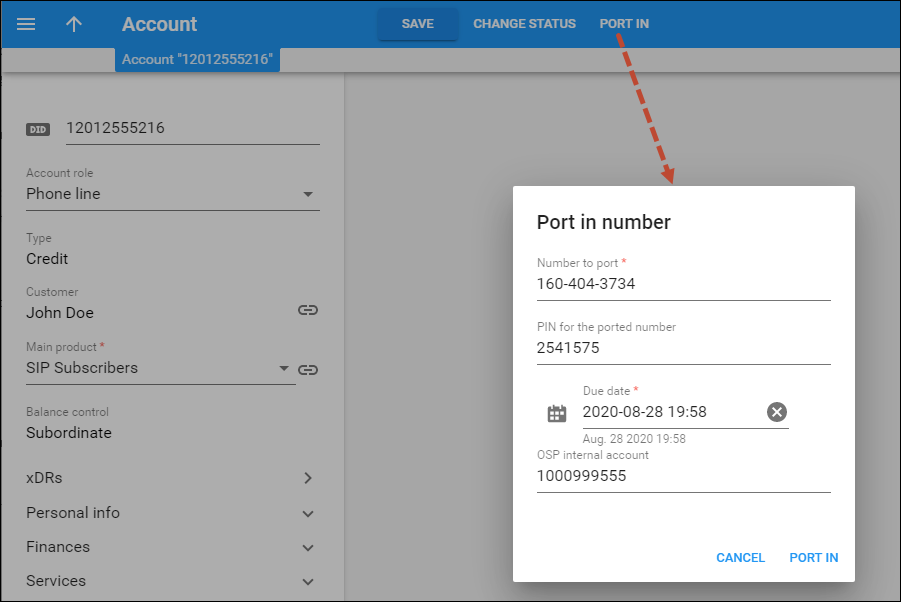
PortaBilling sends the porting request to Neustar and waits for confirmation. Neustar then requests the number from the telecom, and once confirmation is received, the number is updated in PortaBilling. The customer can then receive calls on the new number.
When PortaBilling receives a port-out request, it searches for the account associated with the requested number. If the account is found, PortaBilling terminates it and informs Neustar that the number is available. Neustar then sends this information to the telecom that requested the number. Once the number has been ported to this telecom, calls are routed to the new telecom network.
The PortaBilling administrator may monitor all requests to the system (the Port-in panel) and from the system (Port-out panel) on the Number porting page (Infrastructure > Number porting).
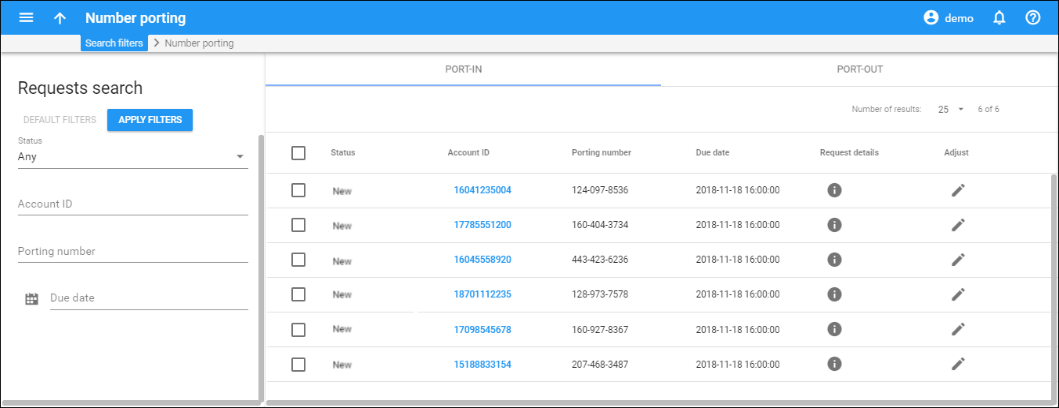
PortaBilling can receive number porting requests via the HTTP/HTTPS protocols.
This feature allows customers to use their existing number, regardless of the telecom. If you want PortaBilling to collaborate with other number porting companies, contact PortaOne Support.


