



On this panel, you can fine-tune the bundle item configuration. These settings are available for items of bundles of the One-off with top-ups type.
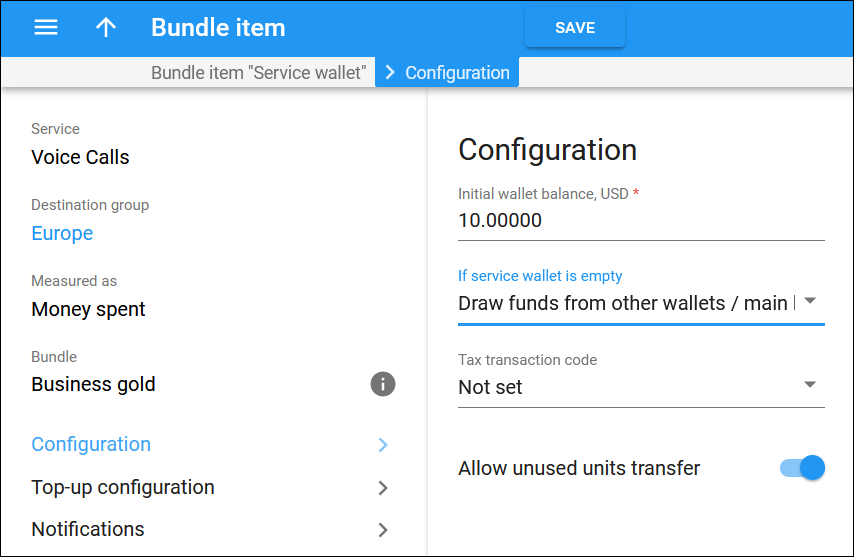
Initial wallet balance
Grant some service units or money to customers by setting the initial balance in the service wallet. For example, you can grant your IPTV customers 1 GB of free internet usage as a promotional offer.
After the initial balance on the wallet is used up, the user must top up the wallet to continue using the service.
If service wallet is empty
Configure service availability once the units or funds of the service wallet are used up. Select one of the following options:
- Draw funds from other service wallets/main balance – no service restrictions will be applied. The service usage will be covered by funds from other service wallets with the same service (if there are any assigned), or the end user can consume the services on a pay-as-you-go basis according to the assigned product’s tariff.
- Block the service – the service usage will be restricted.
Tax transaction code
This is the internal tax transaction code. PortaBilling uses this code to extract taxation codes for taxation plug-ins and process taxes for the service provided by this bundle item.
To create a tax transaction code, go to the Tax transaction codes panel.
Allow transfer of unused units
Turn on the toggle to enable end users to transfer service units or money between their service wallets.
To allow units/money transfer, enable this option within the service wallet for both the sender and the recipient. Note that the service wallets’ usage volume must be measured identically (e.g., in MB, minutes, or money).
The lifetime of transferred units/money synchronizes with the lifetime of the recipient’s service wallet. Transferred units/money are always used up first.


