



A bundle includes one or more bundle items with allocated service volumes.
To create a new bundle, click Add on the Bundle list panel and fill in the details. To save the bundle, click Save. To save and continue editing the bundle, click Save & Edit details. To create more bundles, click Save & Add a copy.
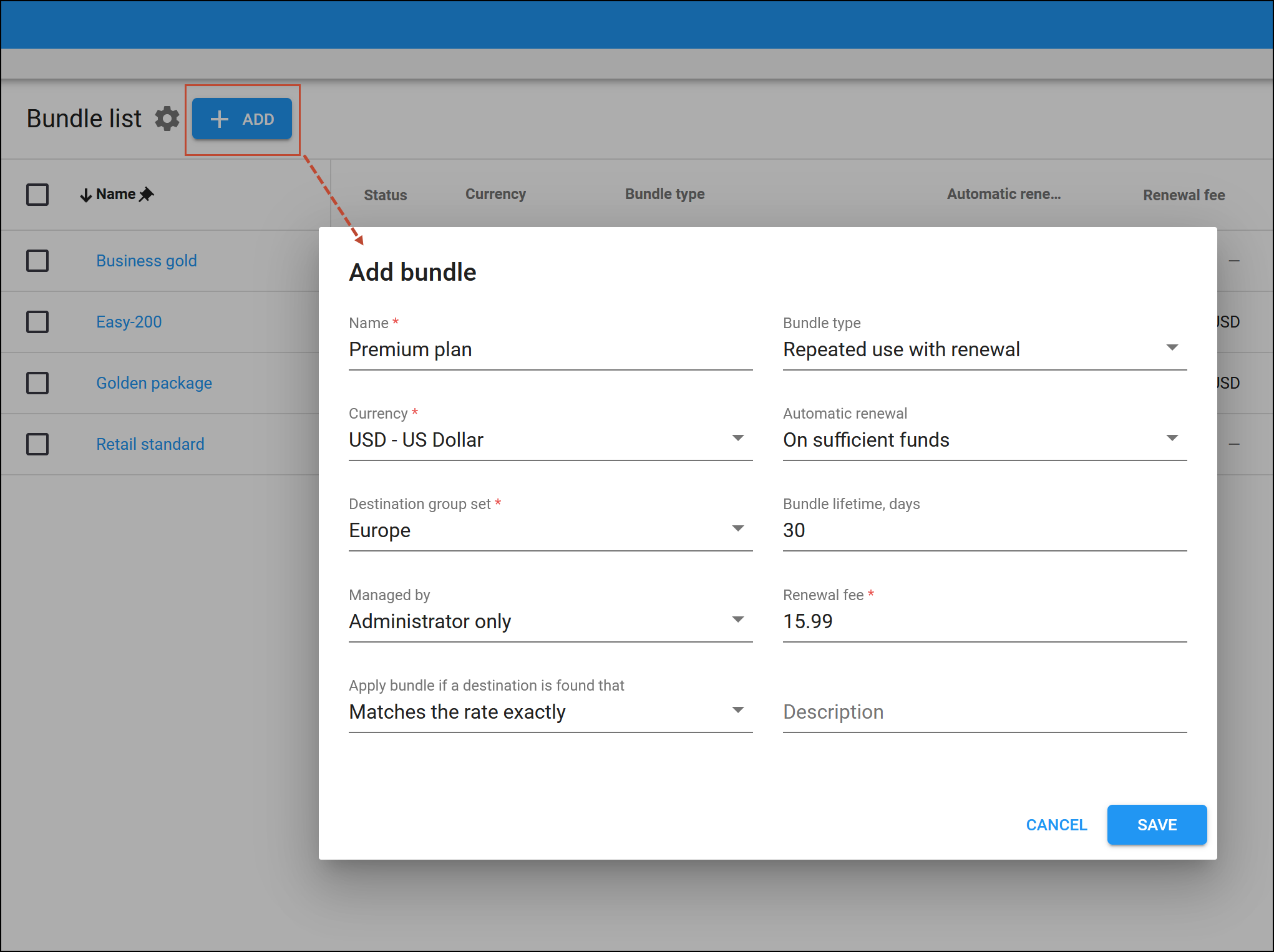
Name
Type a unique name for the bundle.
Currency
Select a currency used for billing calculations in the bundle. Once saved, the currency can’t be changed.
Destination group set
In PortaBilling, a bundle always incorporates a destination group set, which must consist of at least one destination group. A destination group may include phone prefixes (e.g., 1206) and/or special destinations (e.g., NETACCESS) used for the services provided within a bundle item.
Select the destination group set for this bundle.
Managed by
You can create bundles either for your own needs or to be used by your reseller.
- Administrator only – select to create a bundle managed by your administrators.
- Reseller name – select to create a bundle to be used by this specific reseller.
Apply bundle if a destination is found that
This describes how PortaBilling matches the charging and discount parameters to use a bundle item. Matches are performed based on the destination within the rate against the prefix in the destination group of the bundle item.
- Matches the rate exactly (default) – the rate in the tariff must be exactly the same as the prefix in the destination group for defining a bundle item. For example, if a customer makes a phone call to 4206025551234 and their tariff includes the rate for the 420602 (Czech Republic, Mobile) prefix, the quota applies only if there is a 420602 prefix in the destination group it’s defined for.
- Matches or covers the rate – the rate in the tariff can either be equal to or more specific than the prefix in the bundle. So if the rate in the tariff is 420602 and there is a 420 prefix in the bundle item, the quota is applied to the call. This puts more load on the billing engine, since an extra pattern match must be performed.
- Matches the rate pattern – this method disregards the destination used in the tariff entirely. It matches the components of the rate match pattern against the longest prefix in the bundle starting from the first component in the pattern.The rate match pattern consists of several components including special destinations and dialed numbers divided by the “|” symbol (e.g., VOICEONNET\RX|420123456789). The dialed number is usually the last component in the pattern.PortaBilling first matches special destinations (e.g., VOICEONNET) to the prefixes in the bundle and continues to search until it finds the best match. So, if the prefix VOICEONNETRX is included in the destination group for the bundle item definition, the quota is applied.If no match is found among the special destinations, PortaBilling continues the search based on the number dialed by the customer. The discount is then applied based on the longest full prefix match between the CLD and the prefix in the bundle.Let’s say the bundle contains the following prefixes: 420, 4202, 42032. The discount is applied based on the 420. If the bundle contains 420602 the discount is applied based on that.
This puts more load on the billing engine, since an extra pattern match must be performed.
Bundle type
Select the type of bundle:
- Repeated use with renewal – create a bundle that combines different services, such as voice calls, data, and SMS, for a single fixed fee, all sharing a common lifecycle with the option for auto-renewal.
- Legacy (quotas and wallets) – create a bundle that include quotas and service wallets (the old “Volume discount plans”).
Automatic renewal
Choose whether to enable the automatic renewal of a prepaid bundle (of the Repeated use with renewal type):
- On sufficient funds – select this option to allow auto-renewal of the prepaid bundle. When your customers have enough funds on their balance, PortaBilling will automatically charge the renewal fee on the last day of the active bundle lifecycle.
- Never – this means that the auto-renewal will be disabled for this bundle.
Note that once set during the bundle creation, the Automatic renewal option cannot be changed later.
For bundles of the Legacy (quotas and wallets) type, the only available setting is Set per item which means that the renewal period is set up individually for each bundle item (quota).
Bundle lifetime, days
This setting is only available for bundles of the Repeated use with renewal type.
Set a specific lifecycle (in days) for this bundle. All service volumes allocated within a bundle expire at the same time. The minimum value is 1 day, and the maximum value is 365 days.
Renewal fee
This setting is only available for bundles of the Repeated use with renewal type.
Set the amount of funds that will be withdrawn from the customer’s balance upon assigning/renewal of the bundle.
Description
Give a short description here. You can use it to search for this bundle by typing it in the Name field on the Bundle search panel


