



PortaOne AI Datalink automatically extracts data from the PortaBilling database, transforms it into analytics-ready datasets, and loads them into the data warehouse (Google BigQuery) for use in BI dashboards and AI models.
With this solution, you can:
- Enable business teams to obtain plain-language insights on their own – using AI tools to explore BigQuery data or to build visual reports with simple drag-and-drop actions using BI tools.
- Run advanced analytics without adding load to your billing system.
- Keep historical data for long-term trend analysis and forecasting (while removing old data from the PortaBilling database).
- Avoid investing in extra hardware – everything runs automatically in the cloud.
Requirements
To deploy AI Datalink, you need:
- PortaBilling/PortaSwitch version MR100 or later.
- An active subscription to the AI Datalink module in the Add-on Mart.
Data security and privacy
AI Datalink is GDPR-compliant. The PortaOne team can deploy your Google BigQuery in the same geographic region as your PortaBilling/PortaSwitch installation, or as close to it as possible (depending on the Google BigQuery availability in that region), ensuring that all data stays within your jurisdiction.
In addition, each service provider’s data is stored in Google BigQuery as a separate project and protected by Customer-Managed Encryption Keys (CMEK).
On the PortaSwitch side, your data is protected by a network firewall and IP whitelisting.
Finally, once stored in Google BigQuery, your data is secured by the native security controls of the Google Cloud platform, which are certified under ISO/IEC 27001:2022.
Sensitive data handling
Sensitive customer data – such as names and account IDs – is treated as personally identifiable information. AI Datalink copies the corresponding fields to Google BigQuery along with the rest of the data for further data transformation, but these fields contain no value.
The following fields are considered sensitive:
- Account ID
- Customer class name
- Customer name
- Representative name
- Vendor name
- Merchant name (used for online payment processing)
Data removal and security assurance
All data processed by AI Datalink is stored exclusively in your dedicated project in Google BigQuery. If you decide to cancel your AI Datalink subscription, PortaOne performs a secure cleanup procedure: all datasets created by AI Datalink are permanently deleted from your Google BigQuery project to meet data-removal and privacy-compliance requirements. No copies of your data are retained after the removal.
Datasets
In Google BigQuery, a dataset is a container that groups related data. It holds tables, views, and routines (like stored procedures or functions) that belong to the same topic – for example, customers, charges, or usage. A dataset defines who can see or query this data, because access permissions are set at the dataset level. Grouping data this way helps BI tools and AI agents understand the structure and generate accurate queries.
When AI Datalink copies data from the PortaBilling database into BigQuery, it organises it into a dataset of about 20 tables for easier management.
This is the logical grouping of tables in the dataset:
| Type of data | Data available in the tables |
|---|---|
| Customers |
|
| Subscribers |
|
| Subscribers life cycle and history |
|
| Payments |
|
| Charges |
|
| Costs |
|
| Revenue |
|
| Usage and quotas |
|
| Auxiliary and reference data |
|
A full list of tables included in the dataset, along with detailed column descriptions, is available in Google BigQuery once access is granted (Studio > your project > dataform).

How AI Datalinks works
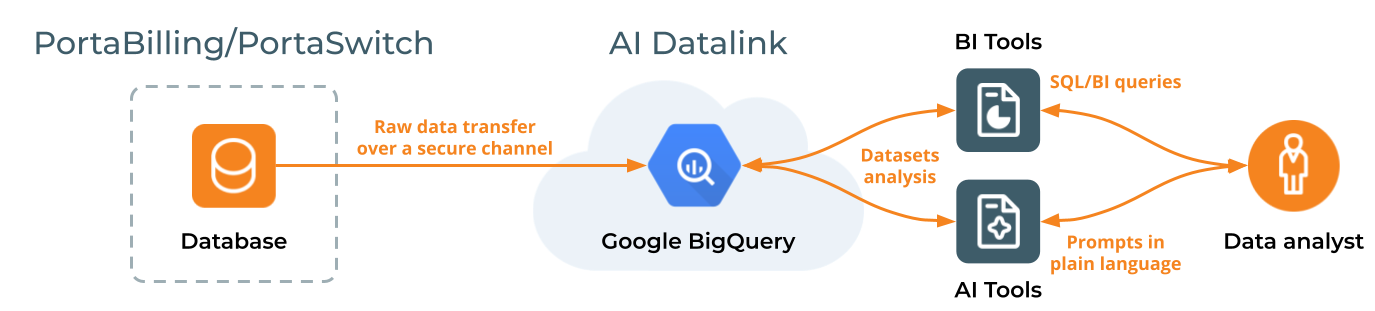
- AI Datalink connects to your PortaBilling/PortaSwitch, copies the initial PortaBilling database to Google BigQuery, and then periodically fetches new billing data (such as product activations and payments). This new data arrives in raw form (MySQL Binary Logs) for further processing.
- The data is then processed, simplified, and organized into structured datasets for easier analysis.
- These datasets are then stored in a Google BigQuery project, keeping the data safe and available for long-term use.
- BI tools and AI agents can connect to Google BigQuery, enabling easy query generation.
Refer to the Working with Google BigQuery page for information about accessing Google BigQuery and connecting AI and BI tools to it.
Data refresh and storage
- By default, billing data in Google BigQuery is updated daily, but the update frequency can be adjusted upon request (e.g., every 12 hours).
- Data storage period has no fixed limit. Google BigQuery supports long-term retention, enabling trend analysis over many years.
- Currently, data is copied from all PortaBilling environments, but only data from the selected environments is transformed and stored in Google BigQuery. Each selected environment gets its own dedicated project in Google BigQuery.


