



With the PortaBilling MCP Server module, you can provide secure access to PortaBilling data for both your own AI agents and your customers’ AI agents, without deploying or maintaining a local Model Context Protocol (MCP) server.
PortaOne provisions, hosts, and maintains a dedicated MCP server exclusively for you. Unlike shared MCP services, you receive an isolated MCP server that can be configured independently. This allows you to control exactly which data is made available to AI agents, whether through PortaBilling API v2 method groups (such as Customer, Product, or Service) or individual API v1 methods.
AI agents that support MCP, such as ChatGPT, Claude, or your own custom agents, can connect to this dedicated MCP server to interact with PortaBilling. Users authenticate with their existing PortaBilling credentials, and the AI agent can retrieve or modify only the data that the authenticated user is authorized to access.
EXAMPLE!!! ABC Company is a new call center that has just signed up with Owl Telecom, which provides ABC Company with an AI agent, Kairo. John, the PBX admin at ABC Company, has access only to PBX management and needs to set up extensions for all call center agents.
Instead of clicking through the CloudPBX portal UI, John opens Kairo and asks it to create extensions for the agents. He provides the required details, including the agent’s names, extension numbers for each agent, and the products to be used. Kairo creates these extensions and shows John how many additional extensions can be created in the future under the service agreement.
John can continue in the same conversation to set up ring groups, adjust extension settings, and configure the auto-attendant. Kairo works within the permissions granted to John. So, if John asks the assistant to pull up the company’s invoice history, Kairo notifies John that he does not have access to the financial data.!!!
Requirements
- PortaSwitch MR105 or later.
- An active subscription to the PortaBilling MCP Server module in the Add-on Mart.
- AI agent that supports the Model Context Protocol (MCP).
How it works
Once you configure the PortaBilling MCP Server module in the Add-on Mart, your users can connect supported AI agents to PortaBilling.
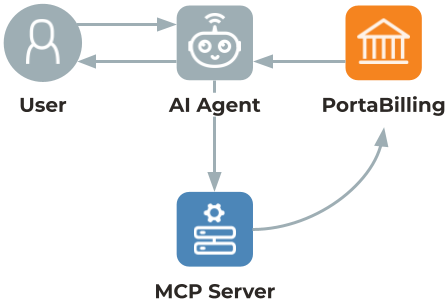
- Once the module is deployed, you provide the server URL and the client ID to a user, e.g., a PortaBilling admin or your customer.
- The user opens an AI agent and connects it to the PortaBilling MCP server using the server URL and client ID provided by you.
- The AI agent redirects the user to the PortaBilling login page, where the user signs in with their existing PortaBilling credentials.
- The user reviews the consent page and approves the AI agent’s access.
- After authorization, the user can tell the AI agent to configure PortaBilling using natural language.
- The AI agent performs configuration steps and provides feedback to the user.
In the background, the hosted MCP server validates the user’s authorization, calls MCP tools that correspond to PortaBilling API methods, and returns the API responses to the AI agent. The AI agent remains authorized and can later access PortaBilling on behalf of the user without requiring repeated login.
Specifics
- The MCP server generates its tools from the PortaBilling API v2, which is still under development. Some operations such as customer invoice retrieval may not be available as MCP tools yet.
- When new PortaBilling API v2 methods are introduced, the MCP Server module must be redeployed via the Add-On Mart Configuration UI to make the corresponding tools available.
- If PortaBilling is unavailable, the MCP server returns an error within 3 seconds but remains operational. The request will fail and the user will need to try again.
What it delivers to the customer
- Complete all configuration tasks faster in PortaBilling.
- Ask the AI agent questions and give instructions in plain language.
What it delivers to you
- Save admin time on configuration tasks by using AI agents.


