



With the Text-to-Speech (ElevenLabs) module, you can play personalized voice messages (such as greeting callers by name, reading out verification codes, or announcing service status updates) during calls handled by custom voice applications, without pre-recording any audio files.
Once your custom voice application retrieves call-specific data from systems such as a CRM and generates the message text, it can send this text to PortaSwitch via the Call Control API. PortaSwitch then automatically converts the text to speech using the ElevenLabs service and plays it to the caller during the active call.
Synthesized audio is cached automatically, reducing ElevenLabs synthesis costs for repeated messages.
The list of available languages depends on the selected ElevenLabs speech model. Use the TTS/get_capabilities PortaBilling API method to retrieve available models and their supported languages, and TTS/get_voice_list to retrieve available voices with their primary languages and compatible models. Both methods query ElevenLabs via the Add-on Mart.
Owl Telecom builds a custom voice application using the PortaSwitch Call Control API. One of Owl Telecom’s business customers, a solar panel company, uses this application to handle calls from existing customers. When a call comes in, the application looks up the caller’s phone number in the CRM, retrieves the customer’s name and their assigned account manager, and composes a greeting message.
The application passes the message text to PortaSwitch, which synthesizes the audio via ElevenLabs and plays the personalized message to the caller in real time: “Hello Mark Spencer. Connecting you to your account manager, Alex Brown.”
If Mark calls again within 30 days, PortaSwitch plays the cached version of that message instantly, without making a new synthesis request to ElevenLabs.
Requirements
- PortaSwitch MR130 or a later release.
- An active ElevenLabs account.
- An active subscription to the Text-to-Speech (ElevenLabs) module in the Add-on Mart.
- Call Control API access is enabled for the customer.
- The User application option is enabled on the account that receives calls. This setting routes incoming calls to the custom voice application instead of using the standard call handling logic.
- The Call Control API-based custom voice application is up and running.
How it works
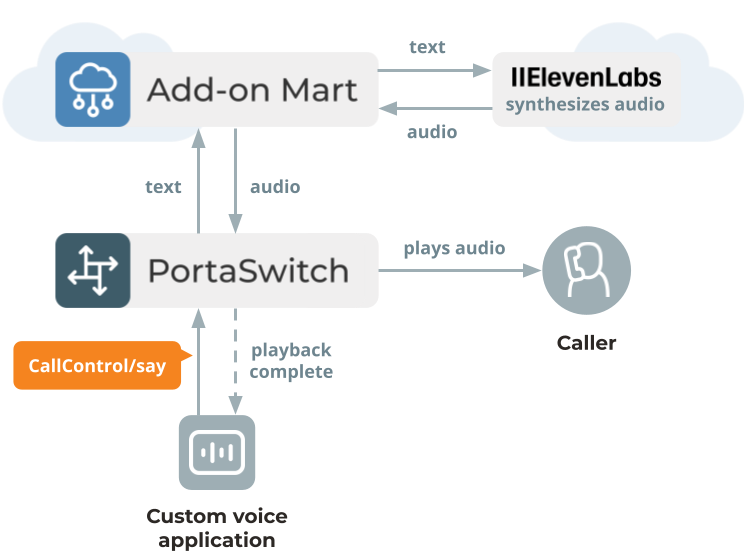
The Text-to-Speech (ElevenLabs) module runs on the PortaOne Add-on Mart infrastructure, which connects PortaSwitch to ElevenLabs (text-to-speech requests are routed through the Add-on Mart).
The flow is as follows:
- The custom voice application receives a call event via WebSocket and applies its business logic (i.e., looking up caller data by their phone number and composing the message text).
- The application sends the message text to PortaSwitch via the CallControl/say API method.
- PortaSwitch checks whether the same text has been synthesized before with the same voice, language, and audio settings. If a cached version exists, it plays that immediately. If not, PortaSwitch sends the text to ElevenLabs through the Add-on Mart, receives the audio, caches it, and plays it to the caller.
- Once playback has finished, the application receives a notification and can continue with the call flow.
Limitations
- The maximum message text length per CallControl/say request is 200 characters. If your application needs longer prompts, split the text into chunks and send sequential CallControl/say requests (waiting for each to complete before sending the next), or pre-record audio files and use the CallControl/play API method.
- Monetization of this feature has not yet been introduced. The feature is available to any customer with Call Control API access enabled.
- In standalone mode (when the main site in site-redundant PortaSwitch goes down), only previously cached audio is available. If the audio has not been synthesized yet, the request returns an error.
Specifics
- The ElevenLabs speech model, language, and voice are defined at the API call level and are passed as parameters in each CallControl/say request.
- PortaSwitch caches audio for each unique combination of text, text-to-speech provider, and settings such as voice, speech model, language, and codec.
- Cached audio files are retained for 30 days by default. The retention period can be changed within the AudioFile.TTSPromptKeepDays option in the Configuration server web interface.
What it delivers to the customer
- Personalized voice experience for callers without pre-recording audio files.
- Customers, resellers, or MSPs can develop their dynamic voice applications.
What it delivers to you
- Ability to develop more competitive voice applications.
- Reduce text-to-speech synthesis costs through automatic audio caching.


